Backprompter
Backprompter
Build, test, and ship AI agents — no backend code.
A complete workspace to create AI agents from system prompts, chat with and evaluate them, then deploy a polished chat UI for your users — with API access, RAG, voice, and Stripe billing built in.
✍️
**Build**System prompts, combo-agents, and a meta-router that picks the right agent per message.
🧪
**Test**Mock users, simulated conversations, scored evaluations, and full version history.
🚀
**Ship**One-click chat UI, REST API & SDK, file/RAG, voice chat, and direct Stripe payments.
🔒 Zero data retention — your prompts & outputs are never stored by the model providers
Get started
Sign in or create an account to continue
Password
Sign In Continue with Google Need an account? Sign Up
Password
Create Account Sign Up with Google Already have an account? Sign In
You're signed in as .
Continue to your workspace Sign out
From prompt to production in three steps
No servers to configure, no boilerplate to write.
!Image 1: Create an app and agent in Backprompter
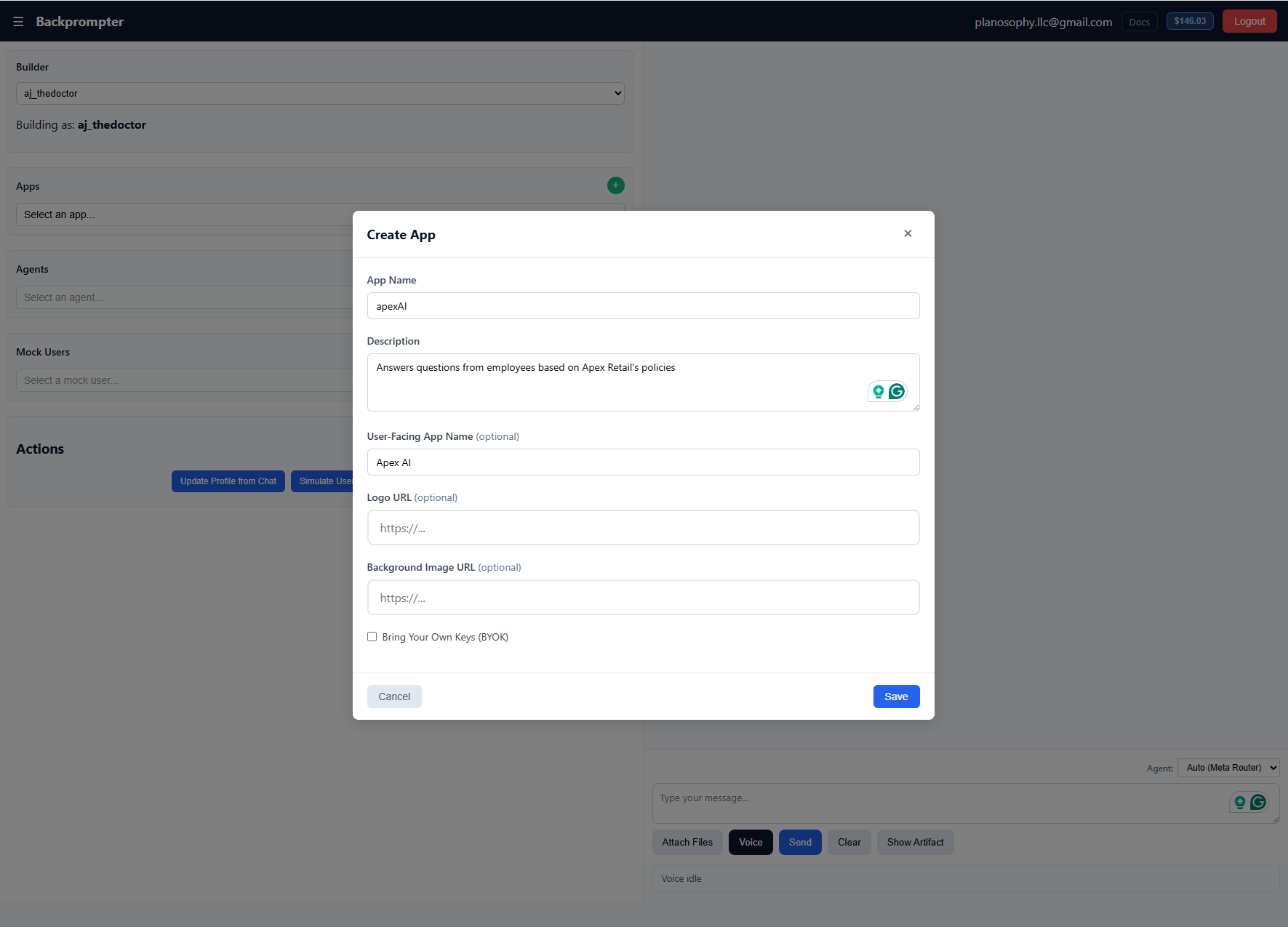
1 · Create Spin up an app and define your agent with a plain-language system prompt.
!Image 2: Chat with and test your agent
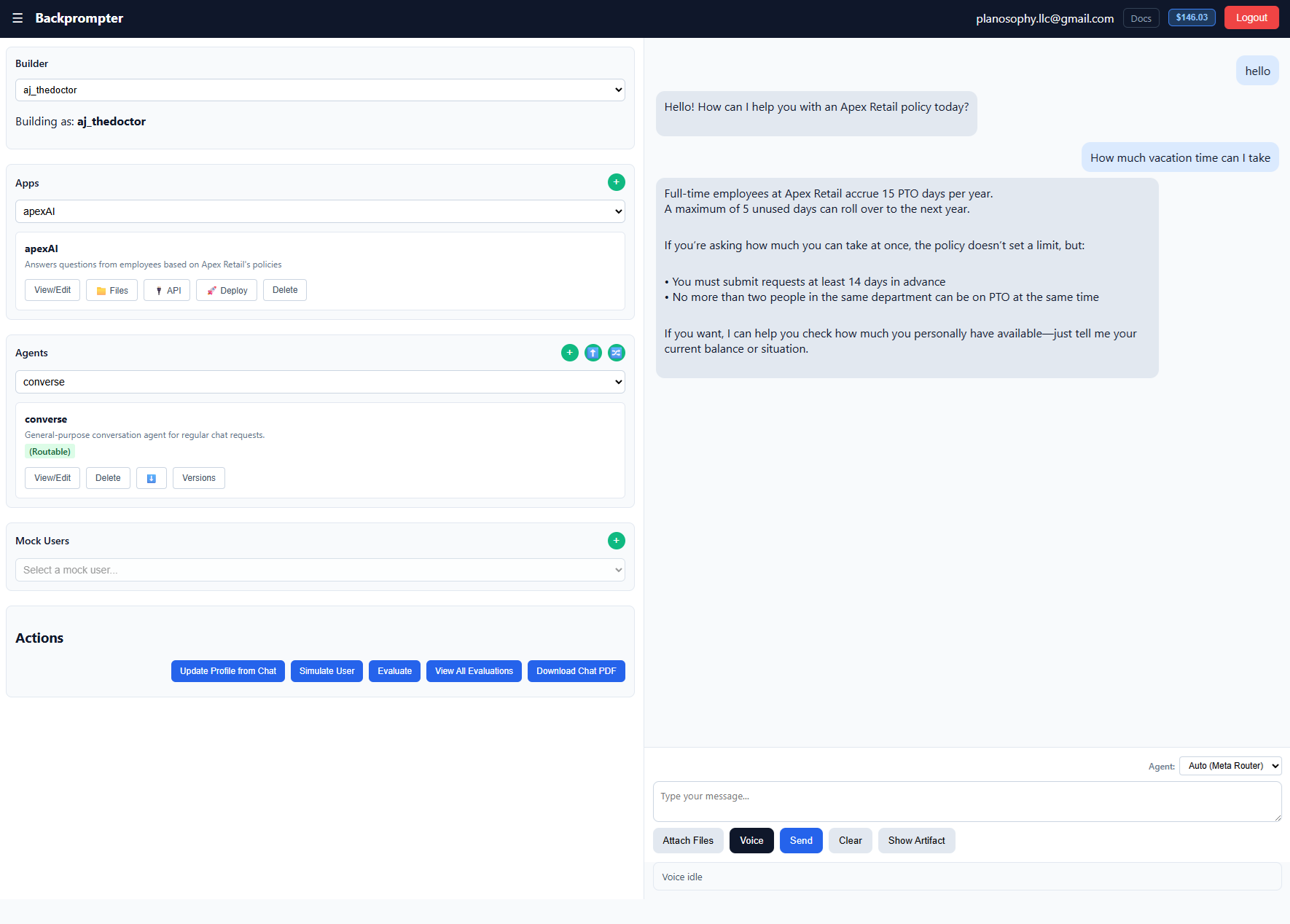
2 · Test Chat with it, simulate real users, and score responses to refine its behavior.
!Image 3: Deploy your agent as a chat UI or API
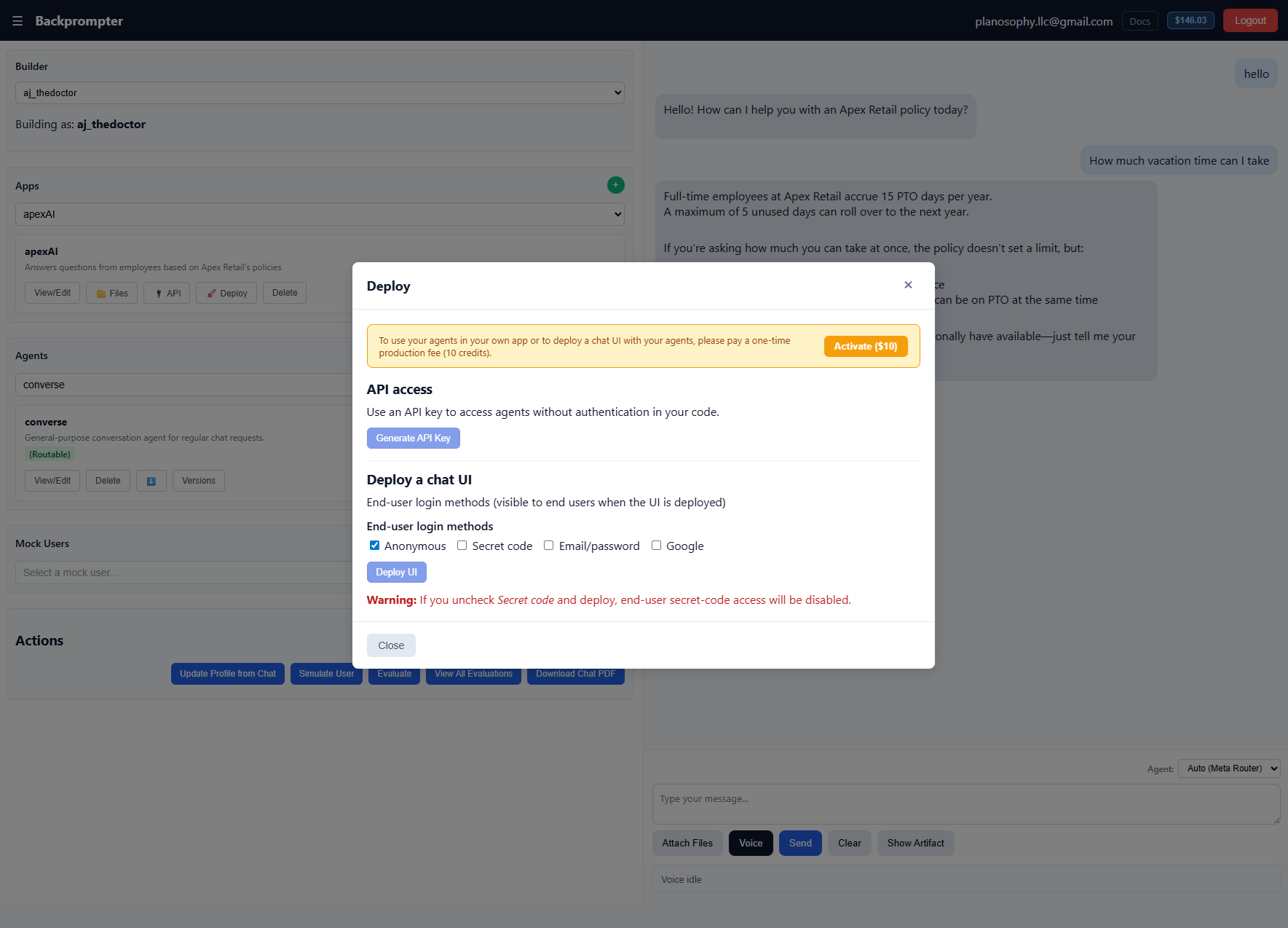
3 · Deploy Publish a hosted chat UI or call the API & SDK — nothing to maintain.
Ship it your way
The same agents, deployed however fits your stack — from zero code to full control.
No code
Hosted chat UI
Publish a polished chat interface for your end users — no frontend or backend to build. Pick your sign-in methods and share the URL.
``` $ no code required ✓ live at your-app.web.app/chat ``` How deploying works →
Your frontend
Custom UI with the SDK
Build your own branded interface while Backprompter handles authentication, agent calls, and per-user data — no backend to run.
``` Backprompter.setAppKey('your-app-key'); await Backprompter.signInAnonymously();
const { response } = await Backprompter.run({ agentId: 'support-bot', userPrompt: message, }); ``` Frontend SDK guide →
Your backend
Call agents from your server
Use a Backprompter API key from your own backend. You handle user auth however you like — Backprompter never sees your users' credentials.
``` const bp = new BackprompterServer({ apiKey: process.env.BACKPROMPTER_API_KEY, tenantId: process.env.BACKPROMPTER_APP_KEY, });
const { response } = await bp.run({ agentId: 'support-bot', userPrompt: ticket, }); ``` Backend SDK guide →
Prefer to self-host? Run Backprompter locally with your own models or other providers — contact us for a quote.
Backprompter by Planosophy LLC
DocsTutorialsPricingTerms of UsePrivacy Policy
© 2026 Planosophy LLC. All rights reserved.
Loading your workspace...
☰
Backprompter
[Home](https://backprompter.com/# "Back to homepage")[Docs](https://backprompter.com/docs.html "Documentation")Logout
Builder
Create Builder
Building as:
Apps
+
View/Edit📁 Files🔌 API🚀 Deploy Delete
Agents
+⬆️🔀
View/Edit Delete⬇️Versions
Mock Users
+
View/Edit Delete
Actions
Update Profile from Chat Simulate User Evaluate View All Evaluations Download Chat PDF
Agent:
Attach Files Data (CSV)Voice Send Clear Show Artifact
Voice idle
Edit System Prompt
×
Reset to Default
Cancel Save
Compare Prompts
×
Compare with:
Current
Comparing
Meta-Router Routing
×
Default agent (fallback when routing is uncertain)
- [x] Prefetch default agent (run default agent in parallel with routing)
Routable agents
Cancel Save
Deploy
×
API access
Use an API key to access agents without authentication in your code.
Generate API Key
- * *
Deploy a chat UI
End-user login methods (visible to end users when the UI is deployed)
End-user login methods
- [x] Anonymous - [x] Secret code - [x] Email/password - [x] Google
- [x] Allow end-users to create their own accounts (sign-up)
Deploy UI Unpublish Generate Secret Key
Host it on your own domain
Download the chat frontend, pre-configured for this app. Modify it freely and deploy to any static host or your own domain.
Download chat frontend (ZIP)
Embed as a chat box
Add the chat to an existing website with an iframe:
Copy embed code
Secret keys (one-time codes)
New secret (store now — will not be shown again)
Actions
Key
Created
**Warning:** If you uncheck _Secret code_ and deploy, end-user secret-code access will be disabled.
- * *
Charge your end-users (Stripe)
Connect your own Stripe account to require payment before end-users can use this app. Payments go directly to you — Backprompter never touches the money and takes no fee.
Connect Stripe
✓ Stripe connected Connect a different account Disconnect
Price (from your Stripe account) - [x] Require payment to use this app
Save payment settings Refresh prices
Close
Create App
×
App Name
Description
User-Facing App Name (optional)
Logo URL (optional)
Background Image URL (optional)
- [x] Bring Your Own Keys (BYOK)
OpenRouter API Key Edit Key
OpenAI API Key Edit Key
Leave blank to use default keys. Keys are encrypted and never displayed after saving.
Cancel Save
Create Agent
×
Agent Name
Summary
System Prompt For combo-agents: Describe how to coordinate sub-agents (e.g., "1. Call Agent1... 2. If result is X, call Agent2...")
- [x] Routable through meta-router
- [x] Include user profile context
- [x] Enable web search (OpenRouter models only)
- [x] Enable web fetch (auto-fetch URLs found in user prompt)
Model
...
Any OpenRouter model ID. Leave blank to use the app default.
Temperature (0-1)
Max Tokens
Artifact Type Artifacts appear in a side pane instead of the chat
Tools (read-only GET tools this agent may call)
Select tools▾
Manage app tools…Define tools once at the app level, then pick the ones this agent should use.
RAG Augment agent context with documents from your app
Save and Commit Cancel Test Now
Agent Versions
×
Version Details
Select a version to view details
System Prompt
Select a version to view the system prompt
Versions
Load Selected Version Promote to Default Delete Selected Version Create New Version Close
Create Mock User
×
Name
Summary
Detailed Profile
Cancel Save
All Evaluations
×
Delete Selected Total: 0 / 200,000 characters
| - [x] | Agent | Version | Mock User | Response | Feedback | Rating | Builder | Timestamp | | --- | --- | --- | --- | --- | --- | --- | --- | --- | | | | | | | | | | |
Close
Update Profile
×
Profile Agent
Mock User
Update Profile
Updated Profile
Profile Changes
Show Diffs Cancel Discard Apply Update
Evaluation
×
**NOTE:** It is recommended that you only modify and test one agent at a time. If you selected "Auto" agent in your chat box, and you have multiple agents, the response may not have been generated by the agent you edited.
Which agent did you evaluate?
Evaluator Agent
Run Evaluation
Evaluator Response
Human Feedback (max 100 words) 0 / 100 words
Rating (0-10)
Suggested System Prompt Update
Apply Suggestion Discard Show Diffs
Suggest System Prompt Updates Cancel Submit Evaluation
Commit Version First
×
You have uncommitted changes to this agent. Please commit your changes before submitting an evaluation.
Commit Message
Cancel Commit & Continue
Artifact
−+📄🖼️✕
App Tools
×
Define read-only GET tools once here; agents reference them by name. Keys are stored encrypted and never sent to the model or browser.
+ Add API tool
Save tools
Billing & Credits
✕
Loading...