The AI-Native SDLC playbook
Code is no longer the bottleneck
Organizations have started using AI to write code at a speed unthinkable one year ago, yet the processes around the code haven't changed at the same pace.
Many engineering teams still have the same approval gates, reviews, handoffs, and policies, stalling productivity gains made by using agentic coding solutions like Claude Code.
The software development lifecycle (SDLC) is the process that takes software from idea to production. Most organizations run some version of the same six stages, covering planning, design, building, testing, deploying, and maintaining software. Traditionally, each stage is a discrete phase owned by a different role. Product managers write requirements, technical architects turn them into designs, engineers build the designs, QA teams at regulated enterprises verify it, releases teams ship it, and operations monitors what is running. Work moves between the phases through documents, tickets, and sign-offs.
The traditional software development lifecycle (SDLC) is process-heavy to ensure accountability and control at each step. However, the traditional SDLC was designed to maximize efficiency in an era where the most time-consuming and expensive stage was writing and implementing code, which is no longer the case. PRDs, estimation rituals, and product security reviews all existed to force alignment during what could be weeks, months, or quarters of development work.
The traditional SDLC also features controls that assume every step is performed by humans. The organizations generating the most value have rebuilt their process around what agentic AI can now do, while ensuring that humans stay in the loop. In this guide, we walk through several of our Applied AI team's best practices for integrating Claude internally across each stage of the SDLC to accelerate development and make processes run faster, inspired by working with our customers.
When code is no longer the bottleneck and the build phase runs faster than the traditional SDLC allows for, three things become true:
- The bottleneck moves to the steps to the left and right of the build phase. This is mainly plan, review/test, and deploy, which still run at human speed.
- The controls stop matching reality and become intractable. Reviewing each line by hand made sense when a person had written it, but it can't keep up once agents write most of the diff.
- Governance costs increase because exceptions still route through meetings and committees that meet weekly or monthly.
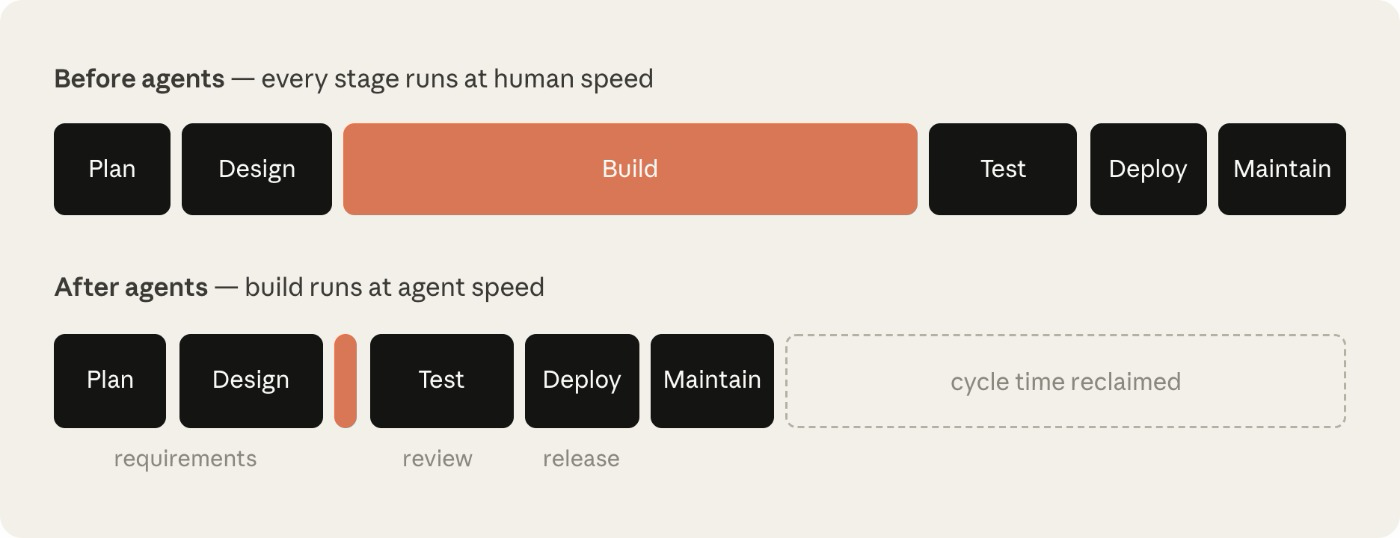
Build is no longer the constraint — the human-speed steps around it are. Human-speed stages keep their length while build collapses to hours.
Let's use a security bottleneck as an example. Security teams are sized for human output, so when agents multiply code output, either the review queue builds or code ships under-reviewed. A regulated organization can't accept either outcome, so its security and policy checks have to keep pace with the agents.
To better realize the productivity gains of and secure agentic AI, the traditional SDLC lifecycle requires the same level of transformation as the implementation phase has undergone.
What is an AI-native SDLC?
The AI-native SDLC is a reimagined process that combines the old control objectives with new enforcement. Instead of a linear flow, the process becomes a loop, and AI is embedded at each point. The AI-native SDLC promotes automated handover and triggering of subsequent plays, helping to address the manual and clunky nature of handoff between the phases of the traditional SDLC.
You'll also hear this shift called the agentic SDLC, the AI SDLC, or simply agentic software development — the labels differ, but they describe the same thing.
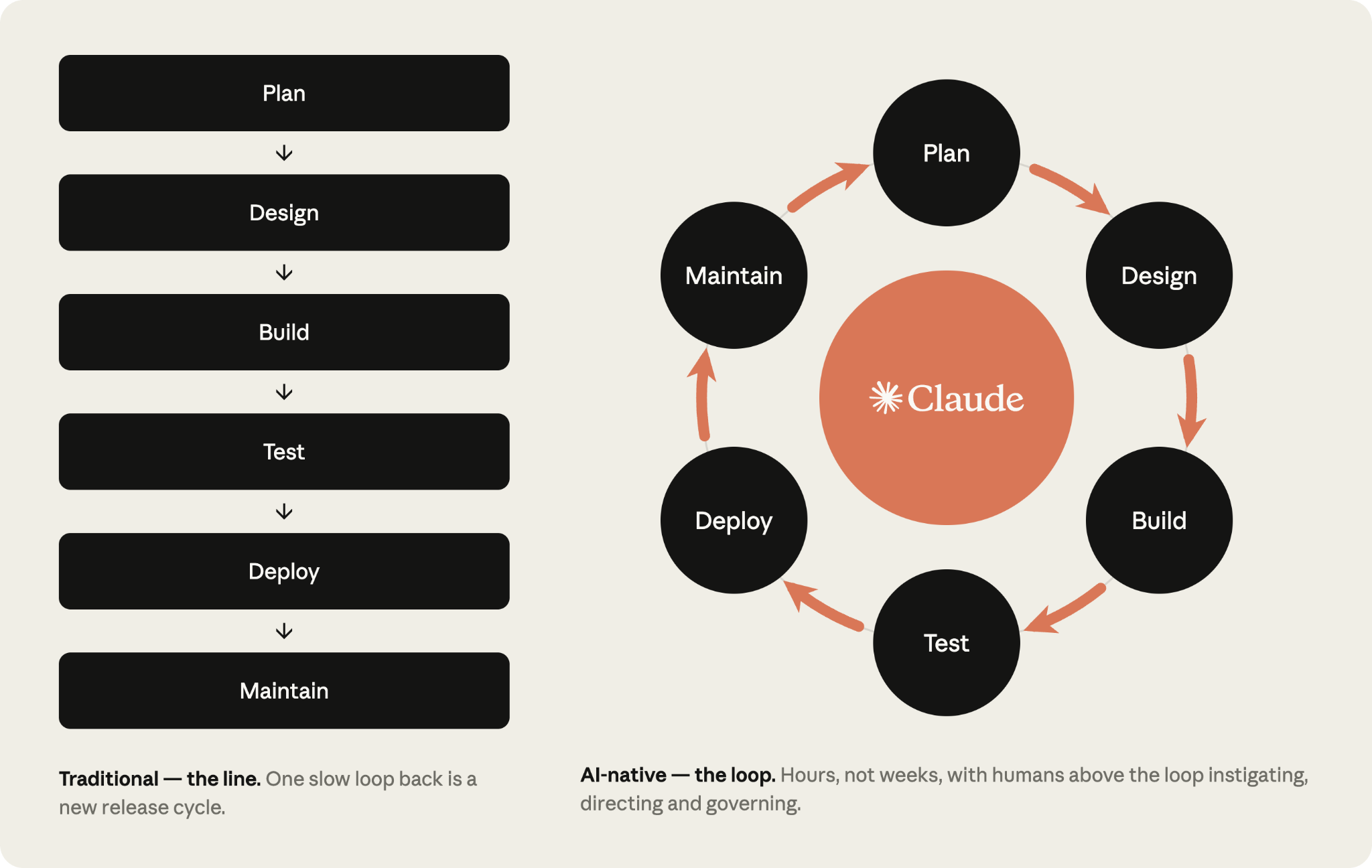
The shifts across the six stages of an AI-native SDLC
The table below highlights the ends of the spectrum between traditional SDLC and AI-native SDLC, supported by Claude. Most organizations sit somewhere between the two columns.
| Stage | Traditional SDLC | AI-native SDLC | | --- | --- | --- |
| Plan | Requirements gathered by committee, distilled through workshops and sign-offs, written up by hand | Claude synthesizes pain points straight from the sources and captures them within `intent.md` which is human readable and machine actionable | | Design | Spec written by analysts, parsed by designers | Requirements and design compressed into one working session with an agent, guided by standards encoded as skills, versioned in git |
| Build | Tests and code are handwritten and documentation is written after the main development happens | Tests and code are generated by AI and institutional knowledge is maintained as versioned machine-readable `CLAUDE.md` files and skills | | Test | QA gates at stage boundaries | Continuous evals woven through implementation |
| Deploy | Humans review every line of code and governance occurs in review cycles, often inconsistently | Layers of agentic review with human review reserved for regulated and critical code. Governance is enforced as the AI acts, with hooks as approval gates | | Maintain | Humans watch production for bugs | Agents monitor live deployments. Any breached control band is diagnosed and written back into the loop as a new `intent.md` |
The thread running through the right-hand column is the committed artifact. Each stage ends by writing one to version control (including `intent.md`, `spec.md`, `plan.md`, the diff and its tests, the PR with its review findings, and the incident record) and the next stage begins by reading it. For the early stages, .md files are the predominant artifact because a product owner and an agent can both read and act on the same file. From Build onward, the artifact is code and its records. The chain of commits is also the audit trail: who asked for what, what the agent produced, and who approved it.
Humans remain accountable for every decision that requires judgment. In the agentic SDLC world, the human attention shifts along with the artifacts that must be reviewed.
Every stage commits an artifact the next stage can read. Together, the intent, the spec, the plan, the diff and the review findings are the audit trail.
Plays
The plays are the core of the playbook and are grouped into six non-linear stages (Plan, Design, Build, Test, Deploy, Maintain), which together cover the complete lifecycle.
Each play covers:
- What changes;
- Getting started;
- Concrete steps for implementation;
- Governance considerations; and
- How you measure whether it worked.
The steps are modular and organizations may choose to prioritize transforming different stages at different times based on their unique needs. Each play names its dependencies under "Prerequisites," which the dependency graph further illustrates.
A stage ends by committing an artifact with the commit initiating the next stage. An accepted `intent.md` triggers the requirements and design pass, an approved `spec.md` triggers plan mode, a merged PR triggers the pipeline, and a breached control band in production writes the next `intent.md` and so the loop continues.
First, you prompt each step by hand with the end state being a loop in which each accepted artifact fires the next gate. Human attention concentrates at the gates, reviewing what the agent flagged rather than starting each stage from scratch.
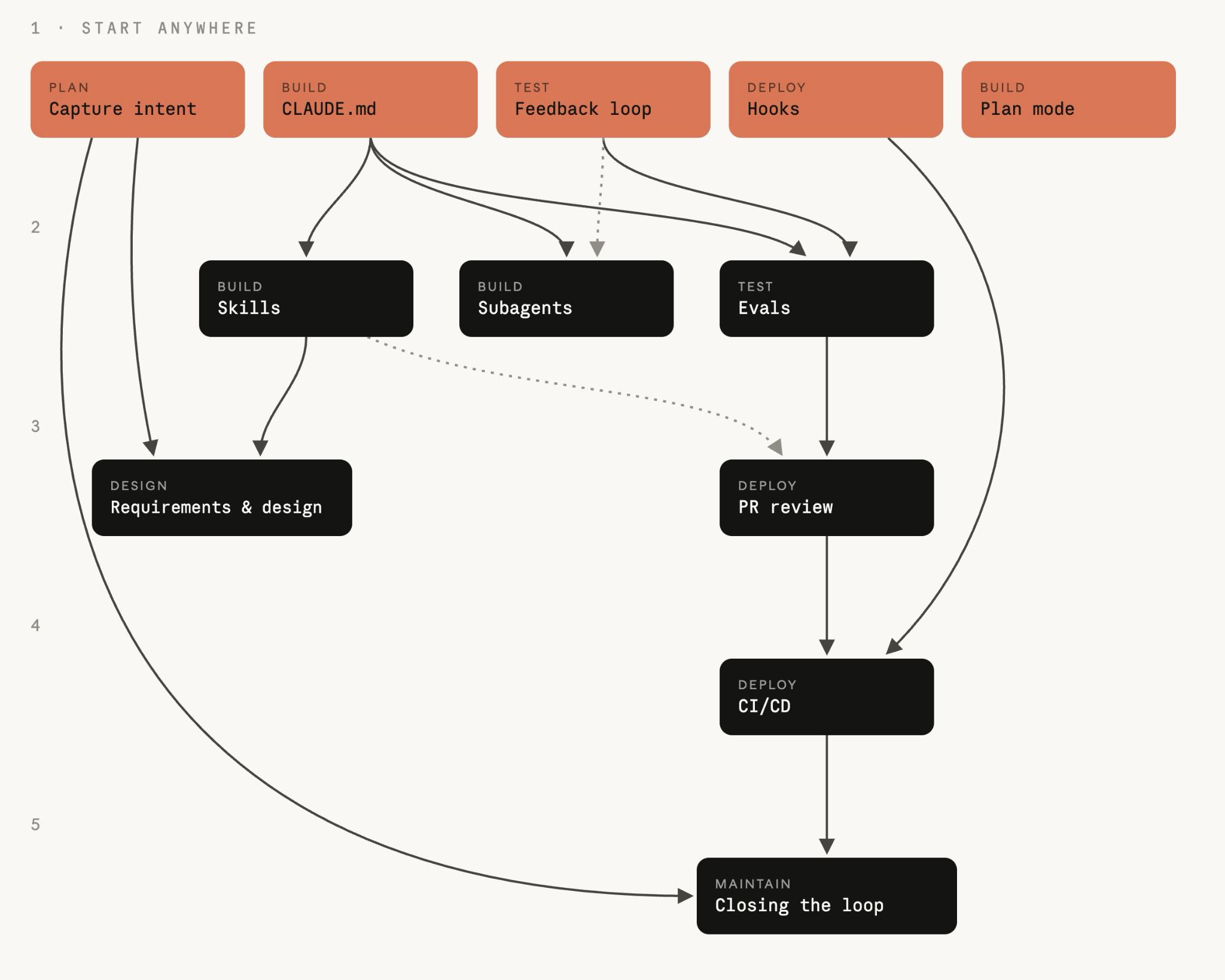
The plays are listed with stage; the arrows give the order to adopt them in. The two are not the same. Start with any clay play — nothing points into it, so it needs nothing first. For any other play, the arrows pointing into it are the plays to adopt before it.
**01**
Plan
Ideas stop waiting for someone to write them up. Intent is captured once, in the originator's own words, as a version-controlled artifact the next stage can act on.
Capture as intent.md
The `intent.md`, which kicks off the software development process can enter through different routes. A person has an idea, a ticket is filed, or an incident is surfaced via an alert (see Stage 6: Maintenance).
When a person has an idea, they brainstorm with Claude and produce a markdown proto-spec. In the traditional SDLC, the same person must then convince a member of the product team to write the idea up with them or on their behalf.
The proto-spec generated by Claude is human readable, version-controlled, and immediately consumable by the next stage. The proto-spec is saved as an `intent.md`.
Regardless of whether the intent originates from an event trigger or an agent, the same steps apply: the product owner reviews and corrects the agent-written `intent.md` before it is committed.
Traditional An idea passes through backlog entries, user stories, story points, and refinement meetings before anyone can act on it. Ownership transfers at each handoff, so what reaches engineering is several steps removed from what the originator meant.
AI-native The originator brainstorms with Claude and writes the result down as `intent.md`, a proto-spec in the originator's own terms. The artifact contains what is wanted, why, and under which constraints. Repeat processes are encoded via skills.
Getting started
**Prerequisites**
None.
**Infrastructure**
Claude access for people who are not engineers (claude.ai or Cowork); an agreed `intent.md` template; a shared, version-controlled home for intent that the product owner watches. For a single product the simplest home is an `intent/` folder in the product repo. This setup keeps the artifact chain next to the code derived from it. A dedicated intent repo is only worth the overhead when intent spans many repositories, and in a monorepo it is a directory. The Stage 3: Build sidebar covers how this home relates to a Jira or requirements tool that already holds the record.
Setting this up is a one-time task for the platform or engineering team. A technical team member needs to stand up the intent home and decide who can write to it, since many contributors will come from across the organization.
Once the repository exists, contributors without git experience don't need to use git directly. Instead a connector to the version-control system (e.g. GitHub) lets Claude commit markdown files on their behalf from claude.ai or Cowork.
#### How to execute it
1. The originator describes the problem to Claude in their own words. The originator may describe what they cannot do today, who is affected by the idea, what better looks like, or what is out of scope. No formal language is required. 2. Brainstorm until the idea is concrete. Claude asks the questions an analyst would ask: scope, users, constraints, and what success looks like.
3. Ask Claude to write the result as `intent.md` using the organization's template, which can be encoded as a skill set up by a technical team member and signed off by a lead. This can cover the problem, proposed outcome, affected users and systems, constraints, and open questions. 4. The originator corrects anything Claude misunderstood. 5. Commit `intent.md` to the shared home. Author and timestamp join the record, and the product owner picks the idea up from there.
```
Intent: claims status self-service
Author: J. Ortiz (claims operations). Status: draft.
Problem
Customers phone the contact center to ask where their claim is. Handlers spend roughly a third of call time on status-only queries.
Proposed outcome
Customers see claim status, next step and expected date in the portal.
Affected users and systems
Claims handlers, portal team, claims-core API.
Constraints
No new PII in the portal session. Existing authentication only.
Open questions
Do third-party loss adjusters need access too? ```
#### Governance considerations
The evidence is the committed `intent.md`, which lists the author, the timestamp and the full revision history. It's logged in the git history of the intent home. The product owner approves, and the accept or reject decision that sends the intent into Stage 2: Design is recorded as the merge or the closing review.
How to measure it
**Leading indicator**
Time from first conversation to a committed `intent.md`, read from git history on the intent home, which records author and time stamp. The expectation is to fall from a multi-week elicitation and refinement cycle to hours.
**Lagging indicator**
The survival rate, or the share of `intent.md` files that the product owner accepts into Stage 2: Design rather than closes. The accept or reject decision is recorded as the merge of the artifact or the closed review. Additionally, the number of changes made to the `intent.md` that are made after the first `spec.md` commit for the same change.
**02**
Design
Requirements and design collapse into one session. Policy is applied while the spec is written, not discovered in a review weeks later.
Requirements and design
Once approved by the product owner, Claude takes the accepted `intent.md` and produces a requirements and design spec. This is guided by the organization's skills for brand, security, compliance, and UX.
The product owner reviews that spec, but doesn't write it. The goal of this process is to create a spec the engineering team can plan against, with flagged areas of concern.
Front-end work is the clearest example. Once the `intent.md` is accepted, the product owner mocks the design up in Claude Design (beta) from the `intent.md`, iterates on the mock, and then exports it to Claude Code to build.
Traditional Requirements and design are separate phases run by separate teams. Analysts formalize the idea into requirements and designers then parse those back into a design. The separation exists for accountability, but it is slow and lossy.
AI-native Both phases happen in a single prompted session. Claude takes `intent.md` and produces a requirements and design spec, constrained by the organization's skills, with areas of concern flagged.
Getting started
**Prerequisites**
Write an `intent.md` file, with brand, security, compliance, and UX policies written as skills.
**Infrastructure**
A product owner with Claude access. No engineering skill is required.
#### How to execute it
1. The product owner opens a session with the organization's skills available and attaches the `intent.md`.
2. The product owners prompt points at the `intent.md`, names the constraints, and demands flagged concerns. Run it by hand at first, then codify it as an organization-level slash command. From there make the acceptance of `intent.md` in the intent home the trigger, with a non-interactive job that fires on the merge, run the pass with the organization's skills loaded, and commit `spec.md` as a pull request (the CI/CD play in Stage 5: Deploy covers the plumbing). From that point the product owner's first involvement is the review. 3. The same product owner reviews the spec against the idea. Does the spec solve the stated problem, and are the open questions from `intent.md` answered or carried forward? 4. Work through the flagged concerns first as they are the points an analyst would have escalated. The product owner resolves each one with its policy owner before engineering sees the spec. 5. Commit `spec.md` alongside `intent.md`. The file pair records what was asked for and what was decided.
6. The product owner decides whether the spec and intent progress to build, consulting a technical lead for anything the organization classes as higher risk. A human team mate always makes this call, and accepting the spec is what starts the plan mode play in Stage 3: Build.
#### What it looks like (the prompt)
`Read the attached intent.md and produce a requirements and design spec for integrating it into our existing codebase. Apply the skills available to you so the plan conforms to our brand guidelines, security policies and UX standards. Document the spec fully as spec.md, ready to hand to the engineering team. Describe clearly any areas of concern, especially where you cannot satisfy contradicting policies.` #### Governance considerations
Instead of being discovered in a review weeks later, the live policy is read and applied while the spec is written. The organization's skills are applied as constraints on the spec. The spec, the prompt that produced it, and the skill versions in force are all logged in version control. The product owner signs off the spec, and routes flagged concerns to the named policy owners.
How to measure it
**Leading indicator**
Elapsed time between the `intent.md` commit and the `spec.md` commit for the same change (two git timestamps), compared with the old requirements-plus-design cycle.
**Lagging indicator**
Requirements rework after build starts. Count `spec.md` commits dated after the first `plan.md` commit for the same change. Git log will give this directly.
**03**
Build
Nothing is implemented without an accepted plan. Institutional knowledge becomes files the agent reads, and the guardrails run as code rather than as habits.
Claude Code plan mode as the default starting point
Engineers start Claude Code sessions in plan mode, give Claude the approved `spec.md` from Stage 2: Design, and let it interview them, iterating on the plan until the engineer is happy with it.
Traditional An engineer reads the design and starts writing code. How the change will be made, down to which files and which tests, stays in the engineer's head or at best a ticket comment. Nobody else can review it. The first thing a reviewer sees is the finished diff, and by then rework is slow.
AI-native Work starts with a written plan that Claude produces in plan mode, where it can read the codebase without changing anything. The engineer corrects the plan before code is written, and the approved version is committed as `plan.md` for later stages to check against.
Getting started
**Prerequisites**
The intent artifact (`intent.md` or `spec.md`) if one exists, and the `CLAUDE.md` file helps.
**Infrastructure**
Claude Code with access to the repository.
#### How to execute it
1. The engineer starts the session in plan mode with Claude. 2. The engineer gives Claude the `intent.md` and the `spec.md` and asks for an implementation plan that names the files that change, the order of the work, and the tests that prove it. 3. Interrogate the plan by asking what the change could break, which step is most risky, and what other options Claude chose not to do. 4. Iterate until an engineer who has never seen the conversation could implement the change from the plan alone. 5. Commit the approved plan as `plan.md`. The plan joins the audit trail, and the PR review play (Stage 5: Deploy) checks the eventual diff against it. 6. Accept the plan and let Claude implement. With a solid plan, the implementation is often a single pass. 7. When implementation departs from the plan, update `plan.md` in the same commit. Consider using a hook to enforce synchronization between the two.
#### What it looks like (plan.md)
```
Plan: claims status self-service (from intent.md 2026-06-02)
Files that change
portal/src/claims/StatusPanel.tsx (new), claims-api/routes/status.py, claims-api/tests/test_status.py
Order of work
1. Add the status endpoint behind existing auth. 2. Panel against the endpoint. 3. Wire into the portal nav.
Risks
The claims-core API rate-limits at 50 rps; the panel must cache.
Proof
test_status.py covers the four claim states; screenshot matches the approved mock. ```
#### Governance considerations
Design review happens before any code is generated, when changing course is still a matter of editing a document. Plan mode enforces this itself, since Claude cannot edit files until the engineer accepts the plan. The plan and its revisions are logged along with who accepted it. Routine changes are approved by the engineer, and anything the organization classes as higher risk goes to a tech lead or architect.
How to measure it
**Leading indicator**
Share of changes that merge from the first implementation pass, and time from plan approval to merged PR with the required data within the PR metadata.
**Lagging indicator**
Rework cycles per change, again from the PR metadata, and how often the merged diff still matches the committed `plan.md`.
Claude Code on auto mode
Claude Code can also run in auto mode, where the engineer approves the plan and, once happy and iterated upon, Claude applies each change without a per-edit prompt. As the guardrails from the later plays mature (a tuned `CLAUDE.md`, skills that encode policy, hooks that block unsafe actions, and a test suite Claude can run), auto-accept becomes the default for routine work: a tight `spec.md`, a small blast radius, and code the tests already cover.
The shift is now away from the user watching the agent make the edits and reviewing actions, towards the review of artifacts after longer autonomous sessions. Auto-accept mode further enables parallelism across individuals and the team when used with worktrees and is fundamental to running the SDLC autonomously and closing the loop as described in Stage 6: Maintenance.
Sidebar
Legacy systems and the source of truth
_Applies to every artifact the process produces._
Existing SDLC processes likely already track artifacts, just not in markdown files. Work items may be in Jira, requirements in a tool with regulatory traceability built in, designs in Figma, and change approvals with a change board. Those systems are hard to displace because auditors and regulators already accept them and other teams depend on them, so the AI-native SDLC has to fit around what exists.
When transitioning to the AI-native SDLC, for every artifact the process produces, name one system as the source of truth, with everything else holding a copy or a link to the original. The configurations below can be set up to have one source of truth, with the choice differing per artifact:
**The repo as the source of truth.** The markdown artifacts are the authoritative record and the legacy system references files within commits. This can be one of the cleanest configurations for engineering-led organizations, as all records live in one tool with one timestamp authority.
**The legacy system as the source of truth.** Jira, ServiceNow, or the requirements tool holds the authoritative record and the markdown artifacts are working copies. Claude reads the record at the start of the session and writes the outcome back through an MCP connector in the same session that produced the spec or the plan.
**Linkage as the minimum bar.** All artifacts note the record ID and all legacy records contain the commit SHA of the markdown file. Linkage is a good place to start when transitioning to the AI-native SDLC, accepting that there are two sources of truth.
Both the legacy system and the markdown-first system can coexist, so long as there is a link between the two or one is declared the source of truth.
The CLAUDE.md
`CLAUDE.md` gives Claude the context a new joiner would need, covering conventions, commands, architecture, and the mistakes the team sees most often. Knowledge that used to sit in people's heads and on wikis becomes a file the agent reads at the start of every session, maintained by the whole team and iterated on whenever a mistake is made.
Getting started
**Prerequisites**
None.
**Infrastructure**
A repo, Claude Code installed, and one engineer who knows the codebase well.
#### How to execute it
1. Run `/init` in the repo. Claude generates a starting `CLAUDE.md` from what it finds. 2. Cut the generated file down to what a new joiner would need on day one. Keep the build, test and lint commands, the conventions that matter, and the things Claude keeps getting wrong. 3. Check `CLAUDE.md` into git at the repo root so the whole team shares one version and changes are reviewed like code. 4. A working rule helps here. When Claude makes a mistake twice, the correction goes into `CLAUDE.md`. 5. Keep it under a page, because Claude reads all of it at the start of a session and anything stale is taking up context for no benefit.
#### What it looks like (CLAUDE.md)
```
Payments service
Commands
- Build: make build
- Test: make test (unit), make itest (integration, needs docker)
- Lint: make lint (runs in CI; fix before pushing)
Conventions
- Java 21, Spring Boot 3. No new Lombok.
- Money is always BigDecimal, never double.
- Every endpoint needs an integration test in src/itest.
Architecture
- api/ holds REST controllers, core/ holds domain logic,
adapters/ talks to external systems.
- Kafka events are defined in schemas/; never edit generated classes.
Things Claude gets wrong
- Do not bump dependency versions; the platform team owns them.
- The legacy v1/ package is frozen; changes go in v2/.
```
#### Governance considerations
`CLAUDE.md` is version controlled, so the instructions the agent works to are reviewable and auditable. Team conventions are applied through the file, changes to it are logged in git history, and code owners approve those changes in PR review.
How to measure it
**Leading indicator**
How often Claude repeats a mistake `CLAUDE.md` should have caught. The corrections or changes to the `CLAUDE.md` should be tracked within the git history.
**Lagging indicator**
Time to first merged PR for a new member of the team from PR history.
Skills as institutional knowledge
Skills are how an organization makes its institutional knowledge operational. The instructions are explicit, version-controlled, applied broadly, and updated centrally when policy changes. The rule of thumb: write a skill for institutional knowledge that must be applied consistently; don't write a skill for components that belong in `CLAUDE.md` or a prompt.
Getting started
**Prerequisites**
None required. Having a `CLAUDE.md` helps, because it keeps the agent's working knowledge in the repo, but a skill does not depend on it.
**Infrastructure**
One policy with a named owner and a written source of truth.
#### How to execute it
1. Pick one piece of knowledge that is enforced inconsistently today. This could be a security standard, an API design convention, or a brand rule. 2. Write it as a skill, a folder containing a `SKILL.md` whose frontmatter says when it triggers and whose body says what to do. An engineer writes it from the policy owner's source of truth, using Claude to help. 3. Put the skill in the repo at `.claude/skills/<name>/` so it ships with the code, or distribute it organization-wide through a plugin. 4. Test that the skill triggers. Ask Claude to do the relevant task in different ways and confirm the skill loads each time. 5. When the policy changes, change the skill and have the policy owner sign off the change. 6. Engineers pick up the new version automatically in their next session.
#### What it looks like (.claude/skills/secure-api-review/SKILL.md)
``` --- name: secure-api-review description: Apply the API security standard. Use whenever creating or modifying an external-facing endpoint, reviewing API code, or generating an OpenAPI spec. ---
Secure API review
When you create or change an API endpoint: 1. Authentication: every endpoint requires the gateway JWT; no anonymous routes outside /health. 2. Input validation: validate request bodies against the OpenAPI schema and reject unknown fields. 3. Audit: every state-changing endpoint emits an audit event with actor, action, entity and timestamp. 4. Data classification: fields tagged pii in the schema must never appear in logs or error messages.
Run scripts/check-endpoints.sh and include its output in your summary. ```
#### Governance considerations
A skill is a control, though an advisory one. It makes Claude likely to apply the policy while the code is written, and nothing forces a session to comply with it. A policy that must always hold needs something deterministic behind the skill, such as a hook that blocks the action or a review pass that re-checks the policy at the PR. The skill makes violations rare and the hook makes them close to impossible. Skill invocations are logged in session traces, and the policy owner reviews skill changes like code.
How to measure it
**Leading indicator**
Time from the policy owner approving a policy change to the updated skill merging, taken from the PR on the skill folder.
**Lagging indicator**
PR reviews findings that cite the policy, which should fall towards zero once the skill is applying the policy while the code is written. Where the findings don't fall towards zero, either the skill isn't triggering or its text has drifted from the official policy.
Hooks as build-time guardrails
A skill is an advisory control while a hook is the deterministic layer behind it. Most of Claude's actions are file edits and shell commands during implementation, so the build phase is where hooks can end up firing most often.
Build-phase hooks can:
- Block edits to protected paths such as generated classes or a frozen package;
- Run the formatter and linter after file edits so drift never accumulates;
- Keep credentials out of the diff.
Back any skill whose policy has to hold without exception. A hook runs on each action that matches it, so build-phase hooks should be fast and scoped to the file that changed. Heavier checks such as the full test suite belong at the commit or the PR.
A hook that asks a human for approval belongs with the gates in Stage 5: Deploy, because an approval prompt during the build puts a person back on the critical path of all the sessions running in parallel.
Parallel sessions and subagents
One engineer can drive several streams of work at once.
A parallel session is another full Claude Code instance, working a separate task in its own git worktree. Each independent session knows nothing about the others, and the engineer steering them is the only thing they share.
A subagent runs inside a single session as a scoped helper with its own context window and tool limits and suits jobs that recur in multiple tasks such as verifying the app runs as expected.
Parallel sessions raise the number of tasks an engineer can have in flight, while subagents keep each session focused on its own task. The engineer's job is steering and reviewing all of them.
Traditional One engineer works one task at a time and spends a significant portion of their day or week on builds, tests and reviewers. Switching between tasks while waiting is possible, but the context switch is tiring enough that few people choose to.
AI-native One engineer runs several Claude sessions at once, each in its own worktree on its own task. Repeated jobs become subagents with their own context and tool limits. The engineer's job shifts to orchestrating, and eventually, to building and monitoring loops.
Getting started
**Prerequisites**
The `CLAUDE.md`, since all sessions read the file. The feedback loop (Stage 4: Test) also helps here, because less supervision from the engineer is needed when a session can verify its own work.
**Infrastructure**
A git repository, since isolation comes from worktrees and permission settings tuned so sessions are not waiting on approval prompts for commands the organization considers safe.
#### How to execute it
1. The engineer splits the work into tasks that touch different files, using the plan from the plan mode play (Stage 3: Build) to see where the work is independent. Tasks that share files run in a single session, one after another.
2. Each parallel task gets its own worktree, for example `claude --worktree feature-auth` in one terminal and `claude --worktree fix-rate-limit` in another. A worktree is a separate checkout on its own branch, which stops sessions colliding on files. 3. Two or three sessions is a sensible starting point. The practical ceiling is how many streams one person can review properly, so add sessions only while review is keeping up.
4. Turn repeated jobs into subagents, as defined in markdown files in `.claude/agents/`, each with a name, a description of when to use it, and the tools it may touch. Examples include a code simplifier that strips needless complexity after the main agent finishes, a verifier that runs the app and checks behavior, a researcher that explores the codebase and reports back without flooding the main context. Check the definitions into git so the whole team shares them.
#### What it looks like (.claude/agents/verifier.md)
``` --- name: verifier description: Runs the app and checks the change works before the session reports done tools: Bash, Read --- Start the app with make run. Exercise the changed behavior and the two nearest neighboring flows. Report what you ran, what you saw, and any behavior that does not match plan.md. Do not fix anything; report only. ```
#### Governance considerations
More sessions means more output, so the controls have to come from configuration in the repo. Hooks and permission settings there apply to all sessions, and what a session does is logged and attributed to the engineer who ran it.
How to measure it
**Leading indicator**
Concurrent sessions per engineer while review quality holds, counted from the OpenTelemetry export, and the share of the day spent steering rather than waiting.
**Lagging indicator**
Changes merged per engineer per week read alongside the rework rate as determined per the PR history.
**04**
Test
Every session checks its own work before a human sees it, and the configuration that steers the agent gets regression-tested like the code it writes.
Give Claude a feedback loop
Always give Claude a way to verify its own work, whether tests, a build, or a screenshot diff. A session checks its own work and fixes its own mistakes before an engineer sees them.
The feedback loop should not be confused with a verifier subagent (Stage 3: Build). The feedback loop runs through the whole task as many times as the work. The verifier subagent, on the other hand, is one way to package the final check by running a fresh context window once the session believes the work is done. This way the verdict is not colored by the assumptions that produced the code.
Traditional The signal that code works arrives late. CI minutes later, a tester days later, production weeks later. With an agent producing the code, a late signal means a person has to check all of its output, and that person becomes the bottleneck.
AI-native The session is given a way to check its own work before a person sees it. Run the tests, run the build, take the screenshot. Claude iterates until the check passes, so what reaches the engineer has already passed it. Setting the loop up falls to the engineer running the session, and the steps below are written for them.
Getting started
**Prerequisites**
None.
**Infrastructure**
A test suite and a build that run locally with one command each. For the UI work, a way for Claude to see the result is crucial, either a browser tool or a screenshot utility wired in via MCP.
#### How to execute it
1. If checking the work today takes a sequence of commands and some environment knowledge, wrap it in a single target such as "make test" or "npm test" that exits non-zero on failure. 2. In the `CLAUDE.md`'s Commands section, list each command with an example of a healthy output. 3. State a target and make it quantifiable so Claude can check the work without asking you, for example: "All tests in test_status.py pass," "the screenshot matches the attached mock," or "the endpoint returns 200 with the new field".
4. For bug fixes, write the failing test first. Ask Claude to reproduce the bug as a test, run it, and confirm it fails for the reason you expect. Commit that test. Only then ask Claude to make it pass without editing the test, with the test-file hook from the final step enforcing the restriction. A test that existed before the fix, and that the agent couldn't rewrite, is proof the bug is gone.
5. For UI work, close the loop with a visual check. Give Claude a browser or screenshot tool, give it the mock, and let it iterate. Implement, screenshot, compare, and adjust. Two or three rounds is normal, and the result should improve with each one. 6. Make verification part of "done." Instruction lives in `CLAUDE.md`. Run the tests before reporting a task complete, and show the output.
7. Finally, the loop itself needs protecting, because an agent fixing code must not be able to weaken the check on that code. A hook that blocks edits to test files during a fix task does this. The alternative is to check the diff in review and reject any change that touches a test.
#### What it looks like (CLAUDE.md verification block)
```
Verifying your work
- Build: make build (must finish with "Build succeeded")
- Test: make test (all green; never skip or delete a failing test)
- Lint: make lint (zero warnings)
Run all three before reporting any task complete, and paste the output. If a test fails, fix the code, not the test. ```
Governance considerations
**What is enforced**
Verification before a task is reported done, and the block on the agent editing test files during a fix, both implemented as hooks where the organization wants them guaranteed.
**What the evidence is**
The literal output of "make test," the build log, or the screenshot diff that Claude ran and pasted, so the evidence comes from the toolchain.
**Where it is logged**
In the session transcript, which the OpenTelemetry export forwards to the organization's observability stack, and in the PR's check run, where the reviewer and any later auditor can both see it.
**Who approves**
The code owner reviewing the PR, who can concentrate on intent and risk because the mechanical evidence is already attached.
How to measure it
**Leading indicator**
First-pass CI success rate for agent-written changes, which the CI system already supports.
**Lagging indicator**
Review time per PR (from the PR metadata), which should fall once the tests catch what reviewers used to catch, and the change failure rate from an incident tracker.
Continuous evals in CI
Evals are the AI-native equivalent of stage-gate QA. In practice that means a suite that runs whenever the agent's configuration changes. When a new model is swapped in or a prompt is rewritten, the eval suite says whether the agent still does the work to the same standard.
The evals should be seen as a live suite. As models improve, cases that once discriminated stop doing so and new ones must be added that arise from ongoing monitoring.
Depending on the use case, some teams may prefer to run these evals offline on a set cadence rather than on every change. The steps below are for continuous evaluations.
Getting started
**Prerequisites**
The `CLAUDE.md` and feedback loop (Stage 4: Test).
**Infrastructure**
CI that can run Claude Code non-interactively, and an API key with budget for eval runs.
#### How to execute it
1. The platform engineer collects 20 to 50 real tasks from recent work with its expected/accepted outcome. 2. Write each task as an eval, meaning the prompt plus the checks that define acceptable (tests pass, lint clean, behavior unchanged, policy followed). 3. The suite runs non-interactively in CI on a schedule and on any change to `CLAUDE.md`, skills or hooks, since that configuration steers the agent and deserves the regression testing that code gets. 4. Gate configuration changes on the results. A skill change that drops the pass rate gets reviewed before it merges. 5. Each production incident gets an eval, written by the team that owned the incident, and stays in the suite as a regression test.
#### What it looks like (.github/workflows/agent-evals.yml)
``` name: Agent evals on: pull_request: paths: ['CLAUDE.md', '.claude/**'] schedule:
- cron: '0 2 * * *'
jobs: evals: runs-on: ubuntu-latest steps:
- uses: actions/checkout@v4
- run: npm install -g @anthropic-ai/claude-code
- name: Run eval suite
env: ANTHROPIC_API_KEY: ${{ secrets.ANTHROPIC_API_KEY }} run: | for eval in evals/*.json; do claude -p "$(jq -r '.prompt' $eval)" \ --allowedTools "Read,Edit,Bash(make test)" \ --output-format json > result.json ./evals/check.sh "$eval" result.json done ```
#### Governance considerations
Evals give QA a gate that keeps up with agent output. The pass-rate threshold is enforced as a merge check, runs are logged so results can be compared over time, and the team that owns the configuration change approves it.
How to measure it
**Leading indicator**
The eval pass rate over time, reported by the suite on every run, and how long a production incident takes to become a permanent eval.
**Lagging indicator**
Regressions caught in CI compared with regressions found in production derived from the incident tracker.
**05**
Deploy
Review runs in both directions, and governance is enforced as the agent acts. The agent does everything up to the production gate and nothing past it.
AI in the PR review loop
Claude both gives and receives reviews. It reviews incoming PRs against the organization's policies and addresses review comments on its own PRs. This allows engineers to focus on behavior in their PR review, which boils down to judging intent and risk.
Traditional Review capacity was planned around human output. A PR waits for a reviewer to read all of it, review quality varies with the reviewer's load, and the author chases while the backlog grows.
AI-native All PRs get an identical set of review passes, with findings ranked by severity. Human attention moves up a level, to whether the change does what the plan intended and whether the risk is acceptable.
Getting started
**Prerequisites**
An updated `CLAUDE.md` file from Stage 3: Build; skills if the review passes enforce written policies, defined subagents.
**Infrastructure**
A repo with the Claude integration installed, either the managed Code Review (research preview) service enabled by an admin or the claude-code-action running in your own CI, with model calls through AWS Bedrock, Google Vertex or Microsoft Foundry where needed (the CI/CD play covers the deployment options). Branch protection policies that require a code owner's approval are also worthwhile.
#### How to execute it
1. The managed Code Review service is the fastest start. An admin enables it and selects repositories. Run the review in your own CI with the claude-code-action when you need control of the pipeline or want API calls routed through your own cloud agreement (the CI/CD play covers that plumbing).
2. The tech lead writes the review policy as `REVIEW.md` at the repo root, divided into the passes the organization cares about: bugs and logical errors; security and vulnerabilities; compliance against the spec (`spec.md` from the requirements play), the implementation plan (`plan.md` from the plan mode play) and design principles. `REVIEW.md` also defines what counts as Important as opposed to a Nit, and what to skip.
3. The tech lead sets the human threshold. Findings do not approve or block a PR on their own, and branch protection still requires approval from a code owner. A platform engineer who wants to gate merges on findings can read the severity counts that the check run publishes as a machine-readable tally.
4. When a reviewer or the author tags `@claude` on a review comment, Claude addresses the comment and pushes the fix. The PR thread records both the request and the change. This fix loop runs through the claude-code-action. In the managed service, commenting `@claude review` requests a fresh review instead. For PRs Claude opened, go further and let Claude babysit the PR to merge. Teams wrap the loop in a custom slash command that sweeps the unresolved review comments and failing checks on the PR, addresses them and pushes the fixes, until the PR is green and waiting only on code owner approval.
5. Review findings feed back into `CLAUDE.md`. When a review flags a mistake for the second time, the correction goes into `CLAUDE.md` as part of that review, and because review reads `CLAUDE.md` the mistake is caught from the next PR onwards. Review also flags when a change has made `CLAUDE.md` outdated. 6. Once a month the tech lead tunes the setup by rating findings so the reviewer improves and by capping Nit volume in `REVIEW.md`. Generated paths and anything CI already enforces are excluded.
#### What it looks like (REVIEW.md)
```
Review instructions
Passes
Run three passes and tag each finding with its pass:
- Bugs: logic errors, broken edge cases, subtle regressions
- Security: injection risks, authentication gaps, PII in logs
- Compliance: the change matches spec.md, plan.md and our design principles
What Important means here
Reserve Important for findings that would break behavior, leak data or breach a policy. Style and naming are nits.
Cap the nits
Report at most five nits per review; summarize the rest as a count.
Do not report
Generated files under src/gen/ and anything CI already enforces. ```
#### Governance considerations
Separation of duties is preserved, because the agent that wrote the code has no way to approve it. The review policy in `REVIEW.md` is applied to all PRs, and findings, fixes, ratings and approvals are logged in the PR history, so the PR is the audit record. Approval comes from a human through branch protection, informed by the findings.
For how these controls compose at production scale, see securing an AI-native SDLC at Anthropic.
How to measure it
**Leading indicator**
Time to first review, which should fall to minutes, and the share of review comments resolved without a human touching the branch with data stored directly on Git.
**Lagging indicator**
Defects and vulnerabilities caught before merge set against those escaping to production, from the PR history and the incident tracker.
Hooks as approval gates
The build phase used hooks as guardrails, allowing or blocking actions with no human involved (Stage 3: Build). A hook can also ask, pausing the action until a specific person approves, which is what release gating needs.
The play sits in Stage 5: Deploy because the release gate is the clearest case, but hooks are not deploy-specific: they run wherever Claude acts. For example, hooks can block edits to migrations and infra without a change ticket during Stage 3: Build, and stop the agent editing test files during a fix task in Stage 4: Test.
Getting started
**Prerequisites**
None.
**Infrastructure**
A written list of the approvals the change process requires.
#### How to execute it
1. Engineering leadership, with change management and compliance, lists the human approval gates that must survive, such as change management sign-off, release authorization, and edits to protected paths. 2. The platform engineer expresses each gate as a hook, a script that runs before Claude acts that can allow, ask, or block. 3. Team hooks go in `.claude/settings.json` in git, and non-negotiable hooks go in managed settings owned by the platform or IT admin, where individual engineers cannot switch them off. 4. A block should explain itself, so when a hook stops an action the reason and the route to approval appear in Claude's output.
#### What it looks like (.claude/settings.json)
``` { "hooks": { "PreToolUse": [ { "matcher": "Bash", "hooks": [ { "type": "command", "command": "${CLAUDE_PROJECT_DIR}/.claude/hooks/production-gate.sh" } ] } ] } } ```
#### And the gate itself (.claude/hooks/production-gate.sh)
``` #!/bin/bash
Production deploys require a named release authorization
cmd=$(jq -r '.tool_input.command' < /dev/stdin) if [[ "$cmd" == *"deploy"* && "$cmd" == *"production"* ]]; then if [ -z "$RELEASE_APPROVAL" ]; then echo "Production deploys need a release authorization." >&2 exit 2 # exit 2 blocks the action; the message goes to Claude fi fi exit 0 ```
#### Governance considerations
Hooks are the approval gates. The gate condition is enforced every time, for everyone. Allow and block decisions are logged with a timestamp. The gate also defines what counts as approval, whether that's an approved change ticket or the release manager's sign-off.
Worked example
Managed settings for a regulated enterprise
_Deployed by the platform team via MDM or the admin console; engineers cannot edit or override any of it._
{ "permissions": { "deny": [ "Read(.env*)", "Read(./secrets/**)", "WebFetch", "Bash(curl *)", "Bash(wget *)" ], "allow": [ "Bash(git *)", "Bash(make build)", "Bash(make test)", "Bash(make lint)" ], "disableBypassPermissionsMode": "disable" }, "allowManagedPermissionRulesOnly": true, "sandbox": { "enabled": true, "failIfUnavailable": true, "allowUnsandboxedCommands": false, "network": { "allowedDomains": ["git.internal.example.com", "registry.npmjs.org"] }, "credentials": { "files": [ { "path": "~/.ssh", "mode": "deny" }, { "path": "~/.aws/credentials", "mode": "deny" } ], "envVars": [ { "name": "GITHUB_TOKEN", "mode": "deny" } ] } }, "allowManagedHooksOnly": true, "disableSideloadFlags": true, "allowManagedMcpServersOnly": true, "strictKnownMarketplaces": [ { "source": "github", "repo": "example-corp/approved-plugins" } ], "requiredMinimumVersion": "2.1.193" }
What each line buys, in control terms
`permissions.deny` keeps secrets out of the agent's context and blocks arbitrary network egress through tools; `permissions.allow` pre-approves the safe inner loop so the deny list doesn't turn into prompt fatigue.
`disableBypassPermissionsMode` plus `allowManagedPermissionRulesOnly` means no engineer, project file or command-line flag can widen the rules.
`sandbox` closes the gap permissions cannot. A tool-level deny on WebFetch doesn't stop a shell command reaching the network; the OS-level domain allowlist blocks egress outright.
`failIfUnavailable` and `allowUnsandboxedCommands` make the sandbox a gate: Claude Code refuses to start when the sandbox cannot initialize, and a command that fails inside the sandbox cannot be retried outside it.
`credentials` closes the gap the deny rules leave open. `permissions.deny` governs Claude's file tools, but a sandboxed shell command could still read `~/.ssh` or `~/.aws/credentials` by default; this block denies those reads and strips the named secrets from the environment of every sandboxed command.
`allowManagedHooksOnly` means the approval gates from this play are the only hooks that run; nothing local can add to or replace them.
`disableSideloadFlags` and `strictKnownMarketplaces` mean every skill, agent, hook and MCP server on an engineer's machine arrived through the organization's approved plugin marketplace, never from a home directory.
`allowManagedMcpServersOnly` makes the agent's tool surface an allowlist owned by the platform team.
`requiredMinimumVersion` refuses to start on a version below the approved floor, so the controls are enforced by a build the organization has actually assessed.
Consider the above a starting point to tailor, rather than a recommendation to copy. Every deny trades against capability, and the right balance depends on the data classification of the repo. The settings reference documents every key, including the managed-only ones: code.claude.com/docs/en/settings
How to measure it (for the hooks themselves)
**Leading indicator**
Time spent waiting on each approval gate. Every hook decision is written to the OpenTelemetry export with a timestamp and an allow or block verdict, so the wait is visible per gate.
**Lagging indicator**
Gate violations reaching production before and after hooks from the incident tracker.
CI/CD integration and deployment
Run Claude Code non-interactively inside the CI/CD pipeline, sandbox the execution so long-running agents run safely, expose deployment through MCP integrations, and rehearse the rollback paths before the agent ever needs them.
Traditional Pipelines run deterministic scripts, and anything that needs judgment waits for a human. For example, triaging the flaky test, writing the changelog, or working out why the build broke. Deployment and rollback are runbooks a human follows under pressure.
AI-native Claude runs non-interactively inside the pipeline for the judgment steps, in a sandbox with scoped credentials. Deployment tooling is exposed to the agent through MCP, so the workflow that wrote and tested the change can also ship it and roll it back, inside gates the organization defines per environment.
Getting started
**Prerequisites**
Claude in the PR review loop and hooks as approval gates, because the gates must exist before automation accelerates anything through them.
**Infrastructure**
A CI platform with the claude-code-action installed, or any runner that can call `claude -p`; model access through the API, or Bedrock, Foundry, or Vertex where traffic must stay on the organization's cloud agreement; MCP servers for the deployment targets; a sandbox profile for agent jobs with no standing production credentials.
#### How to execute it
1. The platform engineer starts with read-only judgment steps. Use `claude -p` in a pipeline job to triage a failed build, summarize a flaky test, or draft the changelog. 2. Add write steps behind the existing gates for jobs like fixing lint, updating generated docs, or addressing review comments via the `@claude` mentions. Anything the agent writes arrives as a PR through branch