I Got Sick of Remembering Port Numbers
I Got Sick of Remembering Port Numbers
I run a lot of stuff locally. Jekyll blogs, Flask APIs, Next.js apps, AI tools, little scripts that do one thing well. Each one lives on some port. Each session, I’d open a new browser tab and think: was that one on 3000? Or did I move it to 5173 because something else grabbed 3000? What about that Tailscale URL for my home server?
The real annoyance is that it wasn’t just one machine. It was layers. Local ports fighting each other. Hostnames I couldn’t remember. Scripts that would happily steal whatever port they wanted if I started them in the wrong order.
I wanted a simple launcher for all the things that aren’t traditional desktop apps. Not Finder, Alfred or Raycast. Something that understood localhost.
The problem is **port rot**: the slow accumulation of services, forgotten ports, and dead browser tabs that makes your local dev environment feel like a junk drawer. Worse many of these things don’t need to be running all the time. They should run when needed and then quietly spin down.
So I built local.vibe.
What it does[](https://gregraiz.com/blog/local-vibe/#what-it-does)
Tell your coding agent about local.vibe and it’ll drop a `vibe.json` in any project:
``` 1 2 3 4 { "name": "blog", "cmd": "bundle exec jekyll s" } ```
Run `vibe start`. Now `https://blog.vibe` works in any local browser. No more port numbers. No more “wait, which tab was that?”
It can auto-assigns a free port, passes it to your app as `$PORT`, and proxies the `.vibe` hostname to it. A local certificate gets trusted in your Keychain so HTTPS just works. The daemon watches the process; if it crashes or rebinds.
The dashboard lives at https://local.vibe and shows everything running at once.
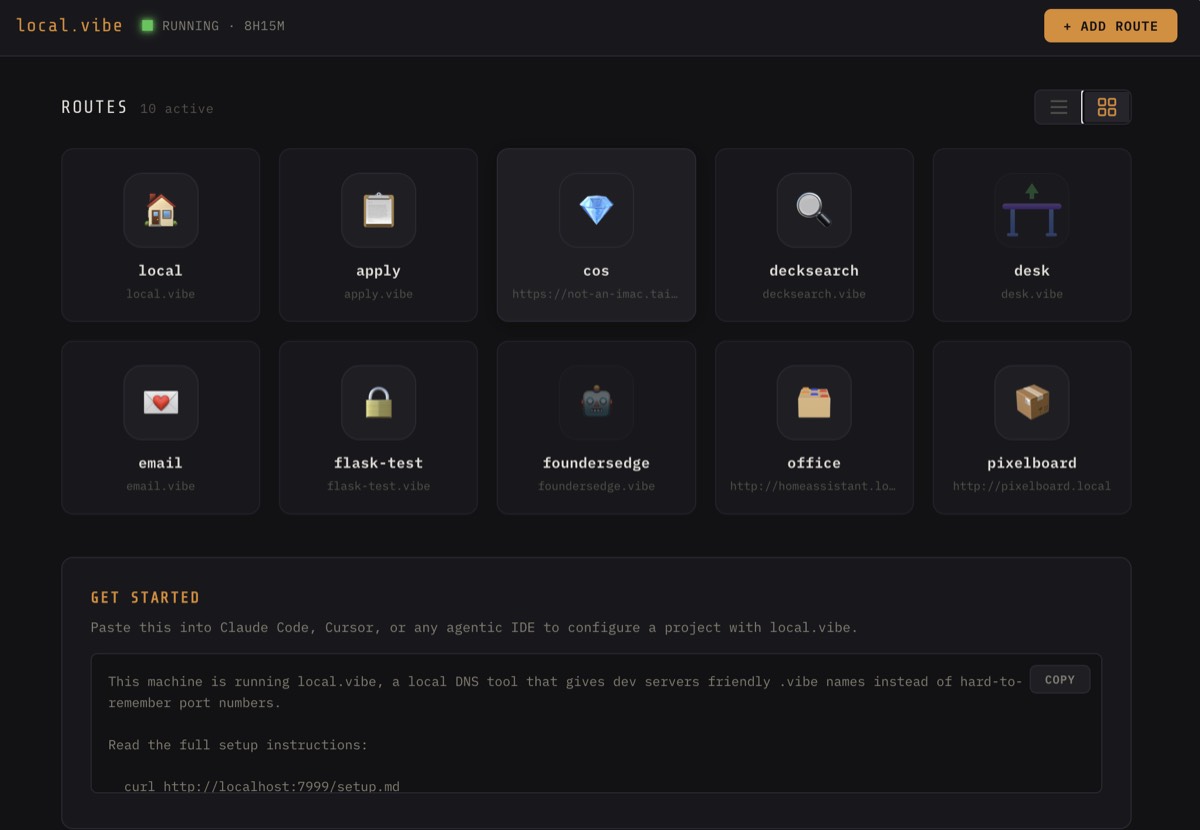

Start, stop, edit, add an emoji icon. Switch between grid and list view.
Bookmarks work too. `tailscale.vibe` can redirect to your Tailscale machine. `hass.vibe` can proxy to your Home Assistant. Anything you’d type into a browser tab can become a `.vibe` name.
Why a single binary[](https://gregraiz.com/blog/local-vibe/#why-a-single-binary)
It’s built in Go. Local.vibe is a single binary. One `setup.sh`, and it installs dnsmasq, a pf port-forwarding rule, and the local CA. After that, it’s just running.
The whole thing communicates over a Unix socket acting as a reverse proxy. No external services, no accounts, no telemetry.
The agent angle[](https://gregraiz.com/blog/local-vibe/#the-agent-angle)
One thing I didn’t expect to be useful but actually is: the setup guide endpoint.
``` 1 curl http://localhost:7999/setup.md ```
Paste that into Claude Code or Cursor and the agent understands your local.vibe setup. It can register new routes, check what’s running, start and stop apps via the HTTP API. That turned out to be a genuinely useful integration to get projects onboarded quickly.
Try it[](https://gregraiz.com/blog/local-vibe/#try-it)
``` 1 2 3 git clone https://github.com/graiz/local.vibe.git cd local.vibe ./setup.sh ```
It’s open source, macOS only for now, MIT licensed. If you’re drowning in port numbers, give it a spin. I’d love to know what breaks, what’s missing, and whether the setup holds up on machines that aren’t mine. Drop a comment below or open an issue on GitHub.