Curier: your inbox, as a feed
Curier is a small, open-source email client for macOS. It groups newsletters and subscriptions into feeds you can skim like a timeline, and keeps everything on your machine.
Apple Silicon. MIT licensed. Gmail today, Outlook in progress.
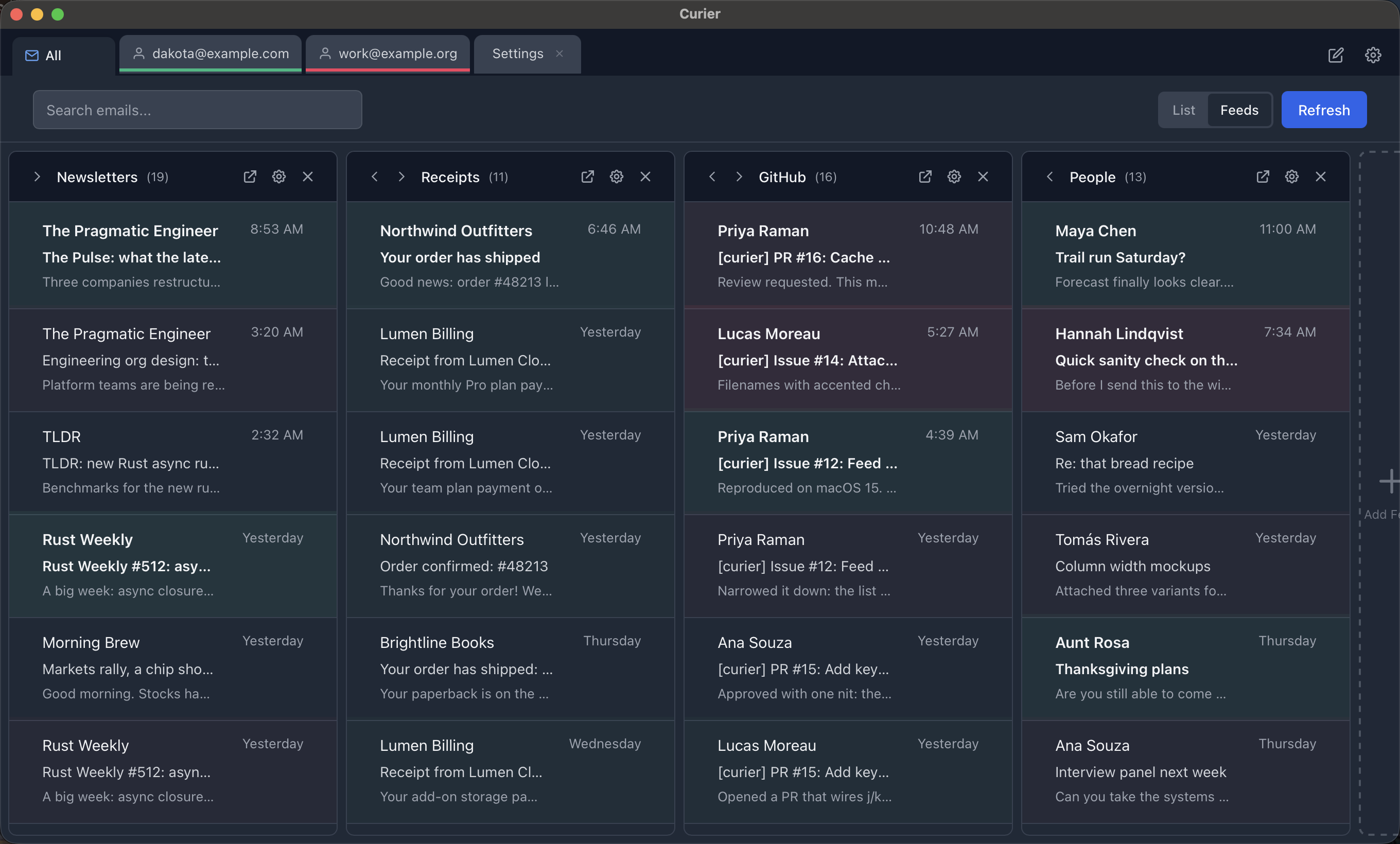
The feeds view, shown with Curier's built-in demo data.
**What this is.** A personal tool, built almost entirely with AI coding agents, that the author uses every day to read mail. It has rough edges and it is not trying to replace a full mail client. If you want a lightweight way to parse your inbox in something other than a chronological pile, it might be for you.
What it does
A short list, on purpose.
Feeds
Build feeds from rules like sender, subject, or tag. Newsletters and receipts land in their own columns instead of burying the mail that matters.
Tabs
Accounts, feeds, messages, and drafts open as tabs. Each tab carries its account color so you always know which inbox you are in.
Rules and tags
Tag messages by hand or let rules do it on sync. Feeds are built from tags, so the sorting you set up once keeps working.
Search and offline cache
Messages are cached in a local SQLite database, so search is instant and the app still opens when the network does not.
Dark mode
Follows the system theme. Email content renders on its own card so dark text stays readable whatever the message assumes.
Safe rendering
HTML mail is sanitized in Rust and shown in a sandboxed frame. Remote images and tracking pixels stay blocked until you choose to load them.
Your mail stays yours
There is no Curier server. Nothing about your account or your messages leaves your Mac except the requests the app makes directly to your mail provider.
Your own OAuth app
You create a Google Cloud project and Curier talks to Gmail with your credentials, over OAuth with PKCE. It asks for read and send permission only, never the ability to delete or modify your mailbox.
Keychain for secrets
Client credentials and tokens live in the macOS Keychain. Nothing secret is written to a plain file.
Local cache, local rules
The message cache, your tags, and your feed rules are files on your disk. Delete the app's data folder and they are gone.
Readable source
Everything, including the security notes and the test suite, is in the repository under the MIT license.
Install
Builds are not notarized, so macOS will call the app damaged on first launch. It is not; the quarantine flag just needs clearing.
1. Download the latest `.dmg` from the releases page and drag Curier into Applications. 2. Clear the quarantine flag once: `xattr -dr com.apple.quarantine /Applications/Curier.app` 3. Create Google OAuth credentials by following the Gmail setup guide, then add your account inside Curier.
Prefer to build it yourself? Clone the repo and run `npm install` then `npm run tauri build`. You will need Node and Rust.
Questions you will probably have
The honest answers, so you can decide whether this is for you before downloading anything.
Why do I have to create my own Google OAuth credentials?
Reading Gmail is a restricted scope. For Google to let one shared app do it, the developer has to pass a paid third-party security assessment every year. There is no budget for that, so instead you create a free Google Cloud project, which gives you a client ID that only your copy of Curier uses. It takes about ten minutes with the setup guide, and it means no one but you ever holds a credential to your mailbox.
Why does macOS say the app is damaged?
Builds are signed ad hoc but not notarized, which needs a paid Apple developer account. Gatekeeper reports un-notarized downloads as damaged. The app is fine; the install step clears the quarantine flag once and it opens normally after that. If you would rather not trust a binary, build it from source.
How much memory does it really use?
The Rust process is small, but the window is a native WebView that behaves like a browser tab, so expect the whole thing to sit somewhere around 100 to 200 MB depending on how many tabs are open. Lighter than most Electron mail clients, not magic.
What leaves my Mac?
Only the requests Curier makes directly to Gmail on your behalf. There is no Curier server, no telemetry, no crash reporting, and no update check. Remote images in HTML email are blocked by default.
Was this code written by AI?
Yes, nearly all of it, directed by a developer who uses the app daily. Before release it was given a unit test suite covering the Rust and TypeScript sides and a security review whose findings were fixed. The README foreword explains the project's origin and what it is and is not trying to be.
Does it work with Outlook, iCloud, or IMAP?
Gmail only right now. Microsoft 365 support is partly built and not finished. Plain IMAP is not on the roadmap.
Is it maintained?
It is used every day, so bugs that affect daily use get fixed. There is no release schedule and no promise of support. Issues and pull requests are read, and correct fixes get merged.