AnalystAIPack: Giving an AI Agent a Malware Analyst's Working Knowledge
Ask a general-purpose AI agent to analyze a suspicious executable and you get confident-sounding mush. It will happily tell you to “check the file for anything malicious,” suggest a plugin that does not exist, or skip the one step that actually matters. The model knows a lot _about_ malware analysis. What it lacks is the analyst’s working knowledge: which Volatility 3 plugin to run on a memory image, how to reach a packer’s original entry point, how to turn a recovered C2 config into a Sigma rule, and, just as important, when _not_ to trust a result.
That gap is what I built **AnalystAIPack** to close. It is an open, Apache-2.0 library of **118 agent skills** for malware analysis, reverse engineering, and threat hunting, and it is now public on GitHub.
What It Is
AnalystAIPack is a library of ready-to-load skills in the agentskills.io`SKILL.md` format, so it drops straight into GitHub Copilot, Claude Code, Cursor, Codex CLI, Gemini CLI, or any compatible agent. It is deliberately **depth-first**: instead of a sprawling catalog that touches everything shallowly, it covers four tightly-scoped subdomains that map to how an analyst actually works.
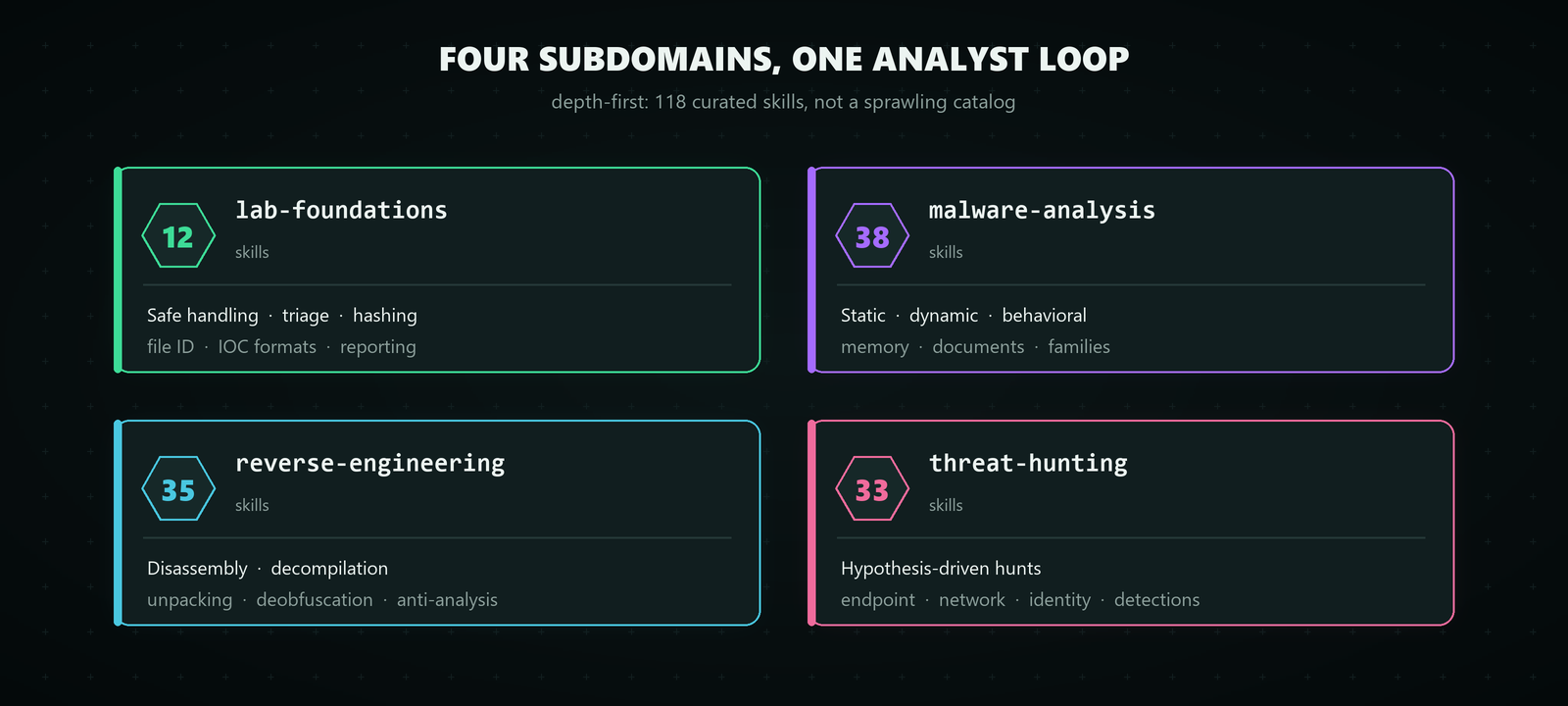
_The library is split into four tightly-scoped subdomains, 118 curated skills in total, arranged around the real analyst workflow._
| Subdomain | What it covers | | --- | --- | | `lab-foundations` | Safe handling, lab setup, triage, hashing, file ID, IOC formats, reporting | | `malware-analysis` | Static, dynamic, behavioral, and memory analysis; document and script malware; families | | `reverse-engineering` | Disassembly and decompilation, unpacking, deobfuscation, anti-analysis defeat, language-specific RE | | `threat-hunting` | Hypothesis-driven hunts, endpoint, network and identity telemetry, detection engineering |
Three things separate it from a folder full of prompts.
**Every skill is runnable.** All 118 skills ship a tested `scripts/analyst.py` that performs the analysis, not just a description of it. They lean on the Python standard library, degrade gracefully when an optional dependency is missing, and are covered by a repo-wide smoke-test harness and CI gates. The tooling actually works, it does not just read well.
**Safe by construction.** The scripts perform static, read-only analysis and **never execute the sample**. IOCs come out defanged (`hxxp://`, `1[.]2[.]3[.]4`), and every sample-handling skill carries an explicit `Safety & Handling` section that assumes an isolated lab. The repository ships no live malware.
**A defender’s framework lens.** Skills map to **MITRE ATT&CK**, **MITRE D3FEND**, and, for hunts, **MITRE CAR**, chosen because they fit reverse engineering, malware analysis, and threat hunting far better than compliance checklists. That mapping lets an agent report coverage and slot findings into detection engineering.
Every skill follows the same body contract, _When to Use_ (with an explicit **Do not use**), _Workflow_, _Validation_, and _Pitfalls_, so the agent always knows the boundaries of a technique instead of applying it blindly.
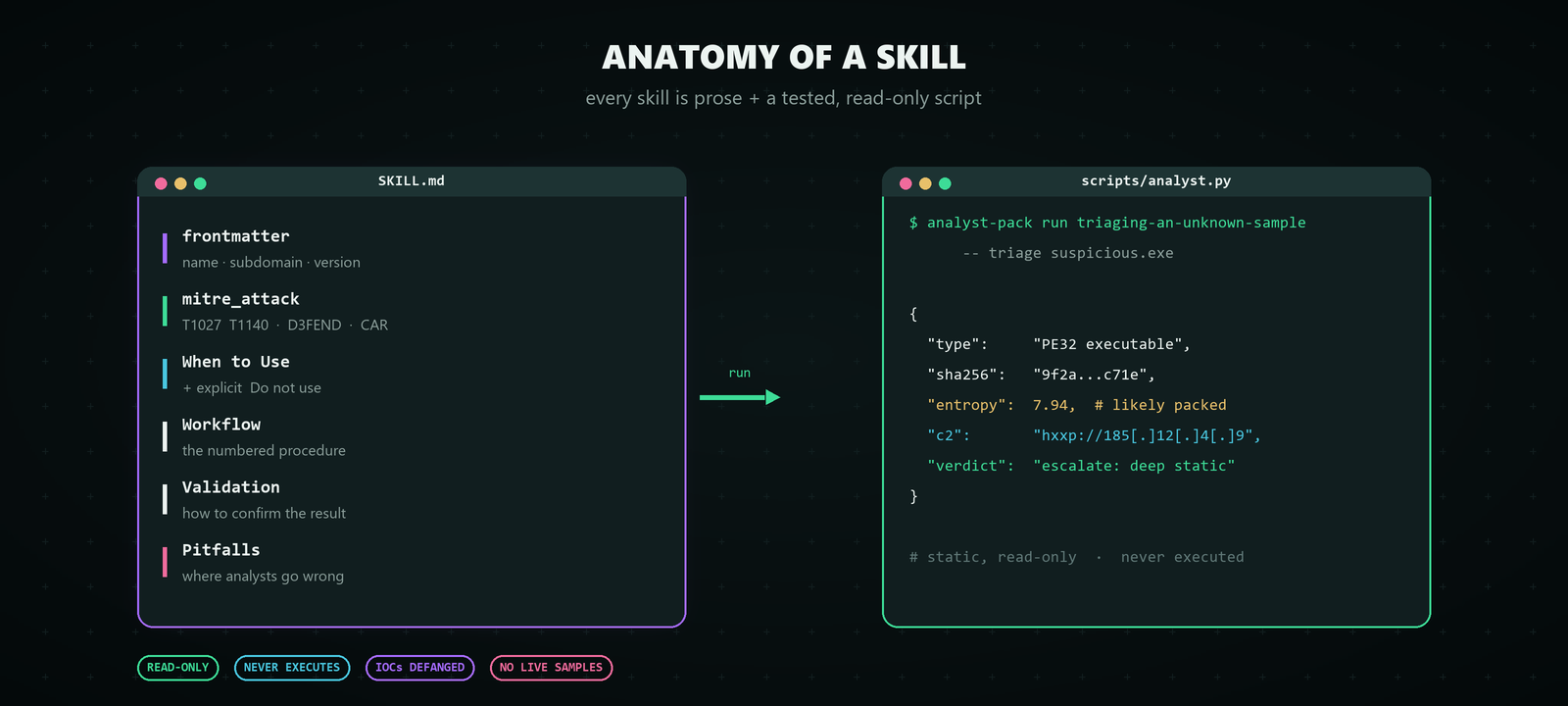
_Each skill pairs an opinionated `SKILL.md` procedure with a tested, read-only `analyst.py` that prints structured, defanged JSON._
A Worked Example: From Sample to Detection
The point of a depth-first library is that the skills chain. Each one is a step, and strung together they cover the full analyst loop. Here is what triaging a suspicious executable looks like end to end:
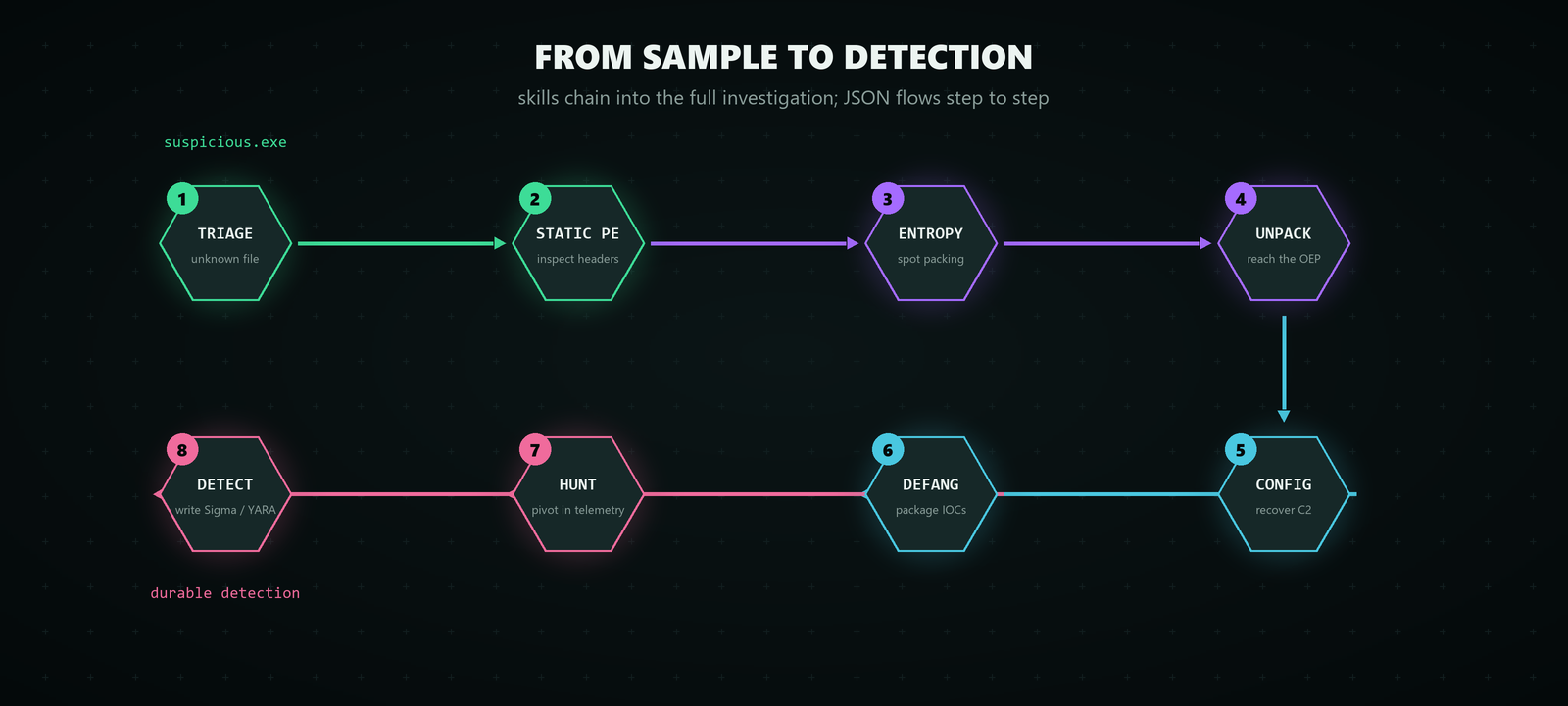
_Eight skills, chained: from an unknown `suspicious.exe` through to a durable detection, with each script’s JSON feeding the next._
| # | Stage | Skill | | --- | --- | --- | | 1 | Triage the unknown file | `triaging-an-unknown-sample` | | 2 | Static PE inspection | `performing-static-pe-analysis` | | 3 | Spot packing via entropy | `measuring-section-entropy-to-detect-packing` | | 4 | Unpack to the OEP | `manually-unpacking-a-packed-binary` | | 5 | Recover the C2 config | `extracting-cobalt-strike-beacon-config` | | 6 | Defang and package IOCs | `defanging-and-sharing-iocs` | | 7 | Hunt the IOCs in traffic | `hunting-cobalt-strike-traffic` | | 8 | Write a durable detection | `writing-sigma-detection-rules` |
Driven from the CLI, the mechanical steps are just:
```
1. Triage, then 5. recover the beacon config (read-only, never executes the sample)
python tools/analyst-pack.py run triaging-an-unknown-sample -- triage suspicious.exe python tools/analyst-pack.py run extracting-cobalt-strike-beacon-config -- parse beacon.bin
7. Hunt the recovered indicators in proxy/Zeek logs, 8. emit a Sigma rule
python tools/analyst-pack.py run hunting-cobalt-strike-traffic -- hunt http.csv ```
Every script prints structured, defanged JSON, so the output of one step feeds straight into the next, into a report, or into a SIEM. The investigation flows the way a real one does: triage, static analysis, unpack and reverse, extract config and IOCs, defang, hunt across telemetry, then write a detection.
How to Use It
The whole library sits behind a single front door, the `analyst-pack` CLI:
``` python tools/analyst-pack.py list --subdomain threat-hunting # browse skills python tools/analyst-pack.py search kerberos # full-text search python tools/analyst-pack.py show hunting-lolbin-abuse-on-windows python tools/analyst-pack.py run identifying-cryptographic-routines-in-binaries -- scan a.bin ```
With **GitHub Copilot** it is even simpler. Open the repository in VS Code and Copilot Chat automatically reads the bundled `copilot-instructions.md`, so it already knows the skills exist and how to run them safely. In Agent mode you just ask in plain language:
- _“Hunt for LOLBin abuse in events.csv”_ chains into `hunting-lolbin-abuse-on-windows`
- _“Triage this unknown file and pull IOCs”_ chains triage into IOC extraction
Or point it at a specific skill and let it drive:
``` #file:skills/extracting-cobalt-strike-beacon-config/SKILL.md Use this skill to analyze beacon.bin ```
The scripts are plain Python, so nothing beyond your existing agent is required. To get started from scratch, clone the repo and point your agent at it:
``` git clone https://github.com/meltedinhex/analyst-ai-pack.git cd analyst-ai-pack ```
AI agents should read `AGENTS.md` first, it explains how to find, run, and safely chain skills.
A Note on Safety
These skills describe real malicious-code techniques, so safety is built in rather than bolted on. Sample-handling skills assume an isolated analysis lab and document safe handling, encrypted storage, and IOC defanging. The scripts stay static and read-only, and the project ships **no live malware samples**. The goal is to give an agent an analyst’s judgment, including the discipline about what not to do.
Try It
AnalystAIPack is open source under Apache-2.0 and public now:
- **Repository:**github.com/meltedinhex/analyst-ai-pack
- **Browse every skill:**CATALOG.md
- **ATT&CK coverage:**mappings/
If it saves you time, a star helps others find it. The best thing you can do, though, is try it on a real sample and tell me where it breaks, that is exactly the feedback that improves the library. If a skill misses a case you hit in the field, open an issue or a pull request, the contributing guide covers the authoring checklist and the originality rules that keep the content genuinely its own.
This is a personal, independent project, maintained in a personal capacity and not affiliated with or endorsed by any employer.