MP4 to Transcript - Convert MP4 to Text Online
MP4Transcript
Convert MP4 to transcript online with timestamps, detected language, and speaker labels when available. Export TXT, SRT, or VTT after review.
15 free minutes after sign-in TXT, SRT, VTT Timestamped text
Upload MP4 to start
MP4, MOV, MP3, M4A, and WAV. Your first 15 minutes are free.
Private upload. Source files and results are deleted after 72 hours.
Upload your file
Choose a supported video or audio file. We validate its duration before any credits are used.
Review the transcript
Follow progress while the file is transcribed, then review text organized with timestamps and speaker labels when available.
Export what you need
Copy the transcript or download clean TXT, SRT, and VTT files before the 72-hour retention window ends.
How it works
How to transcribe MP4 to text
The MP4 to transcript workflow starts with the file you already have. Upload it, review the timestamped text, then export the format your workflow needs. The upload tool validates supported files and duration before credits are reserved.
1. 01
Upload your MP4
Choose an MP4, MOV, MP3, M4A, or WAV file from your device.
2. 02
Review the transcript
Read the generated text organized with timestamps and correct anything that needs attention.
3. 03
Export what you need
Copy the text or download a clean TXT, SRT, or VTT file.
Built for the result
More than an MP4 to text converter — timestamped transcripts for video and audio
A transcript is useful when you can review it, reuse it, and send it to the next step of your work. MP4Transcript keeps that path simple from upload to export. Automatic language detection helps identify the spoken language, while speaker labels are shown when the transcription result provides them.
Editable transcripts with timestamps
Read text in context and use timestamps to return to the relevant moment in the file.
Speaker labels when available
Use timestamped text and available speaker labels to review interviews, meetings, lessons, and recordings with multiple participants.
Subtitle-ready exports
Create caption files without extracting audio first. Export SRT or VTT when subtitles are the next task.
Text you can reuse
Download TXT for notes, research, drafts, searchable archives, and any workflow that starts with clean text.
Export formats
MP4 to transcript export formats for the next step
Choose TXT when you need clean, editable text for notes, research, and drafts. Choose SRT or VTT when the MP4 to transcript needs to become timed captions for a video player. One upload can produce the output that fits the next job without extracting audio first.
Review before reuse
What an MP4 to transcript result looks like
A useful MP4 transcript keeps the words in context. Timestamps make it easier to find a moment again, and speaker labels can make a conversation easier to scan. Copy the text after review or use an export when you need captions.
AI transcription quality depends on the recording. Clear speech generally produces the best result; strong accents, background noise, crosstalk, names, and technical terms can need a manual check. This is why the MP4 to transcript result is presented for review before you reuse it.
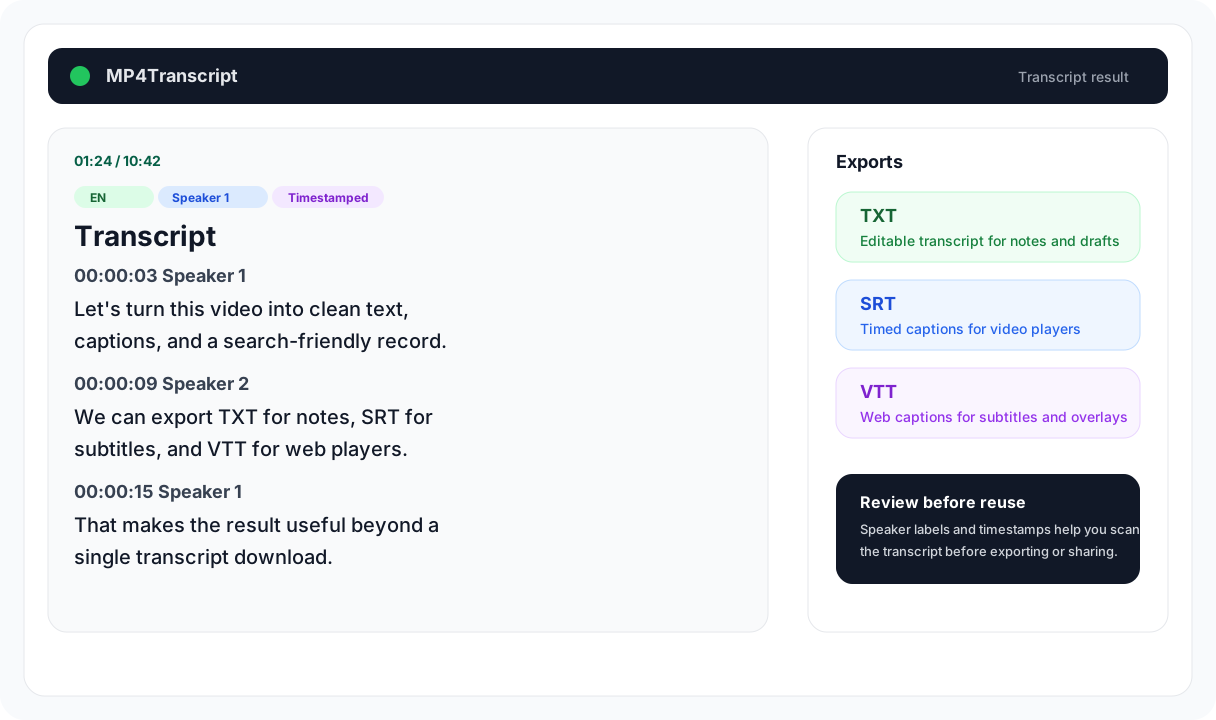
A completed transcript keeps the spoken text, timestamps, and export options together in one place.
Privacy and limits
Private MP4 to transcript processing with clear limits
Files are processed to create the transcript you requested and are automatically deleted after 72 hours. You can also delete a transcription before it expires. Your source file and results are not public listings.
Private by default
Files and exports are not public listings.
72-hour retention
Original files, transcript data, and exports expire automatically.
Up to 4 hours
A single file can be transcribed up to the current duration limit.
Up to 1 GB
Upload a file within the current single-file size limit.
Straightforward pricing
Start an MP4 to transcript with free minutes
Sign in to use your first 15 free transcription minutes. After that, purchase one-time minute packs when you need them instead of committing to a subscription. One credit equals one minute of transcription, and the upload flow shows the required credits before processing starts.
If a transcription fails, its reserved credits are returned. If a completed file is shorter than the initial estimate, unused reserved credits are returned automatically.
15 free minutes
Available to new accounts after sign-in.
One-time minute packs
Buy transcription minutes as needed; no recurring plan is required.
Credits protected on failure
Reserved credits are returned when a transcription fails.
Made for real files
Use MP4 to transcript for work you can search, share, and caption
Turn a creator video into captions and a draft description, make a course or lecture searchable, review an interview, preserve research notes, or prepare accessible subtitles. The same MP4 to transcript workflow works on a phone or desktop: choose a file, upload it, follow progress, review the result, copy text, or download an export.
Creators and captions
Create a transcript to review spoken content and export subtitle-ready files.
Courses and interviews
Make lessons, recordings, and conversations easier to search and quote.
Mobile-friendly workflow
Choose a file, upload it, view the result, copy text, and download exports from a mobile browser.
Questions
MP4 to transcript FAQ
Clear answers before you upload a file.
How do I convert an MP4 to a transcript? Upload the MP4, wait for transcription to finish, review the timestamped text, then copy it or export TXT, SRT, or VTT.
Can I transcribe an MP4 for free? New accounts receive 15 free transcription minutes after sign-in. One-time minute packs are available when you need more transcription time. View pricing at /pricing to purchase more credits.
What file types can I upload? MP4, MOV, MP3, M4A, and WAV files are supported. The upload tool checks the file before credits are used.
Can I export subtitles from an MP4? Yes. Download SRT or VTT after transcription when you need timed subtitle files, or use TXT for clean editable text.
Are uploaded MP4 files private? Files are stored privately for processing and are automatically deleted after 72 hours. You can delete a transcription earlier from the product.
What happens if my MP4 transcription fails? The product returns reserved credits when a transcription fails, so you can retry the file without losing those credits.