Investigating Linux graphics - Thomas Leonard's blog
I learn how to draw a triangle with a GPU, and then trace the code to find out how the graphics system works (or doesn't), looking at Mesa3D, GLFW, OpenGL, Vulkan, Wayland and Linux DRM.
**Table of Contents**
- Overview
- OpenGL
- Vulkan
- Removing Vulkan's Wayland extension
- Kernel details with bpftrace
- Start-up and library loading
Introduction
In the past, I've avoided graphics driver problems on Linux by using only Intel integrated graphics. But, due to a poor choice of motherboard, I ended up needing a separate graphics card. Now my computer takes 14s to resume from suspend and `dmesg` is spewing this kind of thing:
``` [59829.886009] [drm] Fence fallback timer expired on ring sdma0 [59830.390003] [drm] Fence fallback timer expired on ring sdma0 [59830.894002] [drm] Fence fallback timer expired on ring sdma0
[79622.739495] amdgpu 0000:01:00.0: [drm:amdgpu_ring_test_helper [amdgpu]] *ERROR* ring comp_1.0.1 test failed (-110) [79622.909019] amdgpu 0000:01:00.0: [drm:amdgpu_ring_test_helper [amdgpu]] *ERROR* ring comp_1.0.2 test failed (-110) [79623.075056] amdgpu 0000:01:00.0: [drm:amdgpu_ring_test_helper [amdgpu]] *ERROR* ring comp_1.0.3 test failed (-110) [79623.241971] amdgpu 0000:01:00.0: [drm:amdgpu_ring_test_helper [amdgpu]] *ERROR* ring comp_1.0.4 test failed (-110) [79623.408604] amdgpu 0000:01:00.0: [drm:amdgpu_ring_test_helper [amdgpu]] *ERROR* ring comp_1.0.6 test failed (-110)
[80202.893020] [drm] scheduler comp_1.0.1 is not ready, skipping [80202.893023] [drm] scheduler comp_1.0.2 is not ready, skipping [80202.893024] [drm] scheduler comp_1.0.3 is not ready, skipping [80202.893025] [drm] scheduler comp_1.0.4 is not ready, skipping [80202.893025] [drm] scheduler comp_1.0.6 is not ready, skipping [80202.936910] [drm] scheduler comp_1.0.1 is not ready, skipping ```
But what is a "fence" or an "sdma0" ring? What are these `comp_` schedulers, and why does Linux Oops when enough of them aren't ready? And why does Firefox hang when playing videos since upgrading NixOS? I thought it was time I learnt something about how Linux graphics is supposed to work...
Overview
To show something on the screen, we allocate a chunk of memory (called a _framebuffer_) to hold the colour of each pixel. After calculating all the (millions of) colour values, we tell the _display hardware_ the address of the framebuffer and it sends all the values to the monitor for display. While it's doing this, we can be rendering the next frame to another framebuffer.
Computers aren't well optimised for this kind of work, but a _graphics card_ speeds things up. A graphics card is like a second computer, with its own memory, processors and display hardware, but optimised for graphics:
The main computer (host) Typically has a _small number_ of _very fast_ processors. A graphics card Has a _large number_ of _relatively slow_ processors.
The graphics card architecture is useful because we can split the screen into many small tiles and render them in parallel on different processors. Running the processors relatively slowly saves energy (and heat), allowing us to have more of them.
Note: a GPU (Graphics Processing Unit) doesn't have to be on a separate card; it can also be part of the main computer and use the main memory instead of dedicated RAM.
Usually we run multiple applications and have them share the screen. Ideally, each application (e.g. Firefox) runs code on the GPU to render its window contents to GPU memory (1), then shares the reference to that memory with the _display server_ (2). The display server (Sway in my case) runs more code on the GPU (3) to copy this window into the final image (4), which the hardware sends to the screen (5):
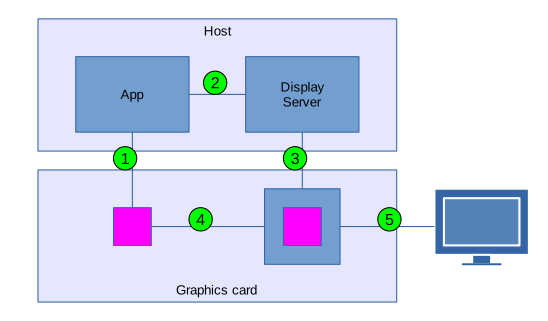

Application processes send instructions to the GPU via a Linux kernel driver (`amdgpu` in my case). Every GPU has its own API, and these are very low-level, so applications generally use the Mesa library to provide an API that works across all devices. Mesa has backends for all the different GPUs, and also a software-rendering fallback if there isn't a GPU available.
The Linux graphics stack in a nutshell has more explanations, but I wanted to try it out myself...
OpenGL
Mesa supports OpenGL, a cross-platform standard API for graphics. However, you also need some platform-specific code to open a window and connect up a suitable backend. After a bit of searching I found GLFW (Graphics Library FrameWork), which has a nice tutorial showing how to draw a triangle into a window.
That worked, and I got a window with a colourful rotating triangle, animating smoothly even fullscreen, while showing no CPU load (use `LIBGL_ALWAYS_SOFTWARE=true` to compare with software rendering):
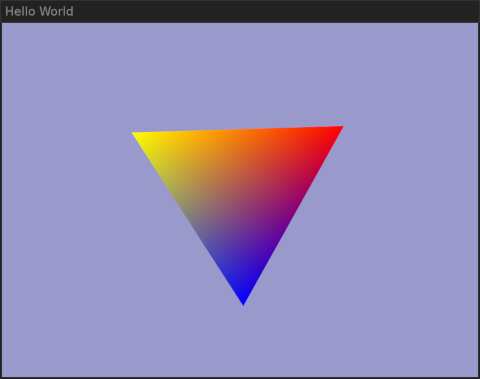

It starts by setting everything up:
1. Create a window (`window = glfwCreateWindow(640, 480, ...)`) 2. Make it the OpenGL target (`glfwMakeContextCurrent(window)`) 3. Create a buffer for the triangle's vertices and send it to the graphics card. 4. Compile vertex and fragment "shaders" for the graphics card.
Programs that run on the GPU are called "shaders" (whether they do shading or not). They're written in a C-like language and embedded in the example's C source code as strings.
The vertex shader runs for each of the triangle's 3 vertices, rotating them according to an input parameter. The fragment shader then runs for each screen pixel covered by the rotated triangle, choosing its colour. This is basically just the identity function, because OpenGL automatically interpolates the colours of the three vertices and passes that as an input to the fragment shader.
The example then runs the main loop, rendering each frame:
1. Set the OpenGL viewport to the size of the window. 2. Clear to the background colour. 3. Set the vertex shader input to the desired rotation. 4. Draw the triangle, using the shaders. 5. Make the final image be the one displayed (`glfwSwapBuffers(window)`).
Mesa offers several other APIs as alternatives to OpenGL. OpenGL ES (OpenGL for Embedded Systems) is mostly a subset of OpenGL, though with some minor improvements of its own. But I was particularly interested in Vulkan...
Vulkan
Vulkan describes itself as "a low-level API that removes many of the abstractions found in previous generation graphics APIs". For example, each OpenGL driver includes a compiler for the shader language, but in Vulkan you compile the shader sources to SPIR-V bytecode with an external tool, then just pass the bytecode to the driver. So, a Vulkan driver should be simpler and easier to understand.
The Vulkan tutorial warns that "the price you pay for these benefits is that you have to work with a significantly more verbose API". Indeed; while the OpenGL triangle example is 171 lines of C, Vulkan's triangle example is 900 lines of C++!
But this is just what I want; a detailed break-down of the different steps. There are a lot of objects you need to create and I ended up making a diagram to keep them straight:


Here are the set-up steps:
- As before, we start by creating a normal Wayland window.
- Make a Vulkan _instance_, requesting the Wayland-support extension.
- Use the instance and the window to create a Vulkan _surface_.
- Use the instance to get a list of the _physical devices_. In my case, this finds two devices: `AMD Radeon RX 550 Series` and `llvmpipe` (software rendering). Oddly, my Intel integrated GPU doesn't show up here.
[Update: in the BIOS settings, "Internal Graphics" was set to "Auto", which disabled it]
- Create a _device_ for the physical device you want to use. Each device can have queues of various "families", and we need to say how many queues we want of each type. We need to choose a device supporting queues that can a) render graphics, and b) present the rendered image on our Wayland surface. My AMD GPU supports three queue families, of which two can present to the surface and one can render graphics. I chose to use two queues, though I could have used one for both on my card.
- Create a _render pass_ with metadata about what the rendering will do. In the tutorial example, this says that rendering will clear the framebuffer, and that it depends on getting an image to draw on.
- Create the _shaders_ by loading the pre-compiled SPIR-V bytecode.
- Create a _graphics pipeline_ to implement the render pass using the shaders.
- Create a _swap chain_ for the device and surface. The swap chain creates a number of _images_ which can be rendered to and displayed.
- Wrap each image from the swap chain in an _image view_, which gives the format of the data.
- Wrap each image view with a _framebuffer_ for the _render pass_.
- Create a _command pool_ to manage command buffers.
- Get a _command buffer_ from the pool.
Now we're ready for the main loop:
- Get the next _image_ from the _swap chain_ (asking Vulkan to notify a _semaphore_ when the image is ready to be overwritten).
- Record the operations we want to perform to the _command buffer_:
1. Clear the image's _framebuffer_ to the background colour. 2. Set the pipeline input's viewport to the current window size. 3. Use the _graphics pipeline_ to render the scene (a single triangle in this case).
- Enqueue the _command buffer_ to the device's _graphics queue_. We pass it the semaphore to wait on (as required by the _render pass_), another semaphore to signal when it's done, and a _fence_ to signal the host that the command buffer can be reused. A "fence" turns out to be just a semaphore shared with the host (whereas Vulkan uses "semaphore" to mean one used to signal within the GPU).
- Enqueue a presentation of the _image_ to the device's _present queue_, asking it to present the image (using the display server) when the rendering semaphore is notified.
Well, that was a lot more work! And animating the triangle required quite a bit more effort on top of that. But I think I have a better understanding of how things work than with OpenGL, and I suspect this will be easier to trace.
The `vulkaninfo` command will dump out pages of information about detected GPUs. Some highlights from mine:
``` Instance Extensions: count = 24 VK_KHR_wayland_surface : extension revision 6 VK_KHR_xcb_surface : extension revision 6 VK_KHR_xlib_surface : extension revision 6 GPU id : 0 (AMD Radeon RX 550 Series (RADV POLARIS11)) [VK_KHR_wayland_surface]: VkSurfaceCapabilitiesKHR: minImageCount = 4 VkQueueFamilyProperties: queueProperties[0]: queueFlags = QUEUE_GRAPHICS_BIT | QUEUE_COMPUTE_BIT | QUEUE_TRANSFER_BIT queueProperties[1]: queueFlags = QUEUE_COMPUTE_BIT | QUEUE_TRANSFER_BIT queueProperties[2]: queueFlags = QUEUE_SPARSE_BINDING_BIT GPU id : 1 (llvmpipe (LLVM 19.1.7, 256 bits)) [VK_KHR_wayland_surface]: ```
One interesting feature of Vulkan is that you can enable "validation layers", which check that you're using the API correctly during development, but can be turned off for better performance in production. That showed, for example, that the synchronisation in the tutorial isn't quite right (see Swapchain Semaphore Reuse for details; the tutorial uses only one `renderFinishedSemaphore`, not one per framebuffer).
Synchronisation
One interesting thing here is that the swap chain sends the image to the compositor (display server) without waiting for rendering to finish. How does that work?
There are two ways to make sure the compositor doesn't try to use the image before rendering is complete: _implicit_ or _explicit_ synchronisation. With implicit synchronisation, the Linux kernel keeps track of which GPU jobs are accessing which buffers. So when we submit a job to render our triangle, the kernel attaches the job's completion fence to the output buffer. When the compositor (Sway in my case) submits a GPU job to copy the image, the kernel waits for the fence first.
This apparently has various problems. For example, the compositor might prefer to use the previous already-complete frame rather than waiting for this one. There is an explicit synchronisation Wayland protocol to fix that, but my version of Sway doesn't support it.
For more details, see Bridging the synchronization gap on Linux and Explicit sync.
First attempt at tracing
How does the rendered image get from the test application to the Wayland compositor (display server)? I ran with `WAYLAND_DEBUG=1` to log all the messages sent and received by the tutorial application:
``` $ WAYLAND_DEBUG=1 ./vulkan-test {Default Queue} -> wl_display#1.get_registry(new id wl_registry#2) {Default Queue} -> wl_display#1.sync(new id wl_callback#3) {Display Queue} wl_display#1.delete_id(3) ... ```
But the output was confusing, and `strace` showed that the test application is connecting 4 times to the display server:
``` $ strace -e connect ./vulkan-test 2>&1 | grep /wayland connect(3, {sa_family=AF_UNIX, sun_path="/run/user/1000/wayland-1"}, 27) = 0 connect(5, {sa_family=AF_UNIX, sun_path="/run/user/1000/wayland-1"}, 27) = 0 connect(23, {sa_family=AF_UNIX, sun_path="/run/user/1000/wayland-1"}, 27) = 0 connect(23, {sa_family=AF_UNIX, sun_path="/run/user/1000/wayland-1"}, 27) = 0 ```
Further complicating things, the example is using 6 Wayland queues:
``` $ WAYLAND_DEBUG=1 ./vulkan-test 2>&1 | sed -n 's/.*\({[^}]*}\).*/\1/p' | sort | uniq -c 618 {Default Queue} 135 {Display Queue} 288 {mesa formats query} 72 {mesa image count query} 144 {mesa present modes query} 385 {mesa vk display queue} ```
In total the test application asks Sway for the list of supported extensions (protocols) 14 times! It binds the same extensions (and calls `zwp_linux_dmabuf_v1.get_default_feedback`) over and over again:
``` $ WAYLAND_DEBUG=1 ./vulkan-test 2>&1 | grep get_registry {Default Queue} -> wl_display#1.get_registry(new id wl_registry#2) {Default Queue} -> wl_display#1.get_registry(new id wl_registry#3) {Default Queue} -> wl_display#1.get_registry(new id wl_registry#21) {Default Queue} -> wl_display#1.get_registry(new id wl_registry#2) {Default Queue} -> wl_display#1.get_registry(new id wl_registry#2) {Default Queue} -> wl_display#1.get_registry(new id wl_registry#2) {mesa image count query} -> wl_display#1.get_registry(new id wl_registry#52) {mesa formats query} -> wl_display#1.get_registry(new id wl_registry#51) {mesa formats query} -> wl_display#1.get_registry(new id wl_registry#50) {mesa present modes query} -> wl_display#1.get_registry(new id wl_registry#43) {mesa present modes query} -> wl_display#1.get_registry(new id wl_registry#44) {mesa formats query} -> wl_display#1.get_registry(new id wl_registry#46) {mesa formats query} -> wl_display#1.get_registry(new id wl_registry#48) {mesa vk display queue} -> wl_display#1.get_registry(new id wl_registry#42) ```
What a mess!
There's too much going on here. GLFW is pulling in support for Wayland and X11, OpenGL and Vulkan, plus keyboard and pointer support. It's also using 11 CPU threads!
Removing GLFW
I removed the GLFW library and replaced it with a minimal Wayland skeleton (from wayland-book.com). The main integration point between Wayland and Vulkan is the `VkSurfaceKHR`, which was previously created by GLFW. I just had to replace `glfwCreateWindowSurface` with `vkCreateWaylandSurfaceKHR`. That takes the libwayland `wl_display` and `wl_surface` objects and stores them in a Vulkan surface struct.
`strace` says we're now making 3 Wayland connections rather than 4, using 5 threads rather than 11, and calling `get_registry` 11 times rather than 14. Still too much!
The noise is made worse because of the Vulkan API's need to call enumeration functions twice, once to find out how big the results array needs to be, and then a second time once you've allocated it. For example, this is how the tutorial suggests getting the devices:
1 2 3 4``` uint32_t deviceCount = 0; vkEnumeratePhysicalDevices(instance, &deviceCount, nullptr); std::vector<VkPhysicalDevice> devices(deviceCount); vkEnumeratePhysicalDevices(instance, &deviceCount, devices.data()); ```
Mesa makes a fresh connection to Wayland both times. It does this to ensure it lists the compositor's default device first, even though we don't care about that (we want to select a device to match our specific Wayland surface, not a generic fallback). This seems to be a hack for applications that always pick the first returned device.
Removing Vulkan's Wayland extension
To simplify things further, I removed `VK_KHR_wayland_surface` (which handles Wayland integration) from the instance extensions, and replaced the swapchain with my own code. This was actually quite difficult, and involved a fair bit of stepping through things with gdb to see how Mesa did it.
Oddly, the present queue doesn't seem to be needed at all. Some code-paths require blitting some data first, and I think the queue is just being used to wait for that, but the way I'm using it with Wayland doesn't need it.
I had to fight a bit with warnings from the validation layer (though it was displaying the triangle fine). For example, Mesa creates the images with `VK_EXTERNAL_MEMORY_HANDLE_TYPE_DMA_BUF_BIT_EXT`, which seems reasonable, but that triggers `VUID-VkImageCreateInfo-pNext-00990`. I'm now using `VK_EXTERNAL_MEMORY_HANDLE_TYPE_OPAQUE_FD_BIT` instead, which seems wrong but works and makes validation happy.
Even this simple version was still using 3 threads! Running under `gdb` with `break __clone3` showed that the Radeon driver's `radv_physical_device_try_create` function creates a couple of disk caches (both called `vulkan-:disk$0`), which create threads. For tracing purposes, having a cache just adds noise and confusion, so I set `MESA_SHADER_CACHE_DISABLE=1` in the code to disable it.
The final version uses a single thread, connects only once to the Wayland compositor, and calls `get_registry` only once. If you'd like to follow along, the code is at vulkan-test and you can run it like this:
``` git clone https://github.com/talex5/vulkan-test.git -b blog cd vulkan-test nix develop make && ./vulkan-test 200 ```
You should see a triangle sliding to the right. The `200` is the number of frames it will show before quitting.
Wayland walk-through
To run the test application with Wayland logging enabled:
``` $ make trace > wayland.log ```
The generated wayland.log shows all messages exchanged with Sway (my Wayland compositor), as well as some `printf` messages I added in the code.
The main function starts by creating a new Vulkan instance with some extensions:
1 2 3 4 5 6 7 8 9``` const char* instanceExtensions[] = { VK_KHR_GET_PHYSICAL_DEVICE_PROPERTIES_2_EXTENSION_NAME, // Get Unix device ID to compare with Wayland VK_KHR_EXTERNAL_MEMORY_CAPABILITIES_EXTENSION_NAME, // Share images over Wayland VK_KHR_EXTERNAL_SEMAPHORE_CAPABILITIES_EXTENSION_NAME, // Use Linux sync files }; VkInstance instance; ... LOG("Create instance with %d layers\n", createInfo.enabledLayerCount); vkCreateInstance(&createInfo, NULL, &instance) ```
You can uncomment the `//#define VALIDATION` if you want to enable the validation layer, but for tracing I've turned it off:
``` Create instance with 0 layers ```
Next, the test application connects to Wayland and requests the registry of supported extensions (protocols):
1 2 3 4 5``` state->display = wl_display_connect(NULL);
struct wl_registry *registry = wl_display_get_registry(state->display); wl_registry_add_listener(registry, ®istry_listener, state); wl_display_roundtrip(state->display); ```
The logs show Sway replying with lots of extensions. When we see one we want, we _bind_ a particular version of it:
``` -> wl_display#1.get_registry(new id wl_registry#2) -> wl_display#1.sync(new id wl_callback#3) wl_display#1.delete_id(3) wl_registry#2.global(1, "wl_shm", 2) wl_registry#2.global(2, "zwp_linux_dmabuf_v1", 4) -> wl_registry#2.bind(2, "zwp_linux_dmabuf_v1", 4, new id [unknown]#4) wl_registry#2.global(3, "wl_compositor", 6) -> wl_registry#2.bind(3, "wl_compositor", 4, new id [unknown]#5) wl_registry#2.global(4, "wl_subcompositor", 1) wl_registry#2.global(5, "wl_data_device_manager", 3) wl_registry#2.global(6, "zwlr_gamma_control_manager_v1", 1) wl_registry#2.global(7, "zxdg_output_manager_v1", 3) wl_registry#2.global(8, "ext_idle_notifier_v1", 1) wl_registry#2.global(9, "zwp_idle_inhibit_manager_v1", 1) wl_registry#2.global(10, "zwlr_layer_shell_v1", 4) wl_registry#2.global(11, "xdg_wm_base", 5) -> wl_registry#2.bind(11, "xdg_wm_base", 1, new id [unknown]#6) ```
Lines starting with `->` are messages sent by us to the compositor. For example, `-> wl_display#1.get_registry(new id wl_registry#2)` means we sent a `get_registry` request to object #1 (of type wl_display), asking it to create a new `wl_registry` object with ID #2.
We bind zwp_linux_dmabuf_v1 (for sharing GPU memory), wl_compositor (basic support for displaying things), and xdg_wm_base (creating desktop windows).
There are more extensions, but we don't care about them:
``` wl_registry#2.global(12, "zwp_tablet_manager_v2", 1) wl_registry#2.global(13, "org_kde_kwin_server_decoration_manager", 1) wl_registry#2.global(14, "zxdg_decoration_manager_v1", 1) wl_registry#2.global(15, "zwp_relative_pointer_manager_v1", 1) wl_registry#2.global(16, "zwp_pointer_constraints_v1", 1) wl_registry#2.global(17, "wp_presentation", 1) wl_registry#2.global(18, "wp_alpha_modifier_v1", 1) wl_registry#2.global(19, "zwlr_output_manager_v1", 4) wl_registry#2.global(20, "zwlr_output_power_manager_v1", 1) wl_registry#2.global(21, "zwp_input_method_manager_v2", 1) wl_registry#2.global(22, "zwp_text_input_manager_v3", 1) wl_registry#2.global(23, "ext_foreign_toplevel_list_v1", 1) wl_registry#2.global(24, "zwlr_foreign_toplevel_manager_v1", 3) wl_registry#2.global(25, "ext_session_lock_manager_v1", 1) wl_registry#2.global(26, "wp_drm_lease_device_v1", 1) wl_registry#2.global(27, "zwlr_export_dmabuf_manager_v1", 1) wl_registry#2.global(28, "zwlr_screencopy_manager_v1", 3) wl_registry#2.global(29, "zwlr_data_control_manager_v1", 2) wl_registry#2.global(30, "wp_security_context_manager_v1", 1) wl_registry#2.global(31, "wp_viewporter", 1) wl_registry#2.global(32, "wp_single_pixel_buffer_manager_v1", 1) wl_registry#2.global(33, "wp_content_type_manager_v1", 1) wl_registry#2.global(34, "wp_fractional_scale_manager_v1", 1) wl_registry#2.global(35, "wp_tearing_control_manager_v1", 1) wl_registry#2.global(36, "zxdg_exporter_v1", 1) wl_registry#2.global(37, "zxdg_importer_v1", 1) wl_registry#2.global(38, "zxdg_exporter_v2", 1) wl_registry#2.global(39, "zxdg_importer_v2", 1) wl_registry#2.global(40, "xdg_activation_v1", 1) wl_registry#2.global(41, "wp_cursor_shape_manager_v1", 1) wl_registry#2.global(42, "zwp_virtual_keyboard_manager_v1", 1) wl_registry#2.global(43, "zwlr_virtual_pointer_manager_v1", 2) wl_registry#2.global(44, "zwp_keyboard_shortcuts_inhibit_manager_v1", 1) wl_registry#2.global(45, "zwp_pointer_gestures_v1", 3) wl_registry#2.global(46, "ext_transient_seat_manager_v1", 1) wl_registry#2.global(47, "wl_seat", 9) wl_registry#2.global(48, "zwp_primary_selection_device_manager_v1", 1) wl_registry#2.global(50, "wl_output", 4) wl_callback#3.done(59067) ```
Mesa's own Wayland support also binds wp_presentation ("accurate presentation timing feedback to ensure smooth video playback") and wp_tearing_control_manager_v1 ("reduce latency by accepting tearing"), but I didn't implement either. Mesa would also bind wp_linux_drm_syncobj_manager_v1, wp_fifo_manager_v1 and wp_commit_timing_manager_v1 if Sway supported them.
Next, we create a window and ask Sway for "feedback" about it:
``` -> wl_compositor#5.create_surface(new id wl_surface#3) -> xdg_wm_base#6.get_xdg_surface(new id xdg_surface#7, wl_surface#3) -> xdg_surface#7.get_toplevel(new id xdg_toplevel#8) -> xdg_toplevel#8.set_title("Example client") -> wl_surface#3.commit() -> zwp_linux_dmabuf_v1#4.get_surface_feedback(new id zwp_linux_dmabuf_feedback_v1#9, wl_surface#3) -> wl_display#1.sync(new id wl_callback#10) wl_display#1.delete_id(10) ```
Sway checks we're still alive, and we confirm:
``` xdg_wm_base#6.ping(59068) -> xdg_wm_base#6.pong(59068) ```
Then the feedback arrives:
``` zwp_linux_dmabuf_feedback_v1#9.main_device(array[8]) zwp_linux_dmabuf_feedback_v1#9.format_table(fd 4, 1600) zwp_linux_dmabuf_feedback_v1#9.tranche_target_device(array[8]) zwp_linux_dmabuf_feedback_v1#9.tranche_flags(0) zwp_linux_dmabuf_feedback_v1#9.tranche_formats(array[200]) Wayland compositor supports DRM_FORMAT_XRGB8888 with modifier 0xffffffffffffff zwp_linux_dmabuf_feedback_v1#9.tranche_done() zwp_linux_dmabuf_feedback_v1#9.done() wl_callback#10.done(59069) ```
`main_device` tells us "the main device that the server prefers to use". It's just a number (of type `dev_t`), which Wayland sends as an array of bytes. We store it for later.
The format table lists Linux formats and we need to find a suitable one that Vulkan also supports. The test application only supports `DRM_FORMAT_XRGB8888` and logs when it finds that.
As well as a format, images also have a _modifier_ saying how the pixels are arranged (see Tiling). My card doesn't seem to support that so I'm using the legacy `DRM_FORMAT_RESERVED` (`0xffffffffffffff`).
``` discarded xdg_toplevel#8.configure(0, 0, array[0]) xdg_surface#7.configure(59069) -> xdg_surface#7.ack_configure(59069) -> zwp_linux_dmabuf_feedback_v1#9.destroy() ```
A quirk of Sway is that it sends a `configure` with a size of 0x0 initially, asking us to choose the size (which it will then ignore). The log message says `discarded` because I didn't register a handler for this message.
The compositor can send further feedback while the window is open. I guess if you drag a window to another screen, plugged into a different GPU, it might tell you it now prefers to use that one. But Sway sends updates anyway so to avoid log clutter I destroyed the feedback object.
Back in `main.c`, we now call find_wayland_device to find the Vulkan device matching Wayland's "main device" above:
``` Wayland compositor main device is 226,128 ```
That's the major and minor part of this device:
``` $ stat --format="%Hr,%Lr" /dev/dri/renderD128 226,128 ```
There doesn't seem to be a way to ask Vulkan for a specific device. Instead, we call `vkEnumeratePhysicalDevices` to get all of them and search the list. The test application lists the two returned devices. It sees that the first device's ID matches the one from Wayland and chooses that.
``` Vulkan found 2 physical devices 0: AMD Radeon RX 550 Series (RADV POLARIS11) 1: llvmpipe (LLVM 19.1.7, 256 bits) Using device 0 (matches Wayland rendering node) ```
We use `vkGetPhysicalDeviceQueueFamilyProperties` to find a queue that can support graphics operations and create a logical device with one such queue:
``` Device has 3 queue families Found graphics queue family (0) Create logical device ```
Next we create a command pool, load the pre-compiled shader bytecode, and set up the rendering pipeline:
``` Create command pool Loaded shaders/vert.spv (1856 bytes) Loaded shaders/frag.spv (572 bytes) vkCreateDescriptorSetLayout vkCreatePipelineLayout vkCreateRenderPass vkCreateDescriptorPool vkAllocateDescriptorSets Create uniform buffer 0 createBuffer vkMapMemory vkUpdateDescriptorSets Create uniform buffer 1 createBuffer vkMapMemory vkUpdateDescriptorSets Create uniform buffer 2 createBuffer vkMapMemory vkUpdateDescriptorSets Create uniform buffer 3 createBuffer vkMapMemory vkUpdateDescriptorSets vkCreateGraphicsPipeline ```
The uniform buffers are used to pass input parameters to the rendering code. We'll pass one number for each frame, telling shader.vert how far to move the triangle to the right.
Allocating a buffer requires choosing what kind of memory to use. Some memory types are fast to access but must be on the graphics card, while others are slower but are also accessible to the CPU. `vkGetBufferMemoryRequirements` tells us what memory types are suitable for the buffer, and we search for one that also has the properties we want (with findMemoryType). The example code allocates memory that is also visible to the host and is coherent with it (doesn't require manual synchronisation).
Next, we create a `VkImage` for the first framebuffer, allocate some device memory for it, and bind the memory to the image:
``` Create framebuffer 0 vkCreateImage vkAllocateMemory vkBindImageMemory ```
For the images, we choose memory that is fast (local to the GPU, rather than accessible to the host).
Now we need to tell the Wayland compositor about the framebuffer's memory. We export a reference to the GPU memory as a Unix file descriptor and use the `zwp_linux_dmabuf_feedback_v1` protocol to send it to the compositor, along with some information about how Vulkan plans to lay it out:
``` vkGetMemoryFdKHR -> zwp_linux_dmabuf_v1#4.create_params(new id zwp_linux_buffer_params_v1#10) -> zwp_linux_buffer_params_v1#10.add(fd 12, 0, 0, 2560, 16777215, 4294967295) -> zwp_linux_buffer_params_v1#10.create_immed(new id wl_buffer#11, 640, 480, 875713112, 0) -> zwp_linux_buffer_params_v1#10.destroy() ```
We do the same for the other framebuffers:
``` Create framebuffer 1 vkCreateImage vkAllocateMemory vkBindImageMemory vkGetMemoryFdKHR -> zwp_linux_dmabuf_v1#4.create_params(new id zwp_linux_buffer_params_v1#12) -> zwp_linux_buffer_params_v1#12.add(fd 14, 0, 0, 2560, 16777215, 4294967295) -> zwp_linux_buffer_params_v1#12.create_immed(new id wl_buffer#13, 640, 480, 875713112, 0) -> zwp_linux_buffer_params_v1#12.destroy() Create framebuffer 2 vkCreateImage vkAllocateMemory vkBindImageMemory vkGetMemoryFdKHR -> zwp_linux_dmabuf_v1#4.create_params(new id zwp_linux_buffer_params_v1#14) -> zwp_linux_buffer_params_v1#14.add(fd 16, 0, 0, 2560, 16777215, 4294967295) -> zwp_linux_buffer_params_v1#14.create_immed(new id wl_buffer#15, 640, 480, 875713112, 0) -> zwp_linux_buffer_params_v1#14.destroy() Create framebuffer 3 vkCreateImage vkAllocateMemory vkBindImageMemory vkGetMemoryFdKHR -> zwp_linux_dmabuf_v1#4.create_params(new id zwp_linux_buffer_params_v1#16) -> zwp_linux_buffer_params_v1#16.add(fd 18, 0, 0, 2560, 16777215, 4294967295) -> zwp_linux_buffer_params_v1#16.create_immed(new id wl_buffer#17, 640, 480, 875713112, 0) -> zwp_linux_buffer_params_v1#16.destroy() Start main loop ```
Now we're ready to run the main loop, displaying frames. We start each frame by asking the compositor to tell us when it wants the frame after this one:
``` -> wl_surface#3.frame(new id wl_callback#18) ```
If a previous frame is still rendering we need to wait for that, because we're reusing the same command buffer for all frames (though obviously this doesn't matter for the first frame):
``` Wait for inFlightFence Rendering frame 0 with framebuffer 0 ```
Now for the implicit synchronisation support. We ask Linux to give us a _sync file_ for any operations currently using the framebuffer and attach it to our `imageAvailableSemaphore`. As this is the first frame, there won't be any, but in general we might be reusing a framebuffer that the compositor's rendering job is still using. Then we populate the command buffer with the rendering commands and the dependency on `imageAvailableSemaphore` and submit it to the GPU:
``` Import imageAvailableSemaphore Submit to graphicsQueue ```
While the GPU is rendering the frame, we export the Vulkan `renderFinishedSemaphore` as a Linux sync file and get Linux to attach that to the image. This ensures that the compositor won't try to use the image until rendering completes. Finally, we attach the in-progress framebuffer (`wl_buffer#11` for framebuffer 0) to the surface and tell the compositor to use it for the next frame:
``` Export renderFinishedSemaphore -> wl_surface#3.attach(wl_buffer#11, 0, 0) -> wl_surface#3.damage(0, 0, 2147483647, 2147483647) -> wl_surface#3.commit() ```
2147483647 is the maximum 32-bit signed value, to invalidate the whole window.
Now the first frame is done, we continue processing incoming Wayland messages. The compositor confirms deletion of various objects (the feedback object and the buffer params for the 4 framebuffers):
``` wl_display#1.delete_id(9) wl_display#1.delete_id(10) wl_display#1.delete_id(12) wl_display#1.delete_id(14) wl_display#1.delete_id(16) ```
The compositor notifies us that the next-frame callback no longer exists, and then the callback notifies us that it's complete. That seems like the wrong way round but it works somehow!
``` wl_display#1.delete_id(18) wl_callback#18.done(40055490) ```
So now we do the second frame, just as before:
``` -> wl_surface#3.frame(new id wl_callback#18) Wait for inFlightFence Rendering frame 1 with framebuffer 1 Import imageAvailableSemaphore Submit to graphicsQueue Export renderFinishedSemaphore -> wl_surface#3.attach(wl_buffer#13, 0, 0) -> wl_surface#3.damage(0, 0, 2147483647, 2147483647) -> wl_surface#3.commit() ```
The second frame done, Sway finally gets around to letting us know how big the window is:
``` discarded xdg_toplevel#8.configure(962, 341, array[8]) xdg_surface#7.configure(59070) -> xdg_surface#7.ack_configure(59070) ```
We should recreate all the framebuffers at this point, but I'm too lazy and just continue rendering at 640x480:
``` wl_display#1.delete_id(18) wl_callback#18.done(40055491) -> wl_surface#3.frame(new id wl_callback#18) Wait for inFlightFence Rendering frame 2 with framebuffer 2 Import imageAvailableSemaphore Submit to graphicsQueue Export renderFinishedSemaphore -> wl_surface#3.attach(wl_buffer#15, 0, 0) -> wl_surface#3.damage(0, 0, 2147483647, 2147483647) -> wl_surface#3.commit() ```
After sending frame 2 (the third frame), Sway lets us know it's done with frames 0 and 1 and asks for frame 3 (with even more dubious ordering of the `delete_id` and `done`!):
``` discarded wl_buffer#11.release() wl_display#1.delete_id(18) discarded wl_buffer#13.release() wl_callback#18.done(40055493) ```
In theory, we should wait for the `release` before trying to reuse a framebuffer, because that lets us know that Sway has started displaying it and we can safely extract the sync file from it. But we've got 4 framebuffers and it seems highly unlikely that Sway would ask for frame 4 before starting to render frame 0, so I didn't implement that for this test.
``` -> wl_surface#3.frame(new id wl_callback#18) Wait for inFlightFence Rendering frame 3 with framebuffer 3 Import imageAvailableSemaphore Submit to graphicsQueue Export renderFinishedSemaphore -> wl_surface#3.attach(wl_buffer#17, 0, 0) -> wl_surface#3.damage(0, 0, 2147483647, 2147483647) -> wl_surface#3.commit() discarded wl_buffer#15.release() ```
And for frame 4 we reuse the first framebuffer (`#11`):
``` wl_display#1.delete_id(18) wl_callback#18.done(40055497) -> wl_surface#3.frame(new id wl_callback#18) Wait for inFlightFence Rendering frame 4 with framebuffer 0 Import imageAvailableSemaphore Submit to graphicsQueue Export renderFinishedSemaphore -> wl_surface#3.attach(wl_buffer#11, 0, 0) -> wl_surface#3.damage(0, 0, 2147483647, 2147483647) -> wl_surface#3.commit() discarded wl_buffer#17.release() wl_display#1.delete_id(18) ```
Kernel details with bpftrace
To see what it's doing in the kernel, I made a bpftrace script (trace.bt). That script also intercepts the application's writes to stdout and stderr and includes them in its own output, so everything appears in sequence.
``` $ sudo bpftrace trace.bt > bpftrace.log ```
Then I ran the application as before in another window. The script traces various amdgpu-specific functions, so if you want to try it yourself you'll need to modify it a bit depending on your GPU and kernel version.
For reference, here's the full log from my machine: bpftrace.log
Start-up and library loading
The bpftrace log shows a few libraries being opened:
``` Attaching 25 probes... open(.../wayland-1.23.1/lib/libwayland-client.so.0) => 3 open(.../vulkan-loader-1.4.313.0/lib/libvulkan.so.1) => 3 open(.../libdrm-2.4.124/lib/libdrm.so.2) => 3 open(.../glibc-2.40-66/lib/libm.so.6) => 3 open(.../glibc-2.40-66/lib/libc.so.6) => 3 open(.../libffi-3.4.8/lib/libffi.so.8) => 3 open(.../glibc-2.40-66/lib/libdl.so.2) => 3 ```
(I removed the `/nix/store/HASH-` prefixes to save space. 3 is the FD; I didn't trace closing and it's getting reused.)
These libraries are all expected; we're using `libwayland-client` to speak the Wayland protocol, and `libvulkan` and `libdrm` to talk to the graphics card. `libc` and `libm` are standard libraries (C and maths), and `ffi` and `dl` are for loading more libraries dynamically.
The Vulkan loader starts by scanning for layers:
``` Create instance with 0 layers open(/run/opengl-driver/share/vulkan/implicit_layer.d) => 3 open(/run/opengl-driver/share/vulkan/implicit_layer.d/VkLayer_MESA_device_select.json) => 3 open(.../vulkan-validation-layers-1.4.313.0/share/vulkan/explicit_layer.d) => 3 open(.../vulkan-validation-layers-1.4.313.0/share/vulkan/explicit_layer.d/VkLayer_khronos_validation.json) => 3 ```
Then it loads the Radeon driver:
``` open(/run/opengl-driver/share/vulkan/icd.d/radeon_icd.x86_64.json) => 3 open(.../mesa-25.0.7/lib/libvulkan_radeon.so) => 3 open(.../llvm-19.1.7-lib/lib/libLLVM.so.19.1) => 3 open(.../elfutils-0.192/lib/libelf.so.1) => 3 open(.../libxcb-1.17.0/lib/libxcb-dri3.so.0) => 3 open(.../zlib-1.3.1/lib/libz.so.1) => 3 open(.../zstd-1.5.7/lib/libzstd.so.1) => 3 open(.../libxcb-1.17.0/lib/libxcb.so.1) => 3 open(.../libX11-1.8.12/lib/libX11-xcb.so.1) => 3 open(.../libxcb-1.17.0/lib/libxcb-present.so.0) => 3 open(.../libxcb-1.17.0/lib/libxcb-xfixes.so.0) => 3 open(.../libxcb-1.17.0/lib/libxcb-sync.so.1) => 3 open(.../libxcb-1.17.0/lib/libxcb-randr.so.0) => 3 open(.../libxcb-1.17.0/lib/libxcb-shm.so.0) => 3 open(.../libxshmfence-1.3.3/lib/libxshmfence.so.1) => 3 open(.../xcb-util-keysyms-0.4.1/lib/libxcb-keysyms.so.1) => 3 open(.../systemd-minimal-libs-257.5/lib/libudev.so.1) => 3 open(.../expat-2.7.1/lib/libexpat.so.1) => 3 open(.../libdrm-2.4.124/lib/libdrm_amdgpu.so.1) => 3 open(.../gcc-14.2.1.20250322-lib/lib/libstdc++.so.6) => 3 open(.../gcc-14.2.1.20250322-lib/lib/libgcc_s.so.1) => 3 open(.../glibc-2.40-66/lib/librt.so.1) => 3 open(.../libxml2-2.13.8/lib/libxml2.so.2) => 3 open(.../xz-5.8.1/lib/liblzma.so.5) => 3 open(.../bzip2-1.0.8/lib/libbz2.so.1) => 3 open(.../libXau-1.0.12/lib/libXau.so.6) => 3 open(.../libXdmcp-1.1.5/lib/libXdmcp.so.6) => 3 open(.../libcap-2.75-lib/lib/libcap.so.2) => 3 open(.../glibc-2.40-66/lib/libpthread.so.0) => 3 ```
I see some AMD Radeon driver stuff (`libvulkan_radeon.so` and `libdrm_amdgpu.so`), plus 4 compression libraries, 2 XML parsers, and some compiler stuff.
And 12 libraries for the old X11 protocol (`libxcb`, etc). That's quite surprising, as I'm not using any X11 stuff.
After a mysterious 7ms delay, Vulkan then loads the fallback software renderer ("lavapipe"):
``` [7 ms] open(/run/opengl-driver/share/vulkan/icd.d/lvp_icd.x86_64.json) => 3 open(.../mesa-25.0.7/lib/libvulkan_lvp.so) => 3 ```
Normally it would load more drivers, but I used `VK_DRIVER_FILES` to disable them, just to make the trace a bit shorter.
Then it loads a Vulkan layer for device selection:
``` open(.../mesa-25.0.7/lib/libVkLayer_MESA_device_select.so) => 3 ```
That's the thing that was making the unwanted Wayland connections to sort the drivers list. Since removing the Wayland extension it hasn't been doing that any more.
Then Mesa loads some configuration files. These seem to be lists of buggy applications and the corresponding workarounds:
``` open(.../mesa-25.0.7/share/drirc.d) => 3 open(.../mesa-25.0.7/share/drirc.d/00-mesa-defaults.conf) => 3 open(.../mesa-25.0.7/share/drirc.d/00-radv-defaults.conf) => 3 ```
Enumerating devices
After Wayland tells us which device to use, we need to call `vkEnumeratePhysicalDevices` to find it. This tries all the drivers Mesa knows about, looking for all available GPUs. The lavapipe software driver goes first, probing to check it can export sync files:
``` Wayland compositor main device is 226,128 open(/sys/devices/system/cpu/possible) => 4 open(/dev/udmabuf) => 4 ioctl(/dev/udmabuf, UDMABUF_CREATE) => fd 6 ioctl(6, DMA_BUF_IOCTL_EXPORT_SYNC_FILE) => fd 7 ```
Then Mesa's Radeon driver lists the `/dev/dri` directory, getting the `dev_t` ID for each device and looking up information about it in `/sys`:
``` stat(/dev/dri/card0) => rdev=226,0 readlink(/sys/dev/char/226:0) => ../../devices/pci0000:00/0000:00:01.0/0000:01:00.0/drm/card open(/sys/devices/pci0000:00/0000:00:01.0/0000:01:00.0/vendor) => 10 ... stat(/dev/dri/renderD128) => rdev=226,128 readlink(/sys/dev/char/226:128) => ../../devices/pci0000:00/0000:00:01.0/0000:01:00.0/drm/renderD12 open(/sys/devices/pci0000:00/0000:00:01.0/0000:01:00.0/vendor) => 10 ... ```
Mesa then opens `/dev/dri/renderD128`, which causes various interesting things to happen:
``` drm_sched_entity_init ([sdma0, sdma1]) drm_sched_entity_init ([sdma0, sdma1]) drm_sched_job (sched=918:1 finished=919:1) drm_sched_job (sched=918:2 finished=919:2) drm_sched_job (sched=918:3 finished=919:3) open(/dev/dri/renderD128) => 9 ```
Note that the `open` call is logged when it returns, not when it starts. I'm indenting things that happen inside the kernel.
The main computer sends commands to a GPU by writing them to a _ring_. Each device can have several rings. For my device, `/sys/kernel/debug/dri/0000:01:00.0/amdgpu_fence_info` lists 18 rings, including 1 graphics ring, 8 compute rings and 2 SDMA rings (see https://docs.kernel.org/gpu/amdgpu/debugfs.html for details).
SDMA is "System DMA" according to the Core Driver Infrastructure docs. DMA is Direct Memory Access. So I think SDMA rings are how we ask the GPU to transfer things to and from host memory.
There can be many processes wanting to use the GPU, and they get their own "entity" queues. The _GPU scheduler_ takes jobs from these queues puts them on the rings, deciding which processes take priority. Each entity queue can use some set of rings.
Opening the device called `amdgpu_vm_init_entities`, which created two entity queues (`immediate` and `delayed`), both of which can submit to both the `sdma0` and `sdma1` rings. I'm not sure why it uses two queues.
`drm_sched_job` indicates that a job got added to an entity queue (but, confusingly, not that it has been scheduled yet). `sched=X` means that fence X will be signalled when the job is written to the hardware ring, and `finished=Y` means that fence Y will be signalled when the GPU has finished the job.
There seem to be several different things called fences:
- A `dma_fence` looks like what I would call a "promise". It's initially unsignalled and has a list of callbacks to call when signalled. Then it becomes signalled and notifies the callbacks. It cannot be reused.
(I'm not very keen on this terminology. "Making a promise", "Fulfilling a promise" and "Waiting for a promise to be fulfilled" make sense. "Signalling a fence" or "Waiting on a fence" doesn't make sense.)
- A `drm_sched_fence` is a collection of 3 fences: `submitted` and `finished` (as above), plus `parent`, which is the GPU's fence. `parent` is like `finished`, except that `parent` doesn't exist until the job has been added to the ring.
Again, the terminology is odd here. I'd expect a parent to exist before its child.
- There's also Vulkan's `VkFence`, which is more like a mutable container of `dma_fence`s and can be reused.
DMA fences get unique IDs of the form `CONTEXT:SEQNO`. Each entity queue allocates two context IDs from the global pool (for `sched` and `finished` fences), and then numbers requests sequentially within that context.
The `open` call then returned and Mesa queried some details about the device. Shortly after that, the kernel submitted the first two previously-queued jobs to the ring:
``` ioctl(/dev/dri/renderD128, VERSION) => 3.61 ioctl(/dev/dri/renderD128, VERSION) => amdgpu 3.61 amdgpu_job_run on sdma1 (finished=919:1) => parent=12:19449 dma_fence_signaled 918:1 amdgpu_job_run on sdma1 (finished=919:2) => parent=12:19450 dma_fence_signaled 918:2 ```
`parent=Z` indicates the creation of a device fence Z. The `sched` fence gets signalled to indicate that the job has been scheduled to run on the device.
The reason the `sched` fences are needed is that we can only ask the device to wait for a job that has a device fence. So if job A depends on some job B that hasn't been submitted yet then the kernel must wait for B's `sched` fence first. Then it knows B's `parent` fence and can specify that as the job's dependency when submitting A to the GPU.
Eventually the `parent` fences get signalled, which then signals the `finished` fences too:
``` dma_fence_signaled 12:19449 dma_fence_signaled 919:1 dma_fence_signaled 12:19450 dma_fence_signaled 919:2 ```
This is triggered by `amdgpu_fence_process`, which is called from `amdgpu_irq_dispatch`; you can always ask bpftrace to print the kernel stack (`kstack`) if you want to see why something is getting called. I'm not tracing these interrupt handlers because they get called for all activity on the GPU, not just my test application, and it clutters up the trace.
Setting up the pipeline
Mesa eventually returns the list of devices. We choose the one we want and create a `VkDevice` for it. Various jobs get submitted to the device:
``` Create logical device ioctl(/dev/dri/renderD128, AMDGPU_CTX) ioctl(/dev/dri/renderD128, AMDGPU_GEM_CREATE) => handle 1 drm_sched_job (sched=918:4 finished=919:4) drm_sched_job (sched=918:5 finished=919:5) drm_sched_job (sched=918:6 finished=919:6) ioctl(/dev/dri/renderD128, AMDGPU_GEM_VA, 1) ioctl(/dev/dri/renderD128, AMDGPU_GEM_CREATE) => handle 2 drm_sched_job (sched=918:7 finished=919:7) ioctl(/dev/dri/renderD128, AMDGPU_GEM_VA, 2) ioctl(/dev/dri/renderD128, AMDGPU_GEM_MMAP) amdgpu_job_run on sdma0 (finished=919:4) => parent=11:46118 dma_fence_signaled 918:4 amdgpu_job_run on sdma0 (finished=919:5) => parent=11:46119 dma_fence_signaled 918:5 ioctl(/dev/dri/renderD128, AMDGPU_GEM_CREATE) => handle 3 ... ```
Note that the `ioctl` lines are logged when the call returns, not when it starts.
Creating the command buffer also allocates some device memory, as does creating the descriptor sets, each uniform buffer (for passing input data to the shaders), and the framebuffers.
The most interesting setup step for me was `vkUpdateDescriptorSets`. This doesn't make any system calls, and it doesn't use the entity queues above, but it does submit jobs to another entity queue. It looks like Mesa's ac_build_buffer_descriptor just tries to write the memory for the descriptor and that triggers a fault, which runs a job to transfer the memory from the GPU to the host first:
``` vkUpdateDescriptorSets (via amdgpu_bo_fault_reserve_notify) drm_sched_job (sched=789:865 finished=790:865) (via amdgpu_bo_fault_reserve_notify) drm_sched_job (sched=789:866 finished=790:866) amdgpu_job_run on sdma0 (finished=790:865) => parent=11:46127 dma_fence_signaled 789:865 amdgpu_job_run on sdma0 (finished=790:866) => parent=11:46129 dma_fence_signaled 789:866 ```
I noticed this because I was originally tracing all `dma_fence_init` calls. I'm not doing that in the final version because it includes fences made for other processes.
Rendering one frame
Finally, let's take a look at the rendering of one frame with the extra tracing.
We start by waiting for `inFlightFence` (which signals when we've finished rendering the previous frame). That's implemented as a Linux sync obj. A sync obj (not to be confused with a _sync file_) is a container for a `dma_fence`. Sync obj fences can be removed or replaced, making them reusable.
``` Wait for inFlightFence ioctl(/dev/dri/renderD128, SYNCOBJ_WAIT, 6) ioctl(/dev/dri/renderD128, SYNCOBJ_RESET, 6) Rendering frame 0 with framebuffer 0 ```
Next, we export the `dma_fence` of the rendering job Sway ran to use this framebuffer last time. We export from the dmabuf (the image) to a sync file (an immutable container of a single, fixed `dma_fence`), and then import that into a new fresh _sync obj_ (I don't know why Vulkan doesn't reuse the existing one):
``` Import imageAvailableSemaphore dma_resv_get_fences => 0 fences ioctl(11, DMA_BUF_IOCTL_EXPORT_SYNC_FILE) => fd 19 ioctl(/dev/dri/renderD128, SYNCOBJ_CREATE) => handle 7 ioctl(/dev/dri/renderD128, SYNCOBJ_FD_TO_HANDLE, fd 19, handle 7) ```
As this is the first frame, Sway can't be using it yet and we just get a sync file with no fence. But even for the later frames (which reuse framebuffers) I still always see `0 fences` here. With 4 framebuffers (the number Mesa uses), and rendering frames when Sway asks for them, it doesn't seem likely we'll ever need to wait for anything.
When we submit the rendering job, Mesa first waits for the sync obj to have been filled in; this seems to be something to do with supporting multi-threaded code:
``` Submit to graphicsQueue ioctl(/dev/dri/renderD128, SYNCOBJ_TIMELINE_WAIT, 7, ALL|FOR_SUBMIT|AVAILABLE) ```
Mesa submits the rendering job with `DRM_AMDGPU_CS` (Command Submission? Command Stream?). The kernel lazily creates an entity queue that submits to the graphics ring the first time we do this:
``` drm_sched_entity_init ([gfx]) drm_sched_job (sched=918:28 finished=919:28) drm_sched_job (sched=918:29 finished=919:29) amdgpu_job_run on sdma1 (finished=919:28) => parent=12:19458 dma_fence_signaled 918:28 drm_sched_job (sched=921:1 finished=922:1) ioctl(/dev/dri/renderD128, AMDGPU_CS) => handle 1 ioctl(/dev/dri/renderD128, SYNCOBJ_DESTROY, 7) ```
We export the semaphore that says when rendering is complete and attach it to the image (where Sway will find it):
``` Export renderFinishedSemaphore ioctl(/dev/dri/renderD128, SYNCOBJ_TIMELINE_WAIT, 1, ALL|FOR_SUBMIT|AVAILABLE) ioctl(/dev/dri/renderD128, SYNCOBJ_HANDLE_TO_FD, 1) => fd 19 ioctl(/dev/dri/renderD128, SYNCOBJ_RESET, 1) ioctl(11, DMA_BUF_IOCTL_IMPORT_SYNC_FILE) ```
We finish by notifying Sway of the new frame:
``` -> wl_surface#3.attach(wl_buffer#11, 0, 0) -> wl_surface#3.damage(0, 0, 2147483647, 2147483647) -> wl_surface#3.commit() ```
Soon afterwards, the kernel submits the job to the device's graphics ring:
``` amdgpu_job_run on gfx (finished=922:1) => parent=1:1525895 dma_fence_signaled 921:1 ```
Re-examining the errors
OK, time to see if the error messages at the start make more sense now. First, the "Fence fallback":
``` [59829.886009 < 0.504003>] [drm] Fence fallback timer expired on ring sd