Timber — read aloud, for free, kept on your phone
Timber✶StoryVoicesHow it worksTimber TabsPrivacyAccessibilitySupportApp Store
A local-first iOS reader · built by a teacher
Timber reads any article, book, PDF, or pasted text aloud, in natural voices that live on your iPhone. A teacher built it after watching a student struggle to read a page. No account, nothing to buy to start — and not one word of it sent to us.
Timber reads any article, book, PDF, or pasted text aloud in natural voices on your iPhone. No account, nothing to buy — and not one word sent to us.
†For iOS 18 and later
324+free voices,
before you pay a cent
3,801 voices in all,
across every library
71 languages
& dialects
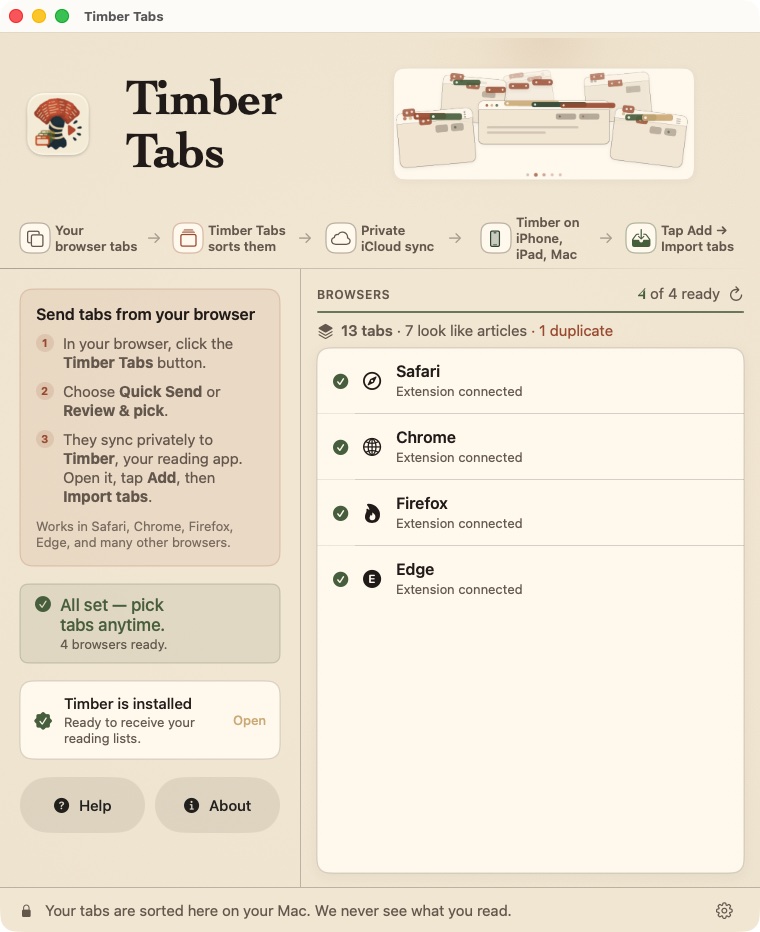 Fig. 02 · The collector, on your Mac
✶Timber Tabs · free for Mac
Your open tabs, turned into a listening queue.
Timber Tabs gathers the pile of tabs you keep meaning to read, groups them by site, and pre-selects the ones that actually read like articles. Keep what you want, then send the list to your iPhone — or save a portable .timberlist file you can put anywhere.






Safari
Chrome
Firefox
Edge
Brave
Arc
Opera
†… and every other Chromium browser — the extension installs in all of them. Read straight from the browser on your Mac, or through the Timber Tabs extension; Firefox always needs the extension.
Your tabs are sorted on your Mac. Timber Tabs reads their titles and addresses — never the pages — and _never contacts a server of ours_.
Hear the voices
Five voices · four engines · provenance
Alan Piper · English (GB) · free
“Timber reads it out loud, and follows along while it does.”
Bella Kokoro · English · free
“Timber reads it out loud, and follows along while it does.”
Caro Davy Pocket · English · free
“Timber reads it out loud, and follows along while it does.”
Rowan Supertonic · M1 · free
“There I was, a teacher visiting a classroom.”
Maren Supertonic · F1 · free
“Then pick a voice. Hundreds and hundreds of voices, free.”
†Every one of these is a free voice, rendered by Timber itself — Piper, Kokoro, Pocket and Supertonic. The first three read the same sentence, so the only thing changing is the voice. They run on the phone: once downloaded, no network hears them.
A note from the classroom
“A young child asked me about the news — then struggled to read the article we pulled up. So I built the app I always wanted: the best free vocal reader for iOS.”
†A teacher · California
What we promised ourselves
Private
What you read stays yours.
Complete
Reads the whole page, not half.
Generous
Free features everywhere. Extras if you want.
The reader
It follows along, word by word.
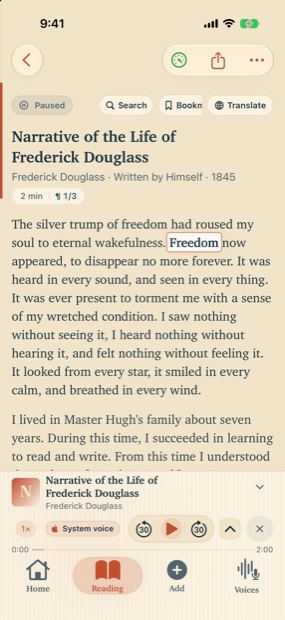
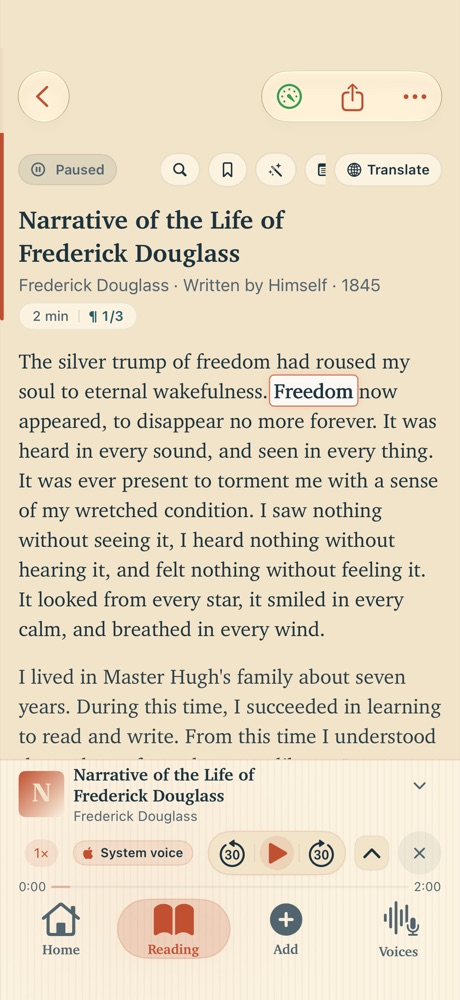
Press play and Timber reads to you — lighting up each word as it speaks, so your eyes and ears stay in step. Switch voices whenever you like, dim the page for night reading, and let it run hands-free. It all happens on the device, so it keeps reading with no connection at all.
Fig. 01 · The reading surface
The libraries
Every library has a free place to start.
For each language, every neural library gives you one free male voice and one free female voice — no charge, no account. Apple's own voices and any voice you record yourself are always free. The wider catalogue is there if you ever want it.
On device Apple Free system voices in every tier — downloaded right from iOS Settings.
On device Piper The widest language reach — small, fast voice files, all offline.
On device Kokoro Warm, expressive English for long, easy listening.
On device Supertonic Clear, lifelike voices across 31 languages.
On device Pocket Clone your own voice from a short recording — kept on your phone.
On device KittenTTS Compact English — eight voices in one small, fast download.
On device Moss Another way to clone your own voice, all on the phone.
Every engine runs on the device — no cloud.
How it works
Steps 01–04
01
Bring it anything to read
Paste a link, share from Safari or Files, open a PDF, or browse free books from Project Gutenberg. Timber pulls the whole article — clean text, not half a page of clutter.
02
Pick a voice you like
Start with the 324+ free voices across 71 languages. Hear any of them first, then download the one that fits — it lives on your phone and keeps working offline.
03
Listen, your way
Words light up as they are spoken. Switch the voice, dim the screen, and turn on dyslexia-friendly type. The reader is built for the long haul — and it keeps your place when you put it down.
04
Speak it back — coming soon
Speech-out, for dictating and reading in turn, is on the way. When it ships, it follows the same rule as everything else: it stays on your device.
A look inside
Six real screens, not a single mockup.
Everything below is a capture of the shipping app on an iPhone — the same build that is on the App Store today.
!Image 7: The Timber home screen, greeting the reader and listing the day's articles.
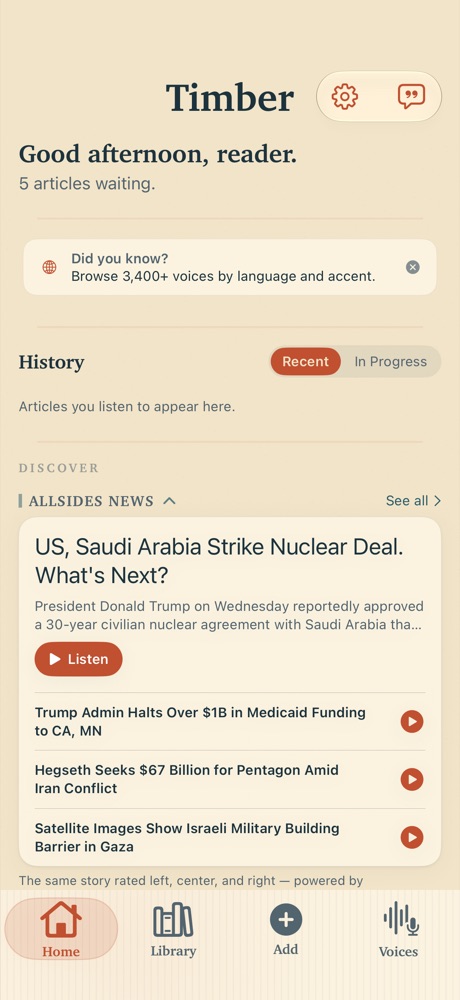
Home Picks up where you left off, and keeps the day’s reading in one place.
!Image 8: The Add screen, offering paste, PDF, EPUB, scanning and the share sheet.
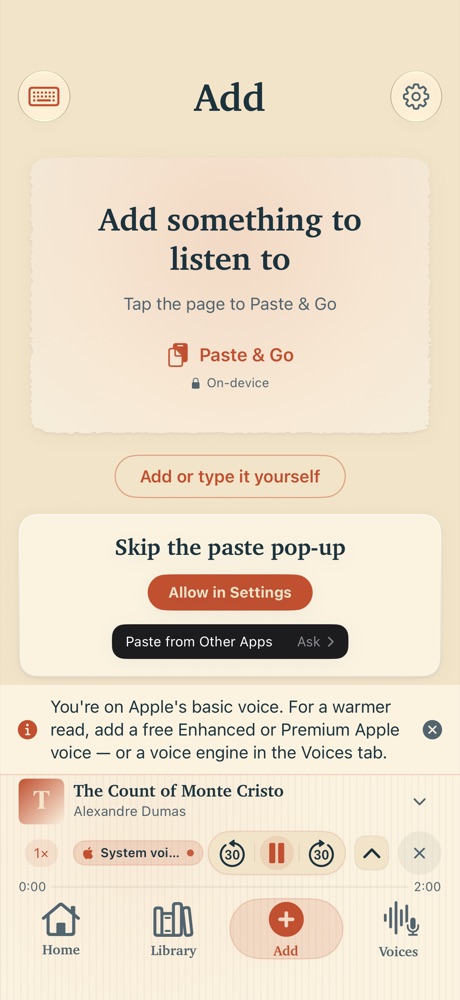
Add anything Paste a link, drop a PDF or EPUB, scan a page, or send it in from the share sheet.
!Image 9: The library, showing saved articles with filters and a listening queue.
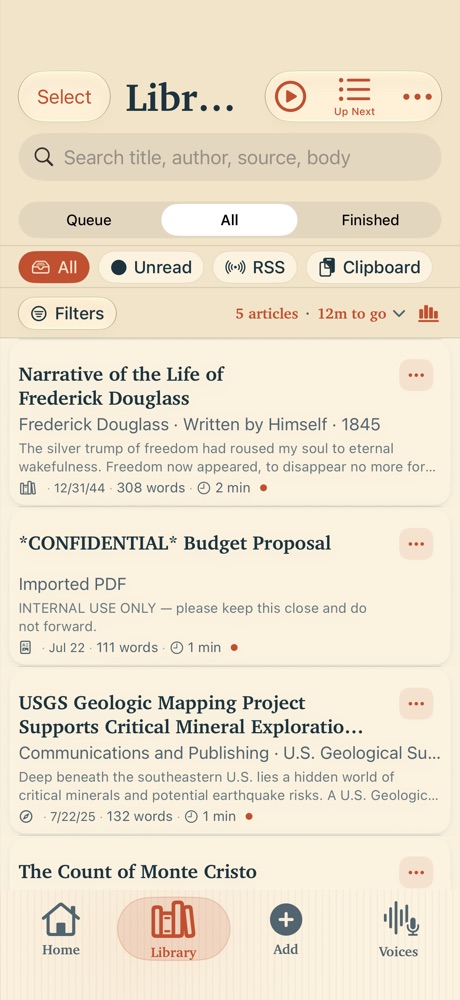
Library Everything you saved, filtered how you like, with a queue that waits for you.
!Image 10: The Voices browser, listing engines and languages to explore.
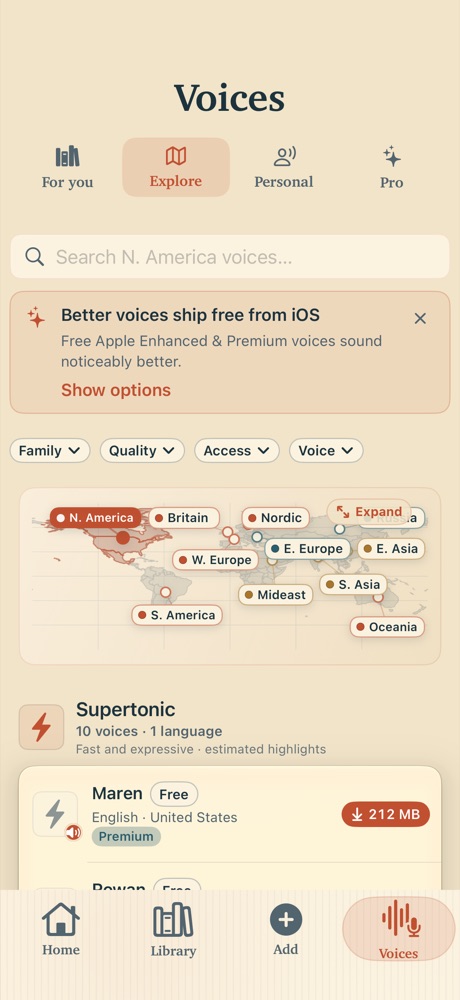
Voices Browse by language and library. The free ones are marked, and there is no wall.
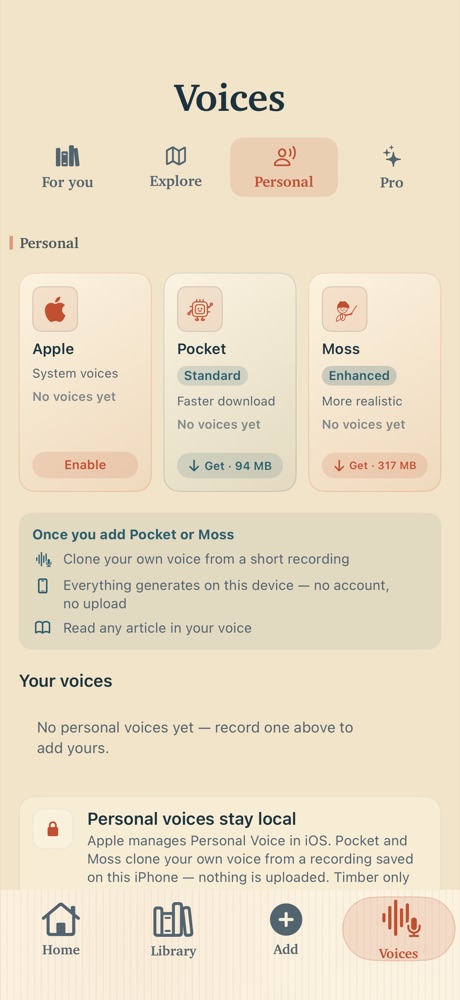
Your own voice Record one and it stays on the device. Apple Personal Voice is always free.
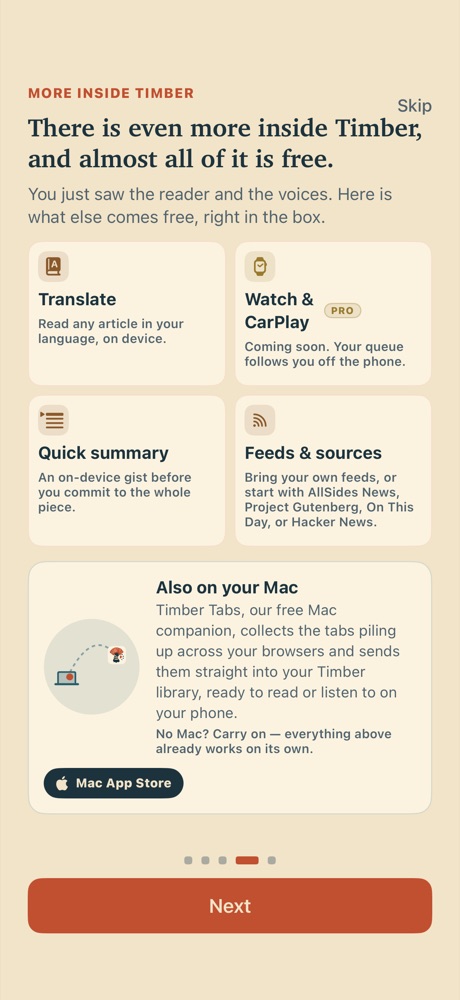
And the rest Translation, summaries, feeds, Watch and CarPlay — almost all of it free.
Privacy
What you read won’t be shared.
Your reading content and your clipboard are processed on the phone, and never sent to us — not for ads, not for analytics, not ever. Here is what we promise, in plain words.
Send your reading content or clipboard to us — ever.
Use your voice recordings as training data for anyone else.
Sell or share what you read with advertisers or third parties.
Accessibility
Made to be read by everyone.
Timber began as an accessibility tool, so reading-first features are not an add-on. A full dyslexia mode, VoiceOver labelling throughout, Dynamic Type, reduced-motion and high-contrast support — built in, and free.
Dyslexia mode
A dyslexia-friendly font, letter anchors, and a warm calming tint — five changes that make text easier to track.
Screen-reader ready
Hundreds of VoiceOver labels so the whole app is navigable without sight.
Your comfort settings
Dynamic Type, reduced motion and high-contrast accents all respected, system-wide.
The deal
Everything you’ve seen is free. Pro is the tip jar — with benefits.
The core reader is complete on its own. Pro is for people who want to support the project and unlock the extras — never a wall in front of reading.
Free · always No account
- ✶The whole reader, every way in — paste, PDF, share sheet, web links, Project Gutenberg, RSS, Hacker News
- ✶Hundreds of free voices — every Apple system voice, plus a free male and female voice in every language, in every library
- ✶Word-by-word highlighting on every voice
- ✶The full dyslexia mode and accessibility settings
- ✶On-device summaries and translation
- ✶Record your own voice — and Apple Personal Voice is always free
- ✶Reading comfort: font size, typeface, spacing, Dynamic Type, VoiceOver
- ✶iCloud sync across your devices, in your own private iCloud
- ✶Lock-screen and headphone controls
- ✶Export to text, Markdown, PDF, or audio — and it all works offline
Pro · the tip jar Optional
- ✶The entire voice catalogue — every remaining speaker in every library, a thousand voices and more
- ✶Variable reading speed across the full 0.3×–3× range (free reads at a natural 1×)
- ✶Unlimited voices for dialogue — free gives you two, Pro lifts the cap
- ✶Every theme — 25 more palettes beyond the three free ones
- ✶CarPlay — browse your library and listen in the car
- ✶Keep your own cloned voices past their free 24-hour trial
- ✶No upgrade nudges — and you help keep a free, private reader alive
Everything on the left stays free, with or without this.