Firefox
Version 159.0, first offered to Release channel users on October 27, 2026
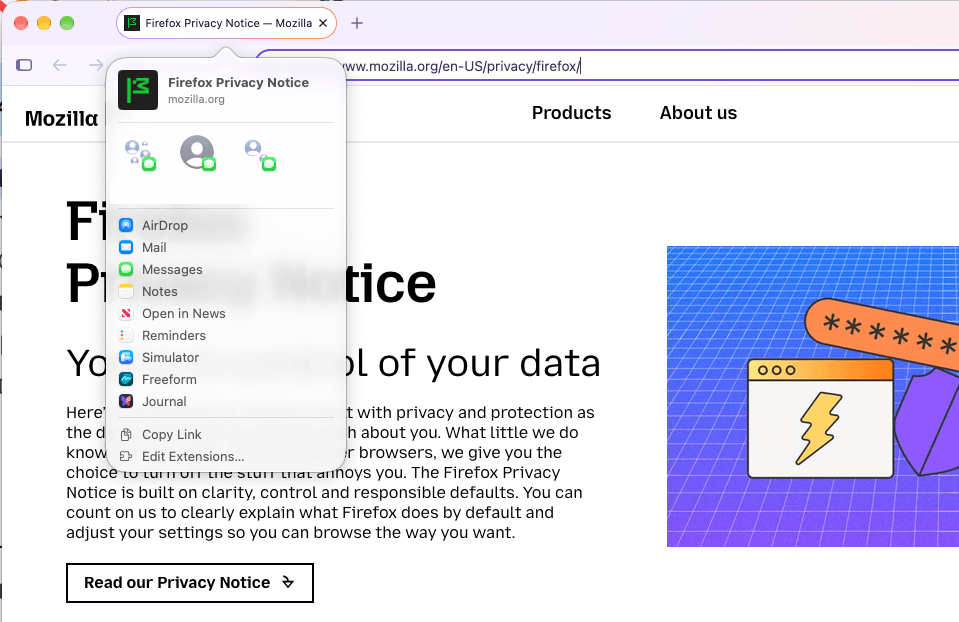
- Sharing on macOS now uses the native macOS share picker, which shows a preview of the page and recent contacts alongside AirDrop, Messages, and other apps. Several selected tabs can also be shared at once.
!Image 1: Screenshot showing the native macOS share picker
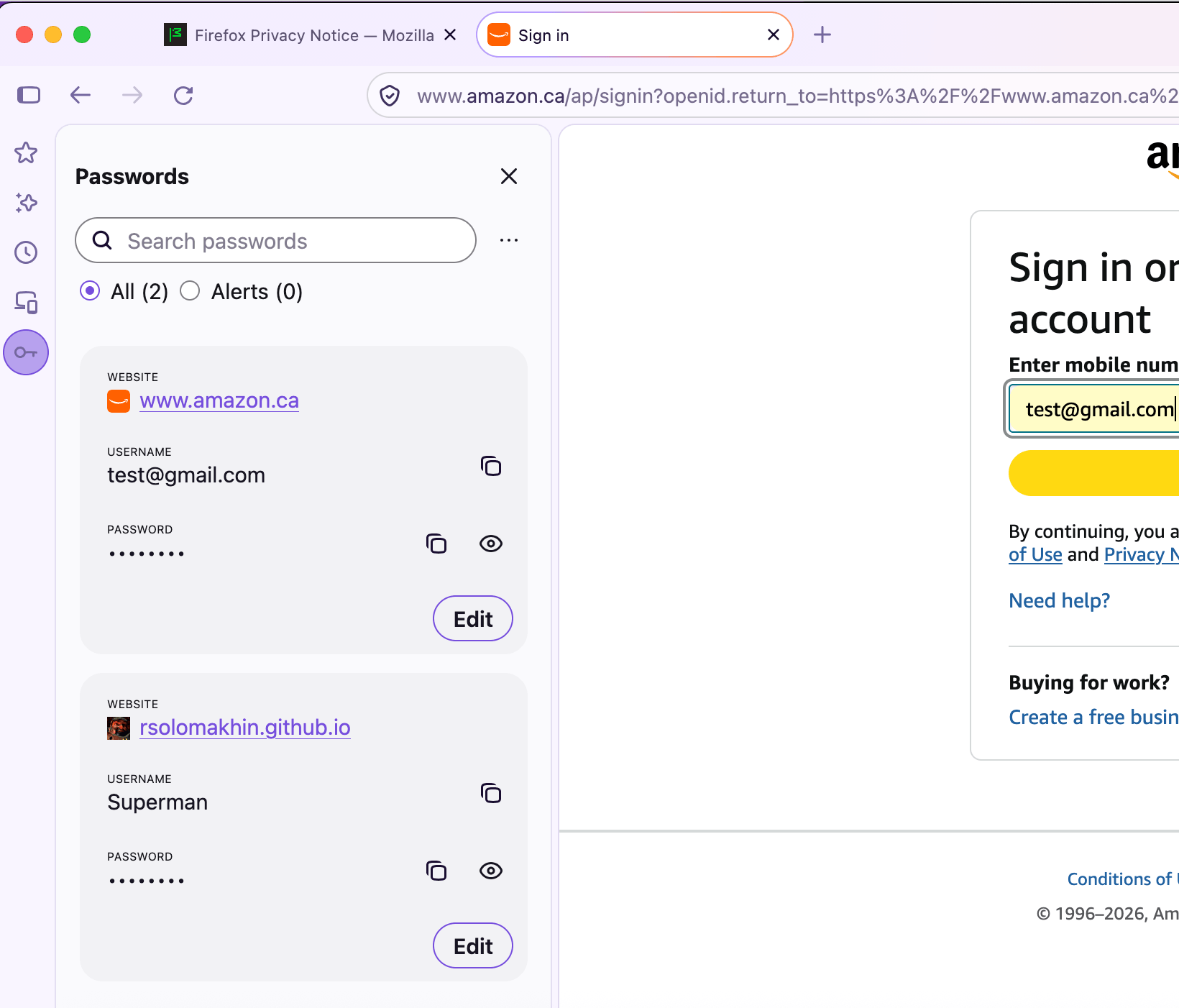
- Saved passwords are now available from the sidebar by default, without having to add the Passwords tool first.
!Image 2: Screenshot showing saved passwords being available in the browser sidebar
- Smart Window can now watch pages for changes such as price drops or restocks. Type `/watch` in the chat to set one up, and Firefox sends a desktop notification when it finds a match. Watches can be managed from the Tasks button in the toolbar or the `about:smartwindowtasks` page.

This feature is part of a progressive roll out.
What is a progressive roll out?
Certain new Firefox features are released gradually. This means some users will see the feature before everyone does. This approach helps to get early feedback to catch bugs and improve behavior quickly, meaning more Firefox users overall have a better experience.
- Fixed the file upload dialog opening in the last folder a file was saved to, such as Downloads, instead of the folder last used for uploads.
- Fixed memory usage growing rapidly when sites such as the Zoom web app were left open in a minimized window.
- Fixed some videos displaying incorrectly on Windows when NVIDIA RTX Video HDR is enabled.
- Fixed bookmarks not being imported from Google Chrome profiles that are signed in to a Google account.
- Fixed the Replace button in Apple Writing Tools on macOS inserting the clipboard contents instead of the rewritten text on some sites, such as Gmail.
- Fixed long drop-down lists on web pages sometimes showing blank space in place of the last options until the list was scrolled.
- Fixed some sites, such as Slack, failing to load instead of falling back to HTTP/2 when the site rejected an HTTP/3 request.
- Fixed Firefox using excessive memory on Linux with AMD graphics when viewing map or place results on sites such as ChatGPT.
- Fixed quick gamepad button presses sometimes being missed in web games on macOS.
- Fixed tabs sometimes detaching into a new window when clicked on Linux with Wayland.
- Fixed menus and panels fading in on Windows and Linux when animation effects are turned off in the operating system.
- On macOS, apps that sign in through the default browser, such as ChatGPT, now open their sign-in page in Firefox instead of Safari when Firefox is the default browser.
- The AI chatbot's Summarize page option now sends the page's address to the chatbot provider instead of the page's text, so long pages are no longer cut short to a partial summary.
- Open tabs can now be searched with a keyboard shortcut: `Ctrl+Shift+A` on Windows and Linux, `Cmd+Shift+A` on macOS. The Extensions and Themes shortcut is now `Ctrl+Shift+F` on Windows and Linux, and `Cmd+Shift+E` on macOS. These shortcuts can be changed in `about:keyboard`.
- Web addresses written in the Javanese, Balinese, Canadian Aboriginal Syllabics, and N'Ko scripts are now displayed in their own script instead of as encoded "xn--" text.
- For Firefox Enterprise updates and fixes, see the Firefox Enterprise release notes. For policy changes, see the Firefox admin docs changelog.
- The Web Console now allows `let`, `const`, and `class` variables to be declared again, so a snippet can be edited and re-run without a redeclaration error.
- Firefox now supports scroll-driven animations, so CSS animations and Web Animations API animations can progress with the scroll position of a container or with an element's visibility as it scrolls into view. This adds the `animation-timeline`, `scroll-timeline`, `view-timeline`, and `animation-range` properties and the `ScrollTimeline` and `ViewTimeline` interfaces.
- Firefox now supports scoped custom element registries. A registry created with the `CustomElementRegistry()` constructor is separate from the global `window.customElements` registry, so custom elements that share a tag name can coexist on the same page.
- On compatible devices, WebGL now supports the `EXT_clip_control` and `EXT_texture_mirror_clamp_to_edge` extensions and WebGL 2 supports `EXT_texture_norm16`.
- The Sanitizer API now sanitizes HTML as it is parsed rather than afterwards, so custom element constructors no longer run for elements the sanitizer removes.
*
With the release of Firefox 159, we are pleased to welcome the developers who contributed their first code change to Firefox in this release, 12 of whom were brand new volunteers! Please join us in thanking each of these diligent and enthusiastic individuals, and take a look at their contributions:
- Abhinav Singh: 2070629
- Atharva Wadodkar[:atharva]: 2070702
- corpus_e: 2070325
- csalinezh: 1970969
- Dmitry Gozman: 2076389
- eldjiikgull (EDS): 2076744
- Fabio: 1735401
- Feng Yu: 2073811
- Jaron: 2069726
- Jason Salerno: 2076831
- Lander Feldman: 2067952
- 赤坂理子: 2044440